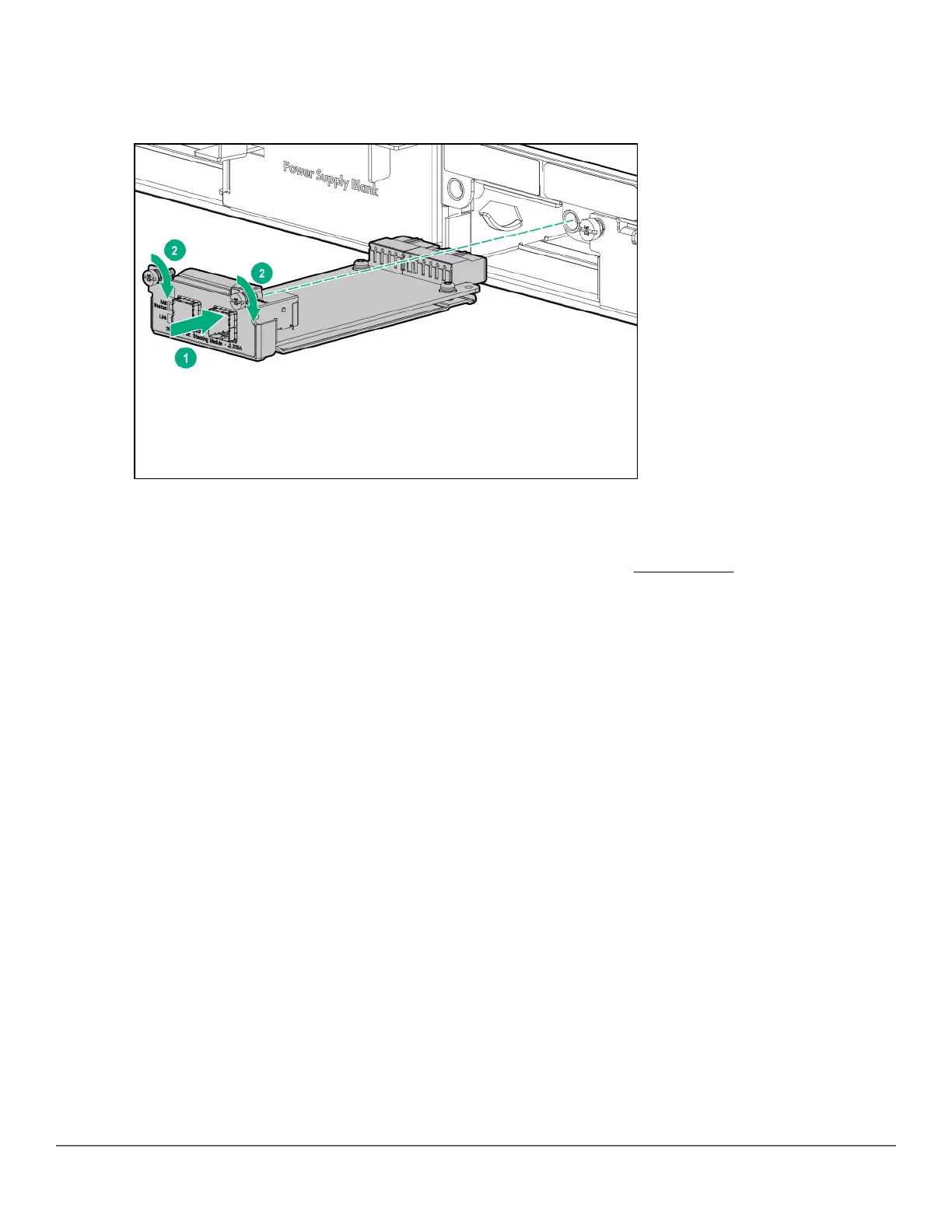
5. Insert the new stacking module fully into the slot as shown below. The face plate of the module will be flush
with the back face of the switch.
Figure 24: Replace stacking module.
6. Engage the retaining screws and tighten them. Be sure to not over tighten the screws.
7. Reconnect the stacking cables.
8. Power on the switch and make sure the module passes its self test. See LED behavior for the module LED
behavior that indicates correct installation.
Replacing the uplink port module
Hot-swapping uplink port modules:
• The switch supports hot-swapping an uplink port module for another uplink port module having the same SKU
(Stock Keeping Unit).
• The switch does not support hot-swapping an uplink port module for another uplink port module having a
different SKU.
To replace a 2930M uplink port module with another uplink port module having a different SKU, deactivate the
module. Use the appropriate choice from the following two options:
• If replacing with the same SKU, power off the module with one of the following commands:
◦ If stacking is enabled: savepower flexible-module A member <ID>
◦ If stacking is disabled: savepower flexible-module A
• If replacing with a different SKU, remove the module with one of the following commands:
◦ If stacking is enabled: member <ID> flexible-module A remove
◦ If stacking is disabled: flexible-module A remove
To replace an uplink port module:
66 Aruba 2930M Switches












 To Next Page