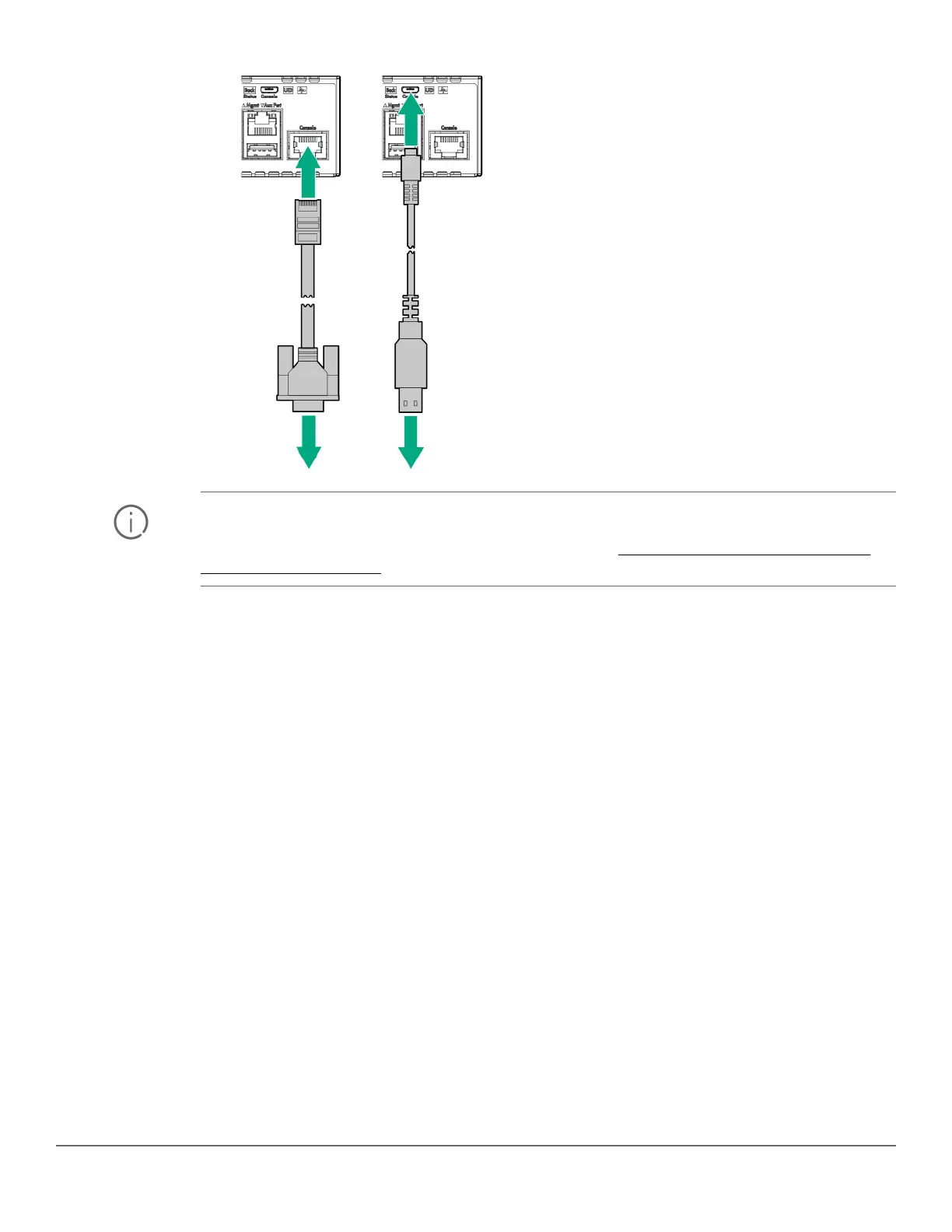
IMPORTANT: You must use the out-of-band console connection to minimally configure the switch
with an IP address and subnet mask before you can use an in-band or out-of-band networked
connection to manage the switch. For more information, see Minimal configuration through the
console port connection.
Configuring the management console
To set up a console to manage the switch through the console port connection:
1. Configure the PC terminal emulator as a DEC VT-100 (ANSI) terminal or use a VT-100 terminal.
2. Configure the terminal with the following settings:
• A baud rate from 1200 to 115200 (the switch senses the speed)
• 8 data bits, 1 stop bit, no parity, and flow control set to Xon/Xoff
• For the Windows Terminal program, disable (uncheck) the “Use Function, Arrow, and Ctrl Keys for
Windows” option.
If you use a management console with different configuration settings, be sure to reconfigure the settings on both
the terminal and the switch in the following order so that both configurations are compatible:
1. Reconfigure the switch and save the new settings.
2. Exit from the console session.
3. Reconfigure the terminal and save the new settings.
4. Begin a new console session.
60 Aruba 2930M Switches












 To Next Page