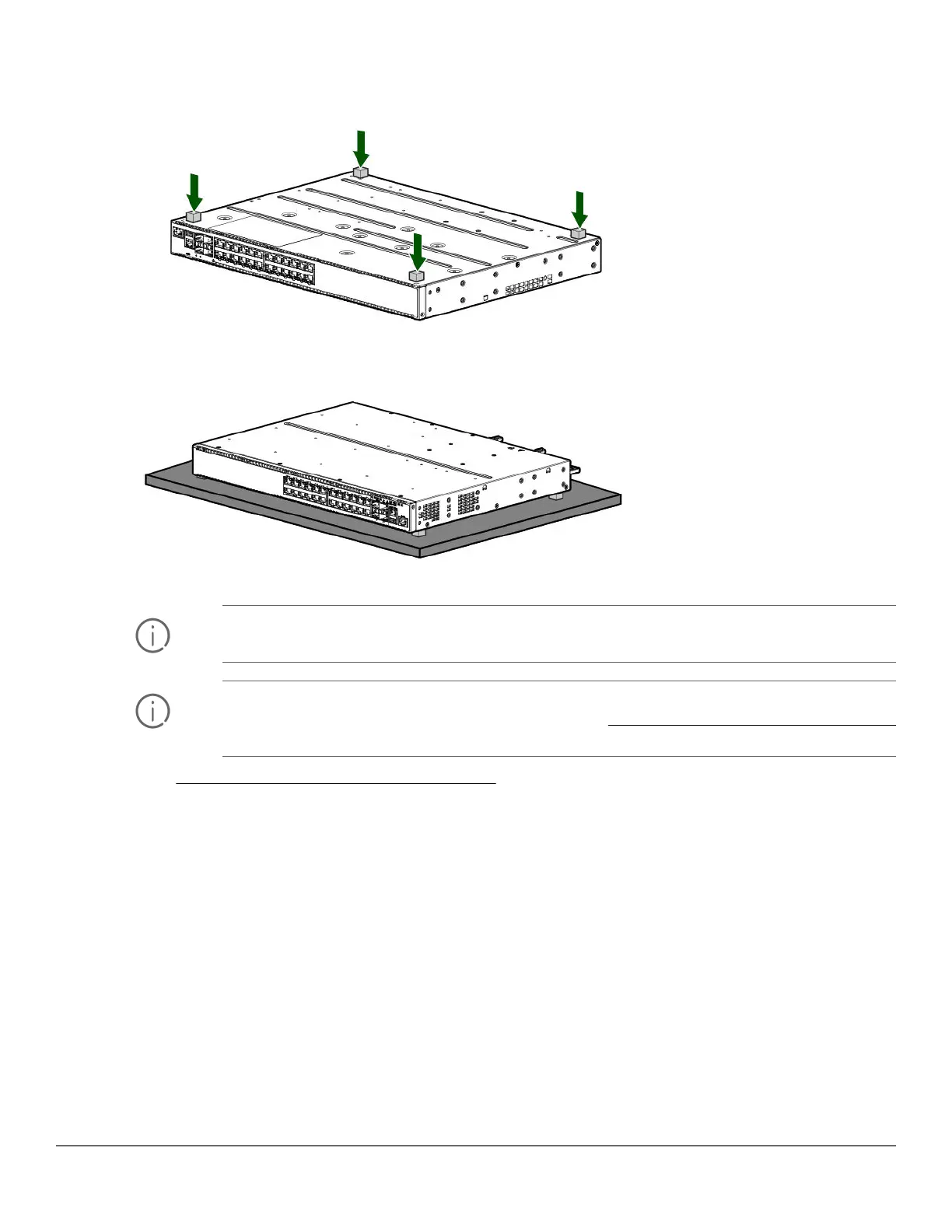
Procedure
1. Attach the four self-adhesive pads to the bottom corners of the switch.
2. Position the switch with the top panel up on the selected horizontal surface.
IMPORTANT: Ensure that the power cord and network cables at switch mounting location will not
create a tripping hazard.
IMPORTANT: Avoid blocking any ventilation openings on the sides, rear, or front of the switch.
For more information on proper ventilation spacing, see Installation precautions and guidelines
on page 34.
3. Go to 10. (Optional) Installing the stacking cables on page 48.
Mounting the switch in a four-post rack
The four-post rack mount for the 2930M switches requires the optional J9583A HPE X410 Universal Rack
Mounting Kit. To use this kit to mount a 2930M switch, see the installation instructions provided with the kit. You
can also download the installation instructions:
1. Enter J9583A in the Enter Search Information field.
2. Select a J9583A option.
3. Click Support Center.
4. Select the Documentation/Manuals document type.
5. Click the download icon.
6. Select the listed document option for the J9583A switch rail kit.
Chapter 3 Installing the switch 45














 To Next Page