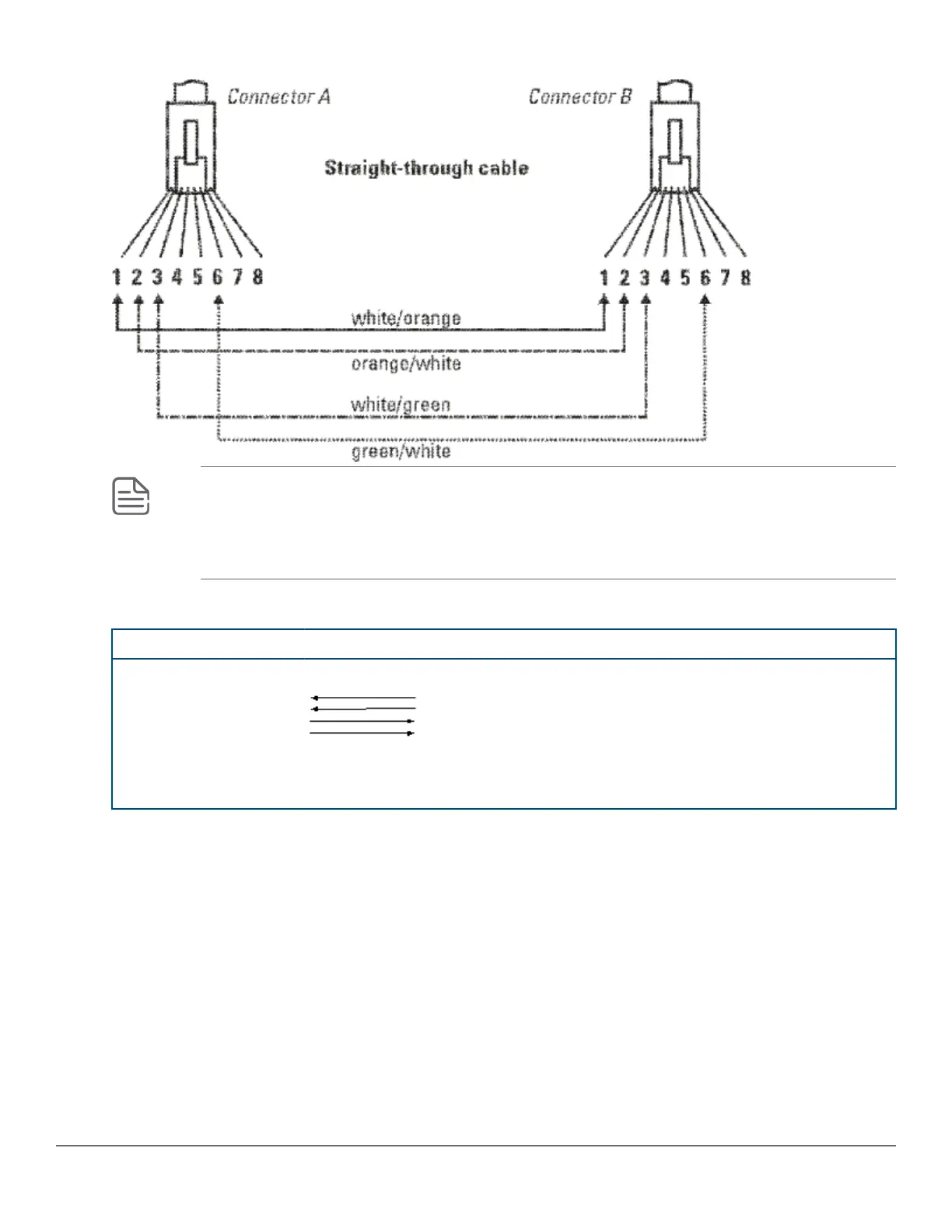
Cable diagram
NOTE: Pins 1 and 2 on connector “A” must be wired as a twisted pair to pins 1 and 2 on connector
“B”.
Pins 3 and 6 on connector “A” must be wired as a twisted pair to pins 3 and 6 on connector “B”.
Pins 4, 5, 7, and 8 are not used in this application, although they may be wired in the cable.
Pin assignments
Switch end (MDI-X) Computer, transceiver, or other end
Signal Pins Pins Signal
receive +
receive -
transmit +
transmit -
1
2
3
6
1
2
3
6
transmit +
transmit -
receive +
receive -
Crossover twisted-pair cable for 10 Mbps or 100 Mbps network connection
The Auto-MDIX operation of the 10/100 ports on the switch also allows you to use crossover cables for all
network connections, to PCs, servers or other end nodes, or to hubs or other switches.
If any of these ports are given a fixed configuration, for example 100 Mbps/Full Duplex, the ports operate as MDI-
X ports, and crossover cables must be then used for connections to hubs or switches or other MDI-X network
devices.
94 Aruba 2930M Switches












 To Next Page