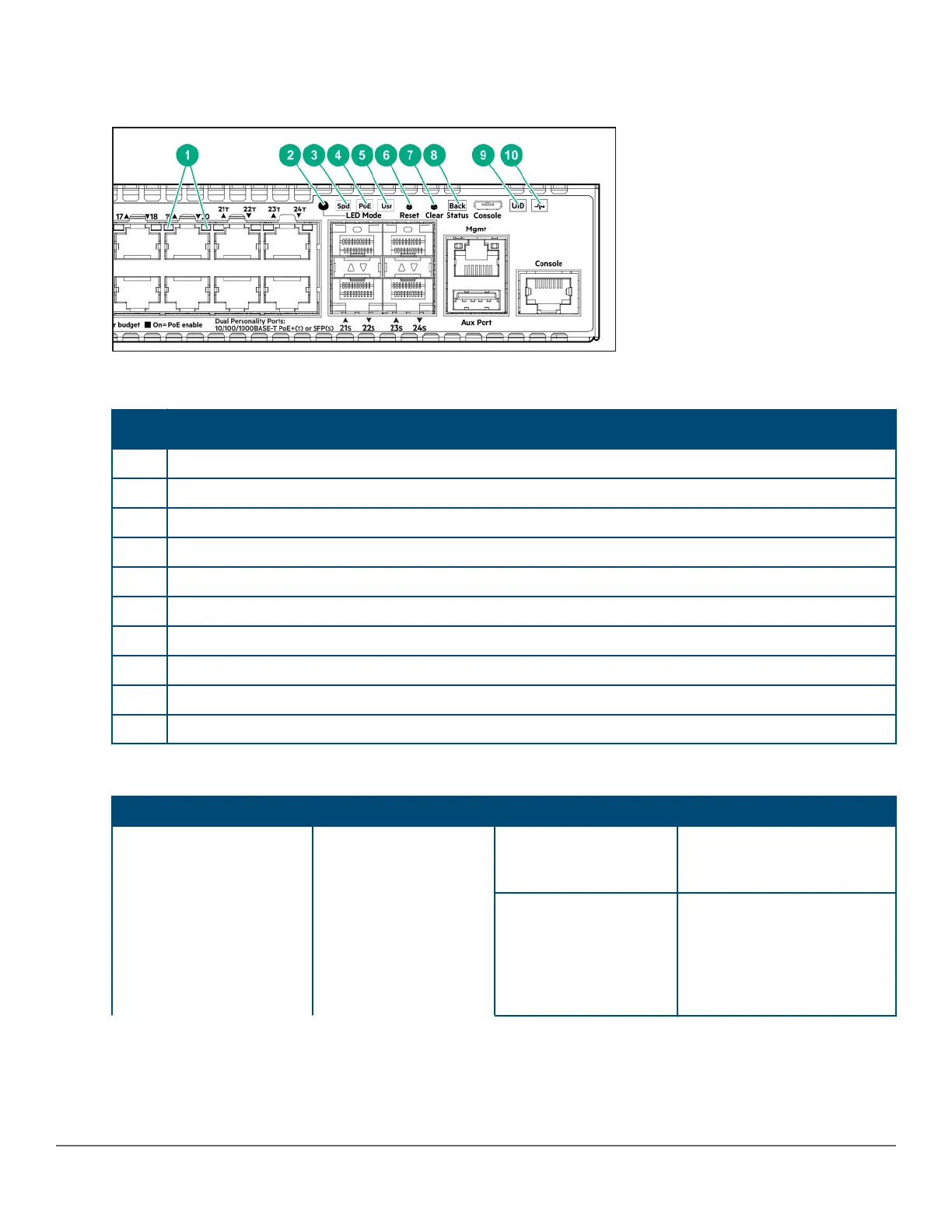
Switch and port LEDs on front of the switches
Figure 3: Switch and port LEDs
Table 5: Switch and port LEDs: Labels and description
Label
Description
1 Port LEDs
2 LED Mode button
3 Speed mode selected LED
4 PoE mode selected LED (only on Aruba 2930M models that support PoE operation)
5 Usr mode selected LED
6 Reset button
7 Clear button
8 Usr LED back status LED
9 UID (Unit Identification)
10 Global status LED
Table 6: Front of switch status and mode LED behavior
Switch LEDs Function State Meaning
Global Status Internal Power Status of
the switch. Self-Test
Status Switch/Port Fault
Status
On Green The Switch has passed self-
test and is powered up
normally.
Slow Flash Green* The switch self-test and
initialization are in progress
after the switch has been
power cycled or reset. The
switch is not operational until
this LED stops blinking green.
Table Continued
14 Aruba 2930M Switches












 To Next Page