Table 9: Switch module/support matrix
Module support
Switch model JL078A 1QSFP+ JL081A Smart Rate 1G/
2.5G/5G/10G PoE
JL083A 4SFP+
JL319A Aruba 2930M 24G 1-slot
switch
Yes Yes, but no PoE Yes
JL320A Aruba 2930M 24G PoE+ 1-
slot switch
Yes Yes Yes
JL321A Aruba 2930M 48G 1-slot
switch
Yes Yes, but no PoE Yes
JL322A Aruba 2930M 48G PoE+ 1-
slot switch
Yes Yes Yes
JL323A Aruba 2930M 40G 8SR
PoE+ 1-slot Switch
Yes Yes Yes
JL324A Aruba 2930M 24 SR PoE
+ 1-slot Switch
Yes Yes Yes
R0M67A Aruba 2930M 40G 8 HPE
Smart Rate PoE Class 6 1-slot
Switch
Yes Yes Yes
R0M68A Aruba 2930M 24 HPE
Smart Rate PoE Class 6 1-slot
Switch
Yes Yes Yes
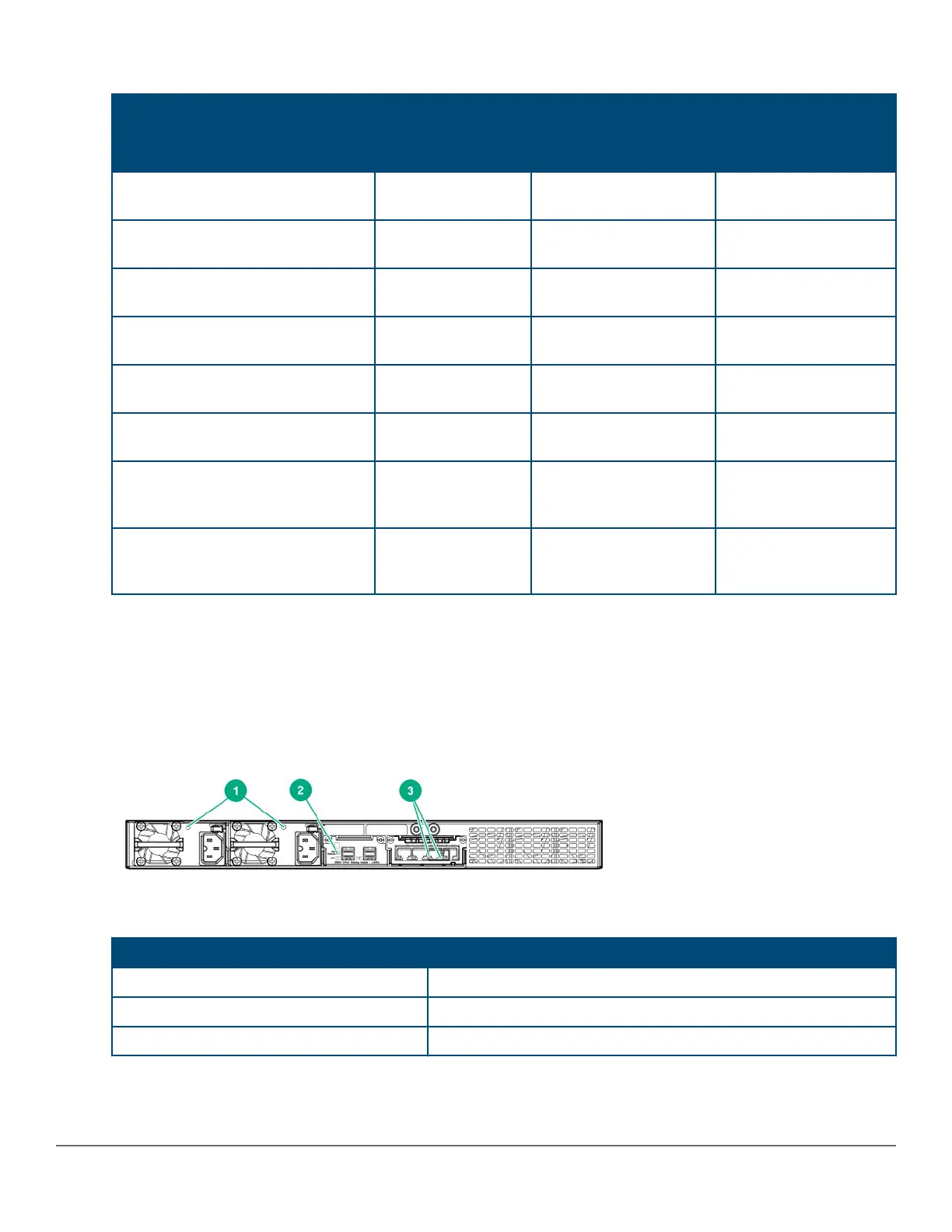
LEDs on the back of the switches
This section describes the LEDs on the back of the switch. When the back LED on the front of the unit is blinking
a fault, the user can look at the back of the switch to find the corresponding blinking LED for the faulted module or
power supply. If a user installs a second power supply and did not turn on the power (PSU module status = OFF),
the back LED will blink orange.
Figure 5: LEDs on the back of switches
Table 10: Back of the 2930M switches LED labels and description
Label Description
1 Power supply unit (PSU) status LED
2 Stacking module status LED
3 Uplink module status LED
24 Aruba 2930M Switches












 To Next Page