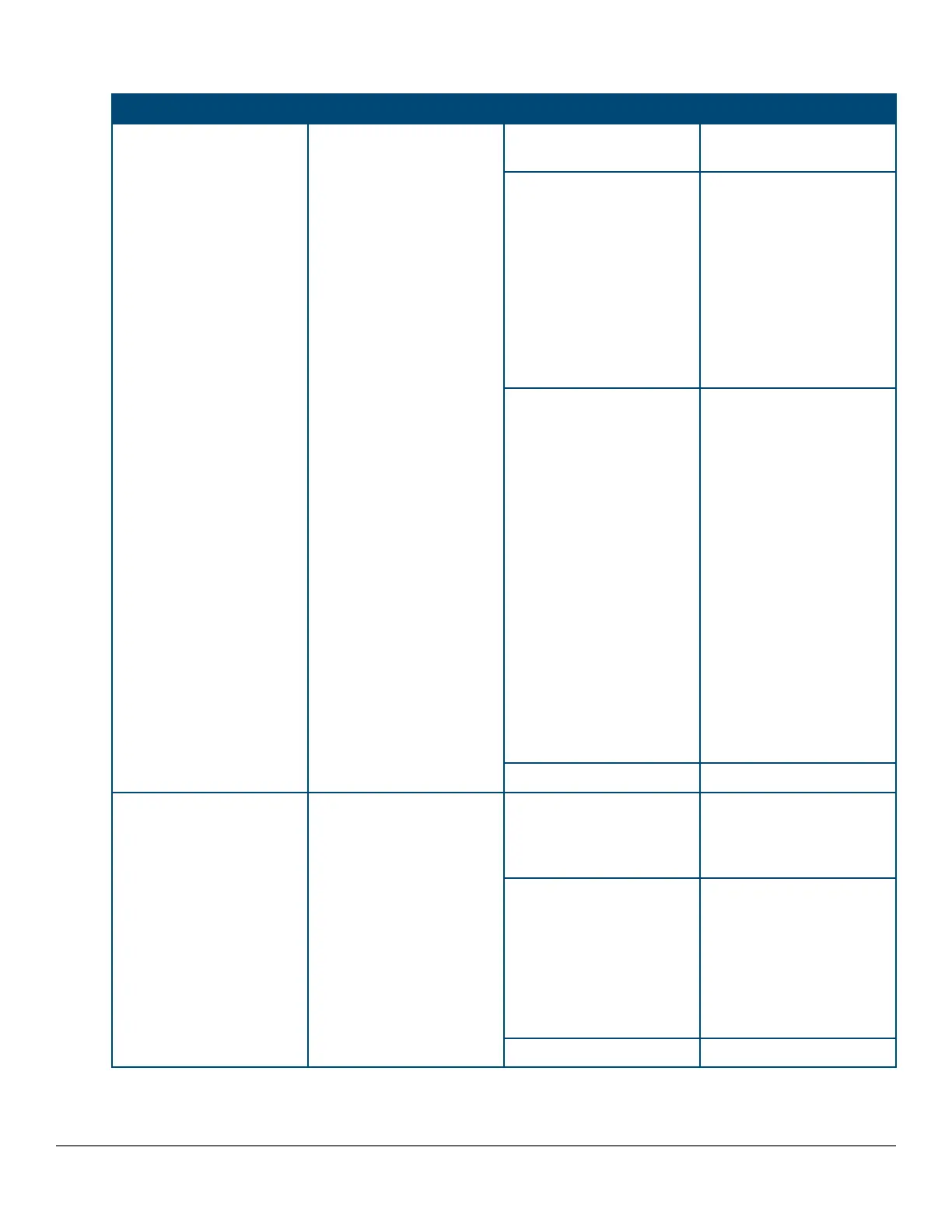
Table 13: Stacking module LEDs
Name Function Mode Description
Stacking Module Status Status of Stacking module On Green Stacking module operating
correctly.
Slow Flash Orange Stacking module has
experienced a fault, or one
or more of the module
ports has experienced a
fault. The 1.6 seconds
cycle flash should be
synchronized with the
switch Global Status LED.
The Global Status and
Back LED should also be
flashing.
Fast Flash Orange
Stacking module or one or
more of its ports is
experiencing an alert
condition.
Alert conditions include
that an unsupported cable
has been installed in the
module or that the
stacking module has been
installed while the switch
was powered on (hot-
swapped) and the switch
needs to be rebooted to
support the module.
The BACK LED should be
flashing and the Global
Status LED should NOT
be flashing.
Off No power
Stacking Link Status The Link LED per stacking
port indicates the port is
enabled, connected and
detects a signal from the
attached device.
On Green The port is enabled and
receiving a link indication
from the connected
device.
Slow Flash Orange Port Failed POST or cable
fault. Module Status LED
on the stacking module
and Global Status and
Back LED on front of unit
should also be
synchronized and flashing
orange.
Off No cable plugged in
Chapter 2 Introducing the 2930M switches 27




 To Next Page