Page 32 of 78
4.7 RS-232 Wiring
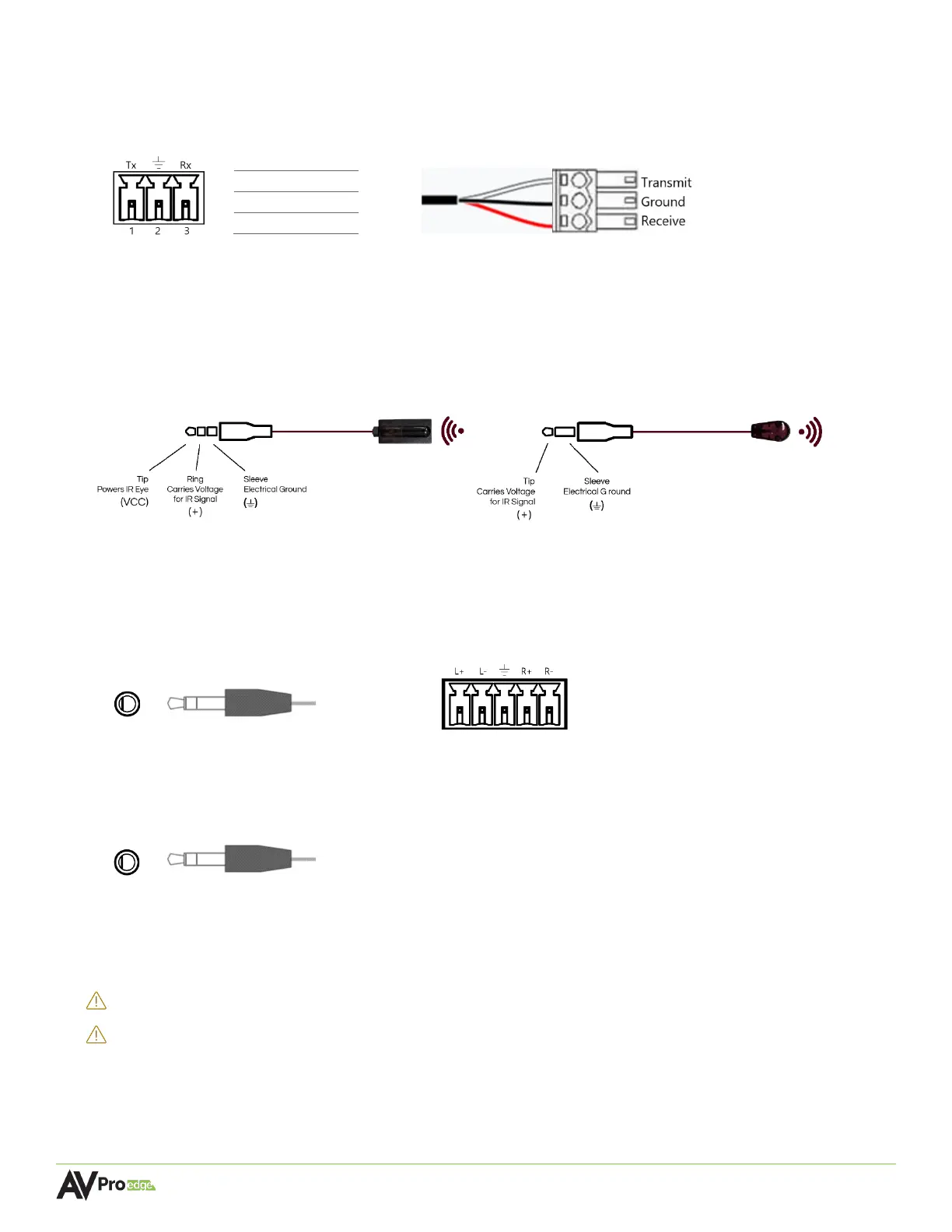
Serial control connections are made using the provided 3-pin terminal block connector. The wire slips
into the hole and locks with a screw located at the top of the connector.
4.8 IR Wiring
IR connections are made using the provided 3.5mm IR Emitter and IR Eye (receiver).
4.9 Analog Audio Ports
The AC-MXNET-1G-E and AC-MXNET-1G-E-AVDM encoders contain one 3.5mm stereo audio input port
and one 5-pin terminal block balanced audio output port.
The AC-MXNET-1G-D decoder contains one 3.5mm stereo audio output port.
4.10 AC Power Connection
SURGE PROTECTION: Use a surge-protected circuit for all components and power supplies.
ELECTRICAL DISCONNECT: The power source outlet and power supply input sockets should be
easily accessible to disconnect power in the event of an electrical
hazard or malfunction.
Stereo 3.5mm (TRS) IR Eye
Mono 3.5mm (TS) IR Emitter



 To Next Page