Page 47 of 78
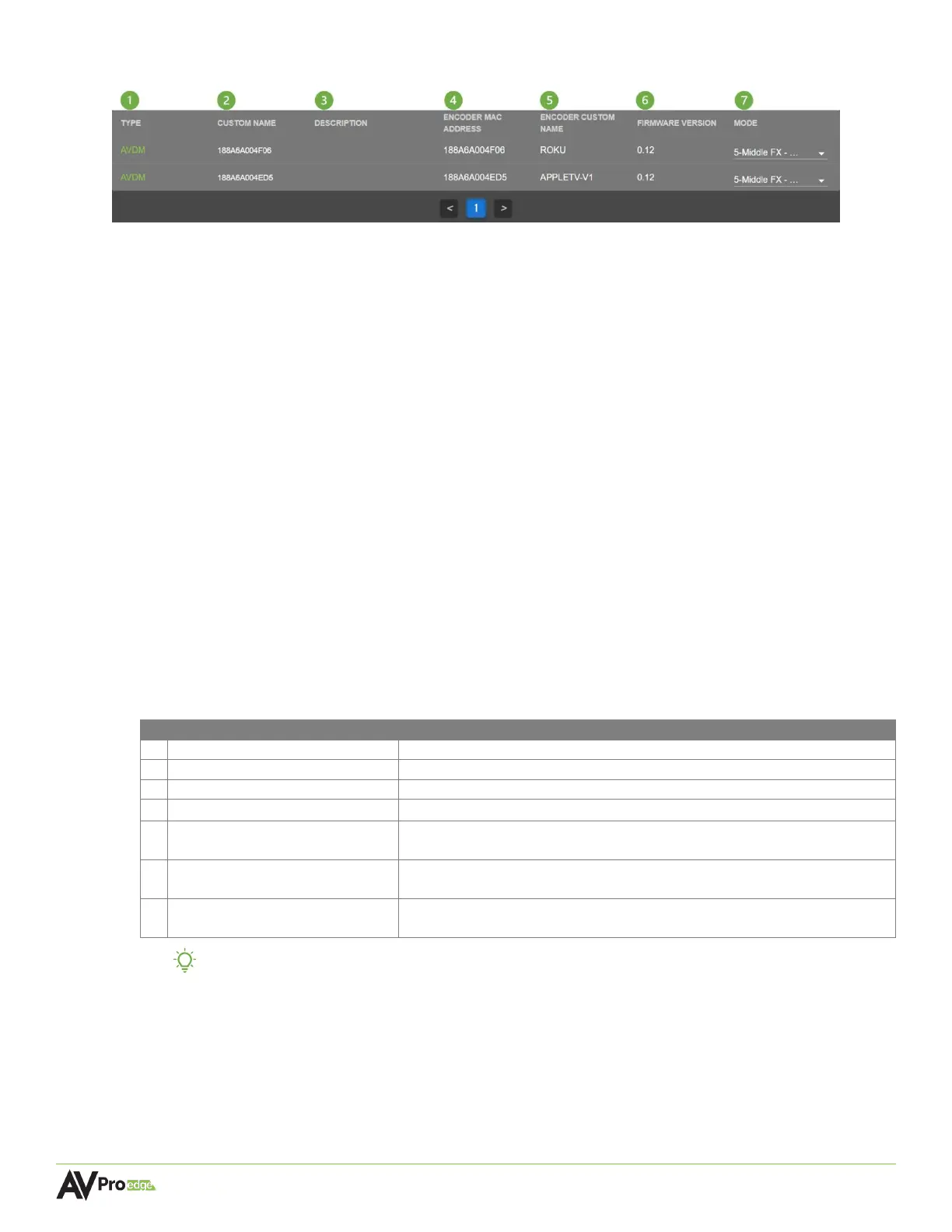
6.4.3 Encoder Module (AVDM Encoders only)
1 TYPE
Shows a list of all the AVDM encoders connected to MXNet.
2 CUSTOM NAME
Text field, limit of 12 characters. Type in a custom name and hit the Enter key to apply it.
3 DESCRIPTION
Text field, limit of 12 characters. Type in a custom description and hit the Enter key to apply it.
4 ENCODER MAC ADDRESS
Shows the MAC address of the encoder. This is a factory setting that cannot be changed.
5 ENCODER CUSTOM NAME
Shows the encoder’s assigned custom name from the Inputs/Encoders/Sources page.
6 FIRMWARE VERSION
Shows the version of firmware currently installed on the encoder. This can be updated in the
System Utilities page under the MXNet Encoders (Tx) Updates section.
7 MODE
Dropdown menu, allows the encoder to adjust the audio downmixing by selecting one of the
following preset modes:
TIP: AVPro Edge and MXNet provides integrators with seven downmixing preset options,
allowing them to tailor the downmixing of a source’s audio, similar to how most
AVR’s and pre-processors can adjust the level of an individual channel in their
surround mix.
1 STD FX (default) Standard downmixing mode
Center Mix increased to 60%
Center Mix increased to 80%
Center Mix increased to 100%
Custom AVPro Mix, including full range of sound with pronounced Center
channel and small amount of LFE
Full FX (large 3-way systems)
Custom AVPro Mix, including full range of sound with extra Surround Mix
and more LFE
Voice FX (voice intelligibility)
Custom AVPro Mix, including Left, Center, and Right channels 100%
mixed. Surround Mix is reduced for minor effects



 To Next Page