Page 50 of 78
6.9 Auto-Matrix
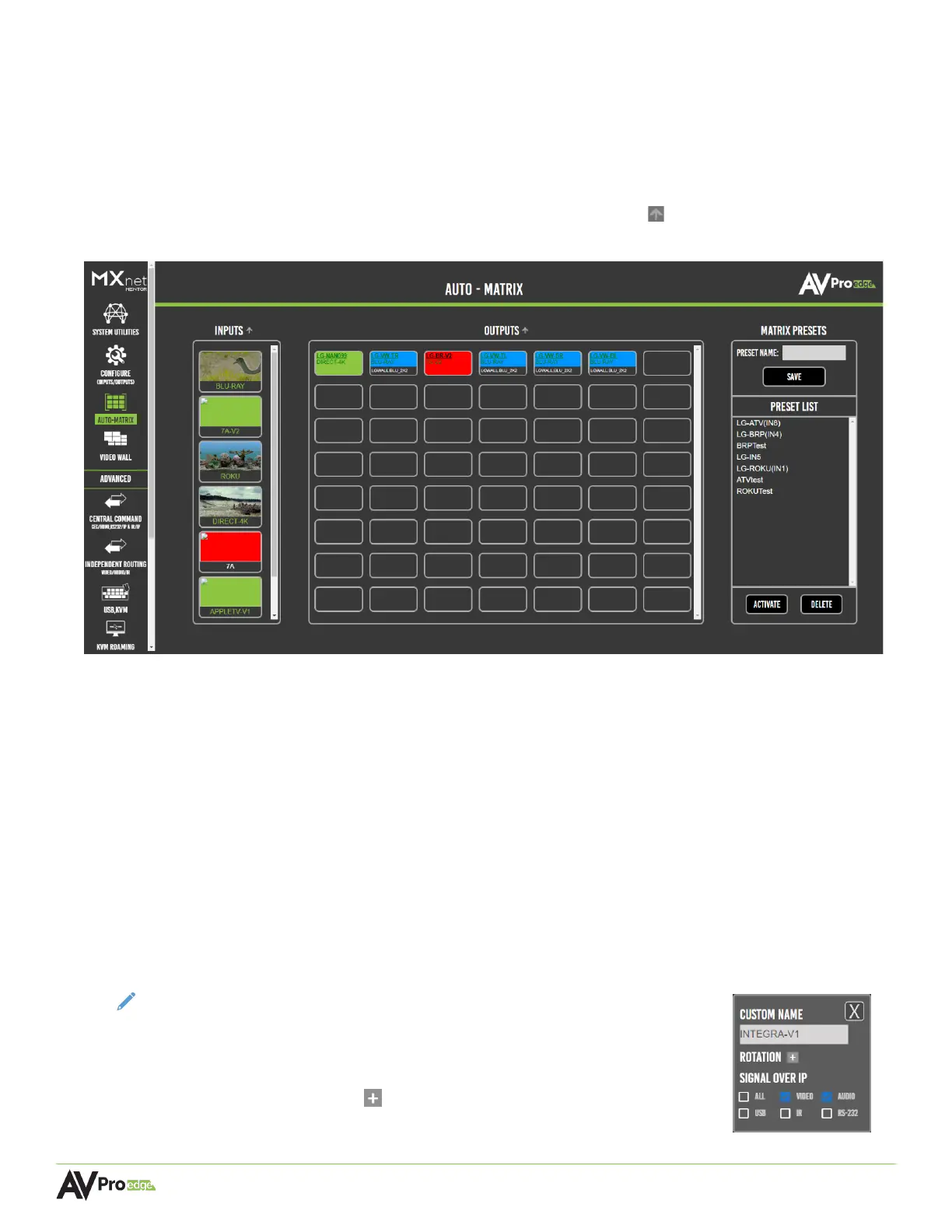
The Auto-Matrix page layout consists of the Inputs column on the left, the Outputs grid in the middle,
and the Matrix Presets section on the right. Each individual tile functions as a selectable button and will
auto-populate the custom names from the Configure page as a label, highlighted by an orange border
to indicate the selected input and output(s).
Inputs and outputs can be sorted by clicking on the sort arrow button to toggle between
ascending and descending alphanumerical order.
6.9.1 Inputs
This column lists all of the encoders, each one is represented as a labeled thumbnail that provides
a preview image of the connected source’s video signal and will automatically refresh every ten
seconds. Each thumbnail functions as a button that can be selected to route the connected
source’s signals to any one or more outputs.
6.9.2 Outputs
All of the decoders are shown in this grid, each one is represented as a separate output button
that is labeled with the decoder’s custom name and the source that is currently routed to it.
Multiple outputs can be selected at a time, indicated by an orange border, to route signals from
any one of the connected source’s input.
NOTE:
The decoder’s custom name, image rotation, and aspect ratio can
also be adjusted from this page by right-clicking on an output. This
will open an additional menu where the signals can be selected for
independent routing of video, audio, USB, IR, and RS-232 signals.
Select the + button to open the menu settings for image rotation
and aspect ratio.



 To Next Page