Page 19 of 78
3.4 AC-MXNET-1G-D / AC-MXNET-1G-DV2
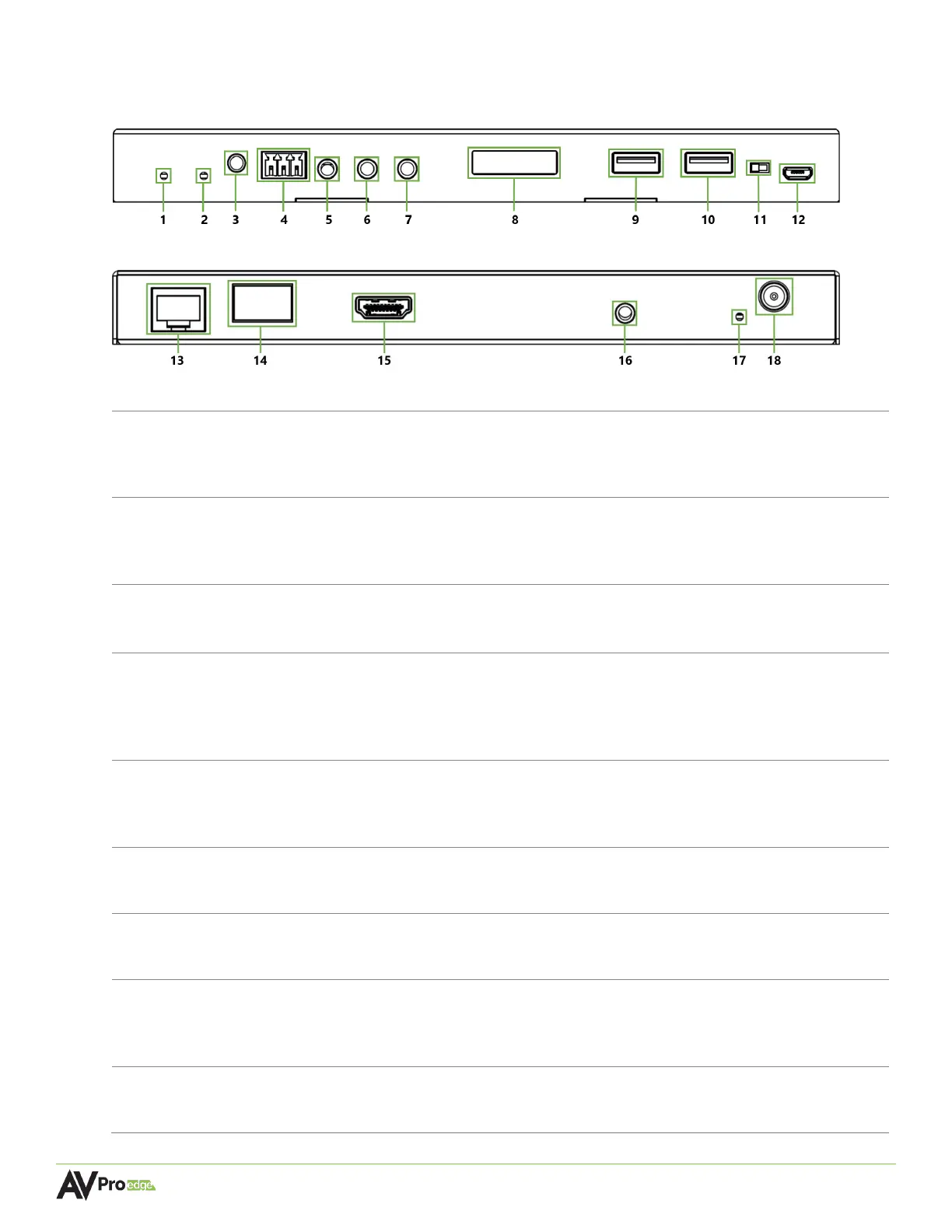
Decoder Front Panel
Decoder Rear Panel
Blue LED status indicator light
• Slowly pulsates until startup is complete after a reboot, at which point the
light will turn solid blue
Green LED status indicator light
• Continuously flashes until an output device is connected to the HDMI OUT
port on the decoder, at which point the light will turn solid green
Press to copy the EDID of the sink device connected to the HDMI OUT port
on the back of the decoder
3-pin terminal block connector port
• Sends encapsulated/virtualized RS-232 (serial pass-through) over IP via the
MXNet API
• Supports serial routing with direct connection to a control system processor
3.5mm stereo jack (TRS) IR receiver port
• Sends IR signal pass-through via an IR emitter, IR bridge, or control system
3.5mm stereo jack (TRS) IR receiver port
• Supports a flashing IR emitter from an IR bridge or control system processor
3.5mm mono jack (TS) IR receiver port
• Sends encapsulated/virtualized IR signals upstream via the API
Built-in front panel mini-OLED screen “data window”
• Displays decoder’s custom name or MAC address (if no custom name is
USB 2.0 Type A female connector port
• Supports routing USB 2.0 signals to a designated host encoder



 To Next Page