Page 66 of 78
6.13 USB & KVM
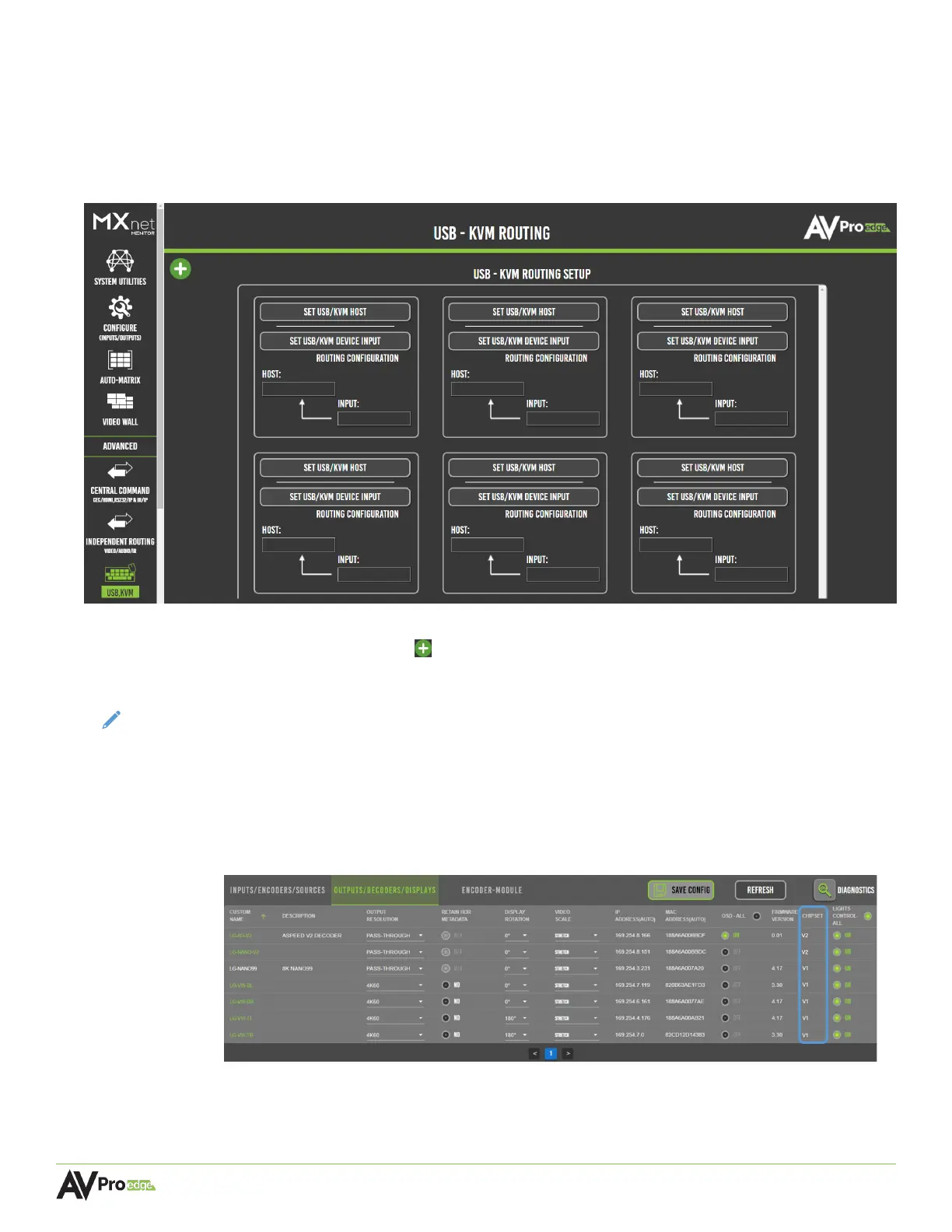
The USB & KVM page provides a setup interface for routing any USB 2.0 device that uses the USB
ports on the decoder which then provides the input for a keyboard and mouse. The KVM decoder
input is then routed directly to the host encoder. For most applications, the host will be a PC type
computer with one of its USB ports connected to the encoder’s USB HOST port.
Mentor provides six routing groups for six different independent routing paths. More routing groups
can be added by selecting + (add) button in the top-left corner of the page.
NOTE:
Chipset V1 decoders (AC-MXNET-1G-D) do not support High-Speed USB 2.0 device
connections, while the Chipset V2 decoders (AC-MXNET-1G-DV2) can support one
isochronous connection to a High-Speed USB 2.0 device (such as a digital camera) using
either USB port 1 or USB port 2 on the V2 decoder.
To check which Chipset version is on a decoder, navigate to the Configure (Inputs/Outputs)
page within Mentor and select the Outputs/Decoders/Displays tab. The Chipset column will
display the versions of all the decoders.



 To Next Page