Page 48 of 78
6.4.4 System Diagnostics
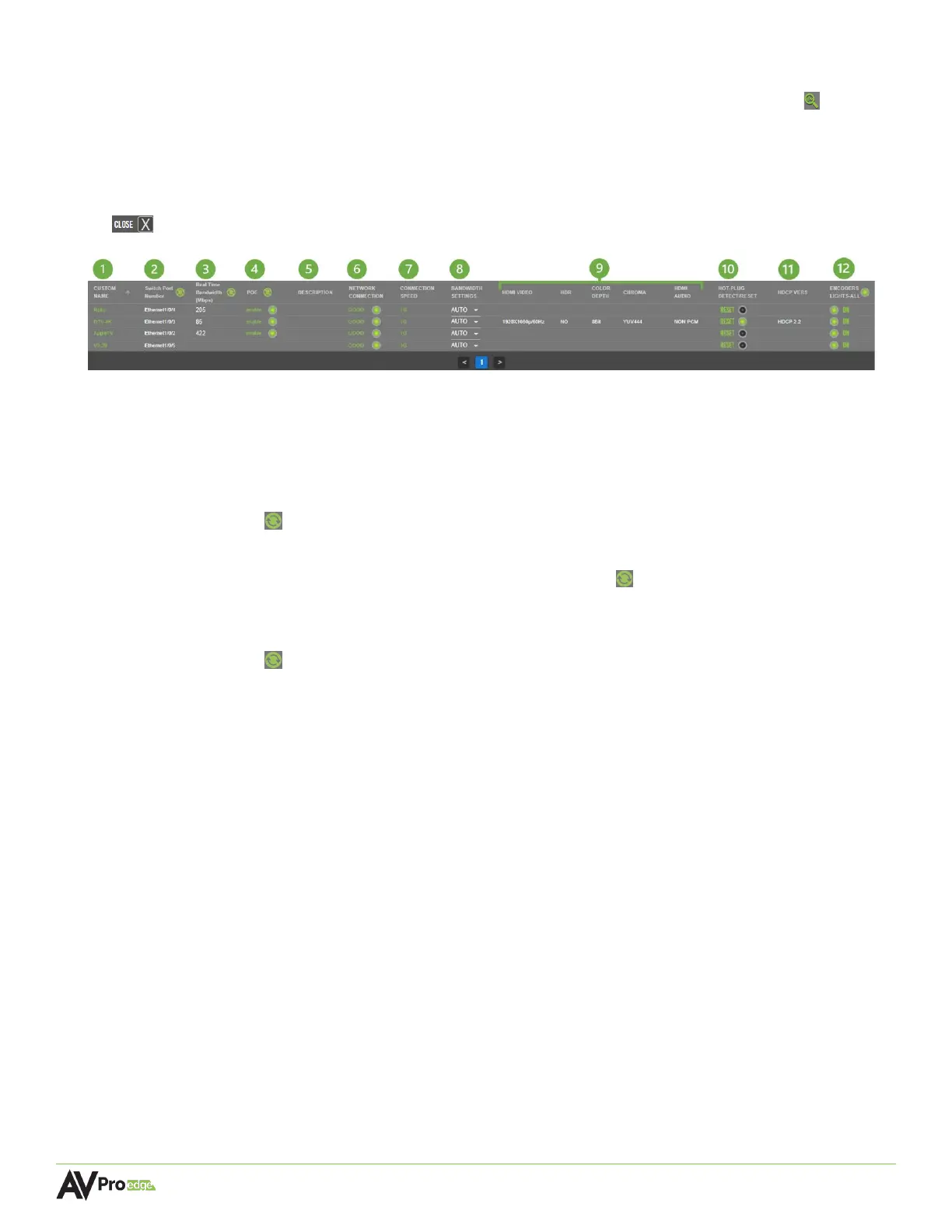
The System Diagnostics page can be accessed by selecting the magnifying glass button located
in the top-right corner of the Configure page. This opens a separate page that shows live
information and provides critical system data for advanced network tracking and cabling
performance. The encoders and decoders each feature their own separate Diagnostics page
located on separate tabs at the top. To exit the System Diagnostics page, select the close button
to return to the Configure page.
1 CUSTOM NAME
Shows the encoder/decoder’s assigned custom name.
2 SWITCH PORT NUMBER
Shows which port on the network switch that the encoder/decoder is plugged into. Select the
refresh button to update the field.
3 REAL TIME BANDWIDTH (Mbps)
Shows the amount of bandwidth. Select the refresh button to update the field.
4 POE
Toggle button, allows PoE to be enabled or disabled to the encoder/decoder. Select the
refresh button to update the field.
5 DESCRIPTION
Shows the encoder/decoder’s assigned custom description.
6 NETWORK CONNECTION
Shows the quality of the network category cable connection, indicated by color:
Green Good, network connection is at 1G
Yellow Marginal, MXNet will automatically throttle bandwidth to 100Mbps
Red Failed, MXNet is unable to detect a connection to the encoder/decoder
7 CONNECTION SPEED
Shows the encoder/decoder’s network connection speed.
8 BANDWIDTH SETTINGS (Encoders only)
Dropdown menu, selecting 200M sets the encoder throughput to as low as 200Mb while
selecting Auto increases its bandwidth to a maximum 850Mb throughput.
9 HDMI VIDEO & AUDIO
HDMI VIDEO Shows the resolution of the source’s video
HDR YES indicates the source is sending HDR metadata
NO indicates the source is sending SDR content



 To Next Page