Page 23 of 78
3.6 AC-MXNET-SW10
10-Port Network Switch Front Panel
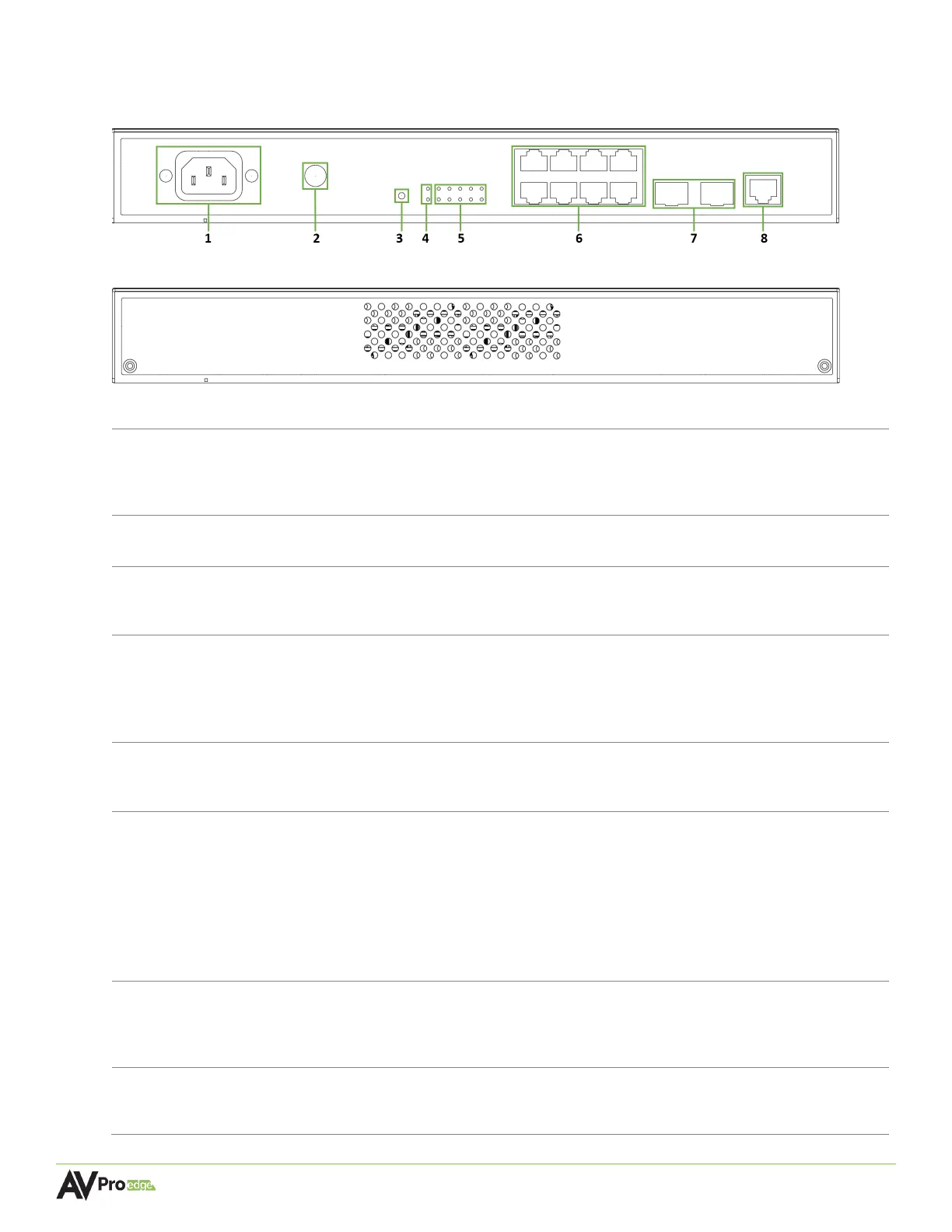
10-Port Network Switch Rear Panel
100~240V AC, 50~60Hz 3A power input
• Total power consumption is less than 132 W
Connect with a grounding cable to the conducting parts
Recessed button, use a paperclip or pen to press in and hold for 7
seconds to restore network switch to factory default settings
Green LED status indicator lights
• DIAG light steadily flashes green to indicate a continuous diagnostic of
the system and the network switch is running on normal operations
• PWR light stays solid green to indicate the switch is powered on
Green LED status indicator lights
•
Steady flickering green light to indicate network activity is present
-8
(8x) 8-pin RJ-45 female connector ports, 1000BASE-T copper Ethernet
• Supports standard PoE power, IEEE 802.3AF (15.4 W)
• Maximum power consumption of 6.5 W
• 10/100/1000Mbps auto-negotiation
• MDI/MDI-X cable mode auto-negotiation
• Maximum distance 100m (330ft) over Cat5e and higher
• Connects to the encoders, decoders, and CBOX
-10
Supports a 1 Gigabit Ethernet copper connection or SFP fiber module
for longer runs to the BI DIR. O.M. LC Fiber port on the encoders and
8-pin RJ-45 female connector port
• Used for accessing the MXNet CLI



 To Next Page