Page 21 of 78
3.5 AC-MXNET-CBOX
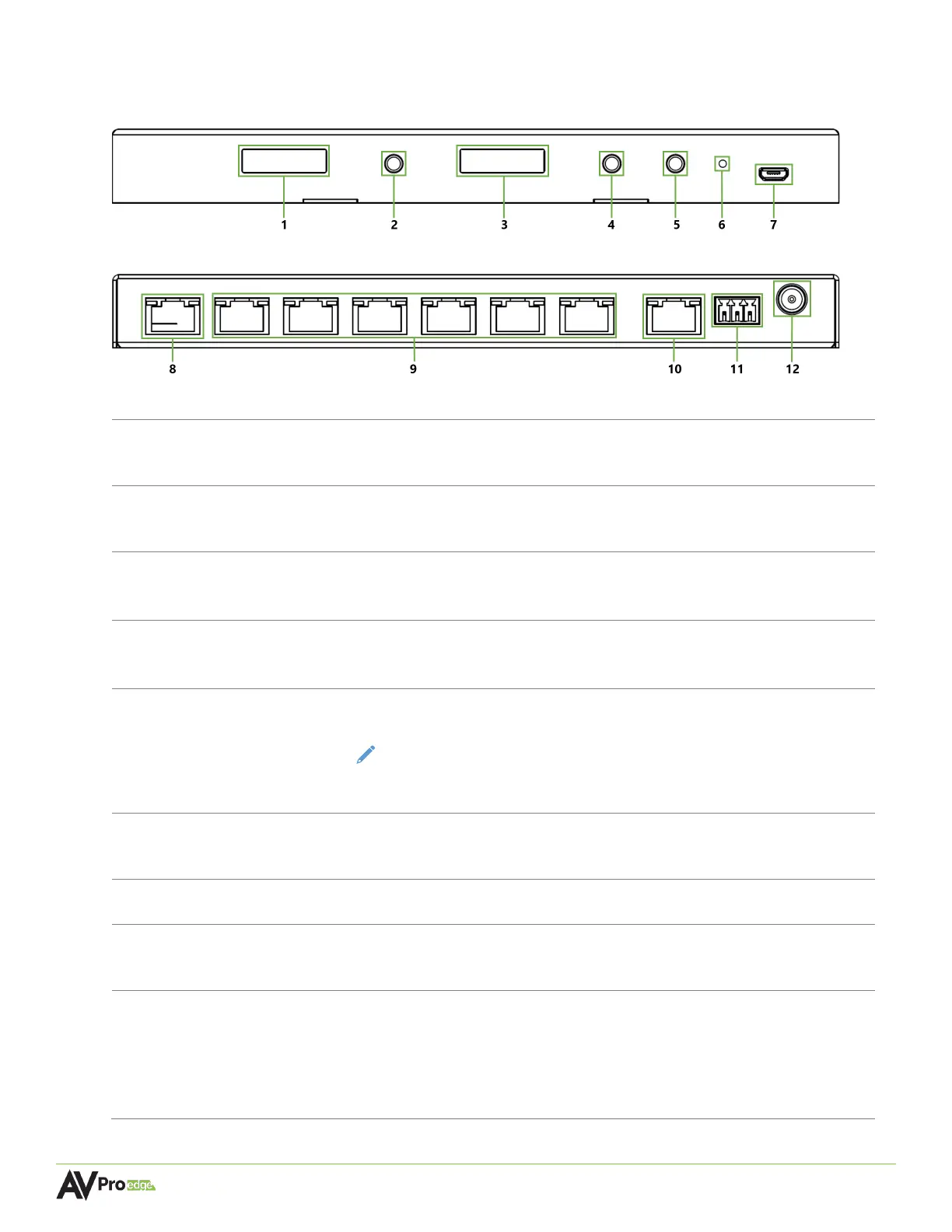
CBOX Front Panel
CBOX Rear Panel
Built-in front panel mini-OLED screen “data window”
• Displays the MXNet LAN and system control network information
Press to cycle through the network settings on the STATUS MONITOR A
screen
Built-in front panel mini-OLED screen “data window”
•
Displays the MXNet AV network information
Press to cycle through the network settings on the STATUS MONITOR B
screen
Press button to toggle between DHCP (default) and STATIC IP mode
NOTE: It is recommended to change the IP address to STATIC after all the
MXNet devices have been successfully installed and the Mentor web UI has
Recessed button, use a paperclip or pen to press in and hold for 7
seconds to restore all factory default settings
• Service port for AVPro Edge technical assistance
PORT 1 MENTOR
LAN / CONTROL
8-pin RJ-45 female connector port
• Connects to a LAN, router, or third-party control system processor
(6x) 8-pin RJ-45 female connector ports
• Supports standard PoE power, IEEE 802.3AF (15.4 W)
• Maximum power consumption of 4.5 W
• Maximum distance 100m (330ft) over Cat5e and higher
• LAN network extender for MENTOR PORT 1



 To Next Page