Page 35 of 78
5.2 Point-to-Point Setup
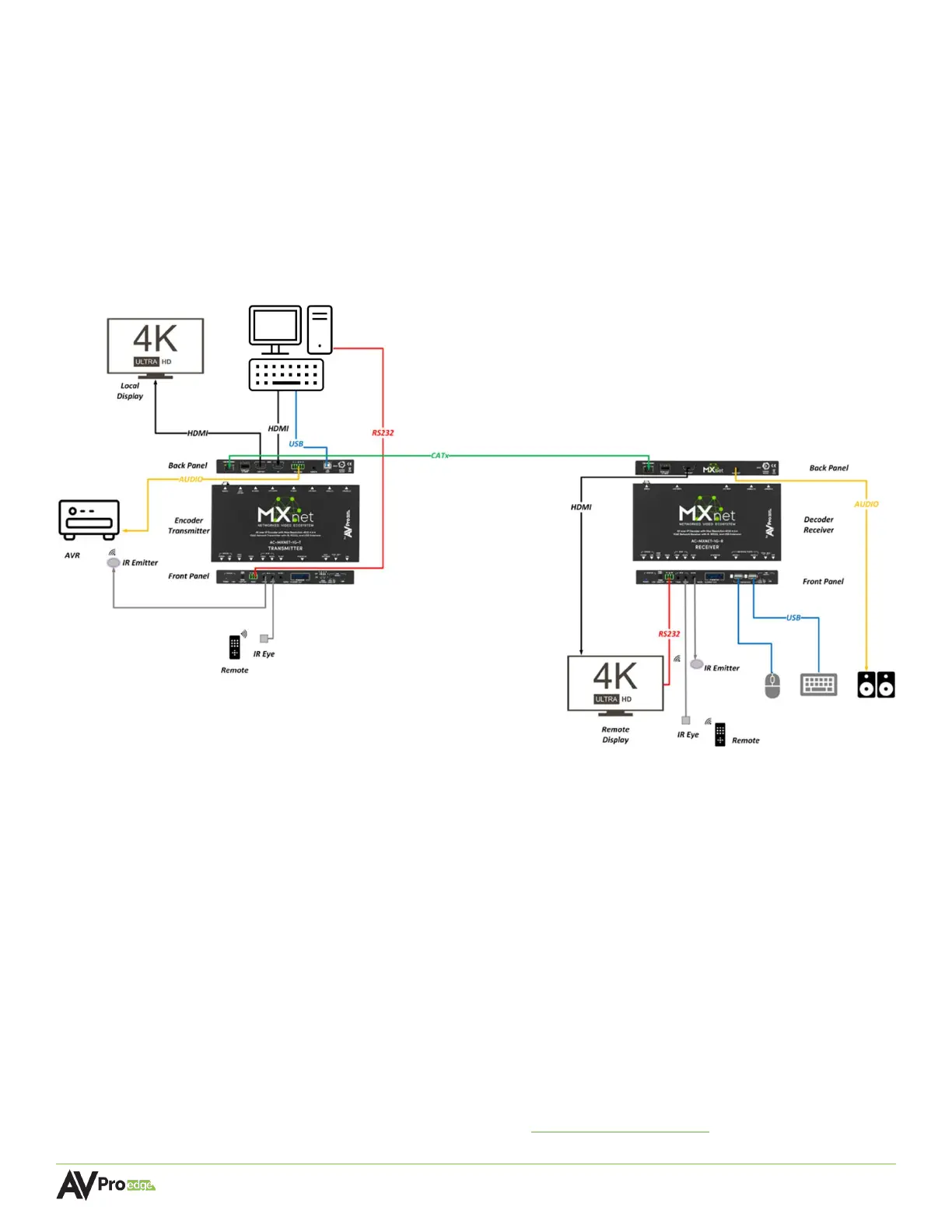
The AC-MXNET-1G-E and AC-MXNET-1G-E-AVDM encoders support a direct point-to-point connection
(unicast) with the AC-MXNET-1G-D decoder.
Video, audio, RS-232, IR, and USB signals can be distributed up to 100 meters through Category cable,
and 40 kilometers through single mode fiber and SFP modules.
The diagram below shows the connections of the AC-MXNET-1G-E encoder and AC-MXNET-1G-D
decoder in a point-to-point application.
5.2.1 Configuring Encoders and Decoders
MXNet encoders and decoders operate in unicast mode by factory default but will automatically
be set to multicast mode by the AC-MXNET-CBOX when connected to the network switch. Once set
to multicast mode, the encoders and decoders must be set back to unicast mode again prior to
point-to-point installation.
Both the encoder and decoder must also be assigned the channel number 0000 and set to unicast
mode prior to point-to-point installation. This procedure is outlined in the steps below and must
be completed on both the encoder and decoder.
Requirements: - Windows based PC or Laptop with internet connection
- Micro-USB to USB Type A cable
- Serial Configuration Software Tool AC-MXNET-1G-SCT
(available for download, located at Support.AVProEdge.com)



 To Next Page