Page 74 of 78
6.16 System Log
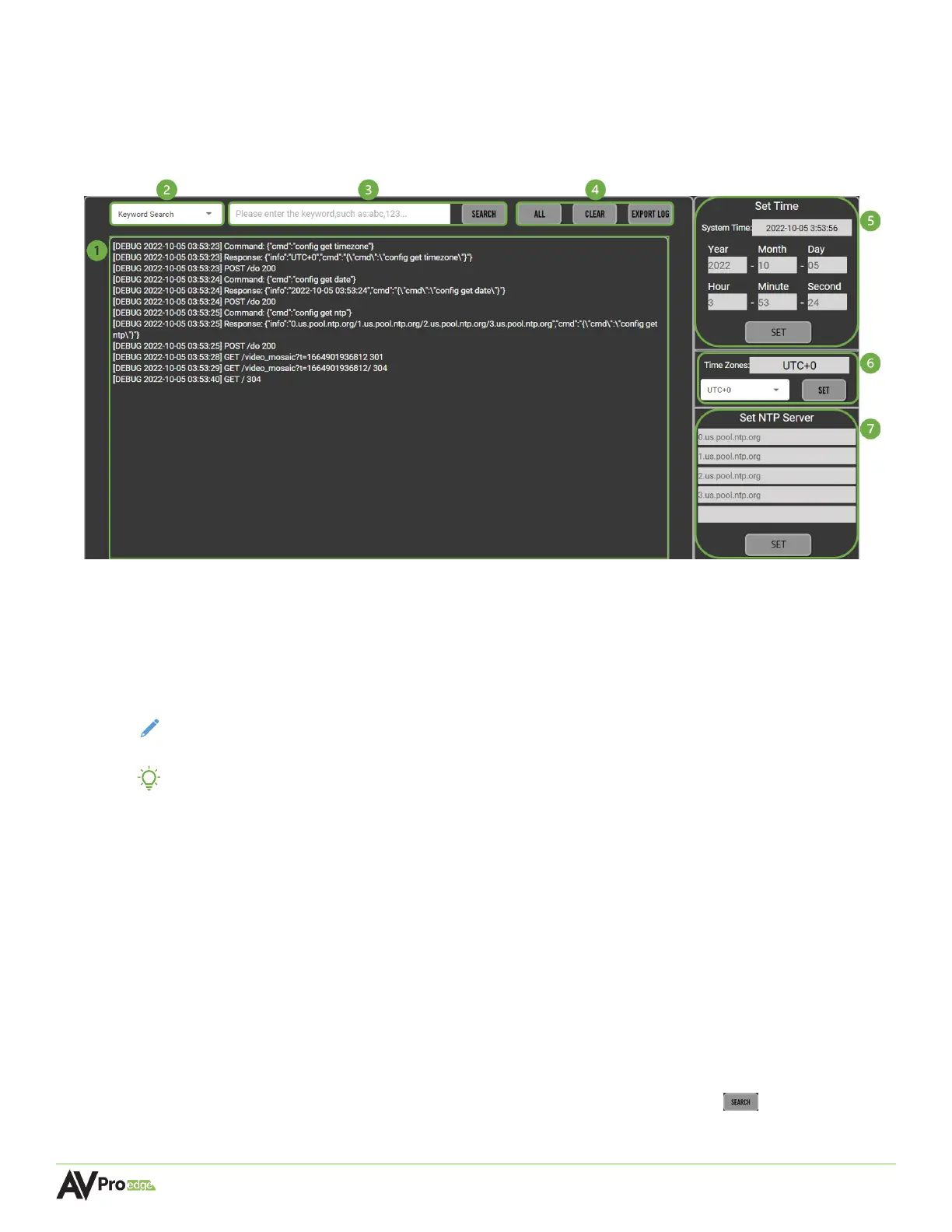
MXNet Mentor features the System Log page that provides current MXNet system information, time
zone options for the system time and date, and setting NTP (Network Time Protocol) servers for more
precise signaling and time synchronization.
1 SYSTEM LOG SCREEN
This is the MXNet log that records system events generated by the AC-MXNET-CBOX in a
continuous stream while the page is open within Mentor. Events recorded in the System Log
consist of timestamped information about commands, system functions, and what actions were
taken. Users cannot alter the recorded information logged by the System Log page.
NOTE:
The System Log only records information while Mentor is opened to the System Log page
and does not record and store information internally.
TIP: Open the System Log page in a separate tab on your web browser to record information
while testing or troubleshooting Mentor on a different web browser tab.
2 KEYWORD SEARCH
Dropdown menu containing search options for locating specific information in the current running
system log. Keywords or phrases can be searched by selecting one of the dropdown menu
options, typing in the keyword or phrase into the text field, and selecting the search button on the
right.
Keyword Search locates all information containing the specific keyword or phrase within the System
Log.
Keyword Filtering hides all information containing the specific keyword or phrase within the System
Log.
3 SEARCH FIELD
Type in a keyword or phrase into the text field then select the search button to locate or hide
all the information containing the keyword or phrase from the System Log screen.



 To Next Page