Page 14 of 78
3 PRODUCT OVERVIEW
3.1 Box Contents and Specifications
Refer to the Specifications page for these products located on the AVPro Edge Website for box
contents and technical specifications.
3.2 AC-MXNET-1G-E / AC-MXNET-1G-E-AVDM / AC-MXNET-1G-EV2
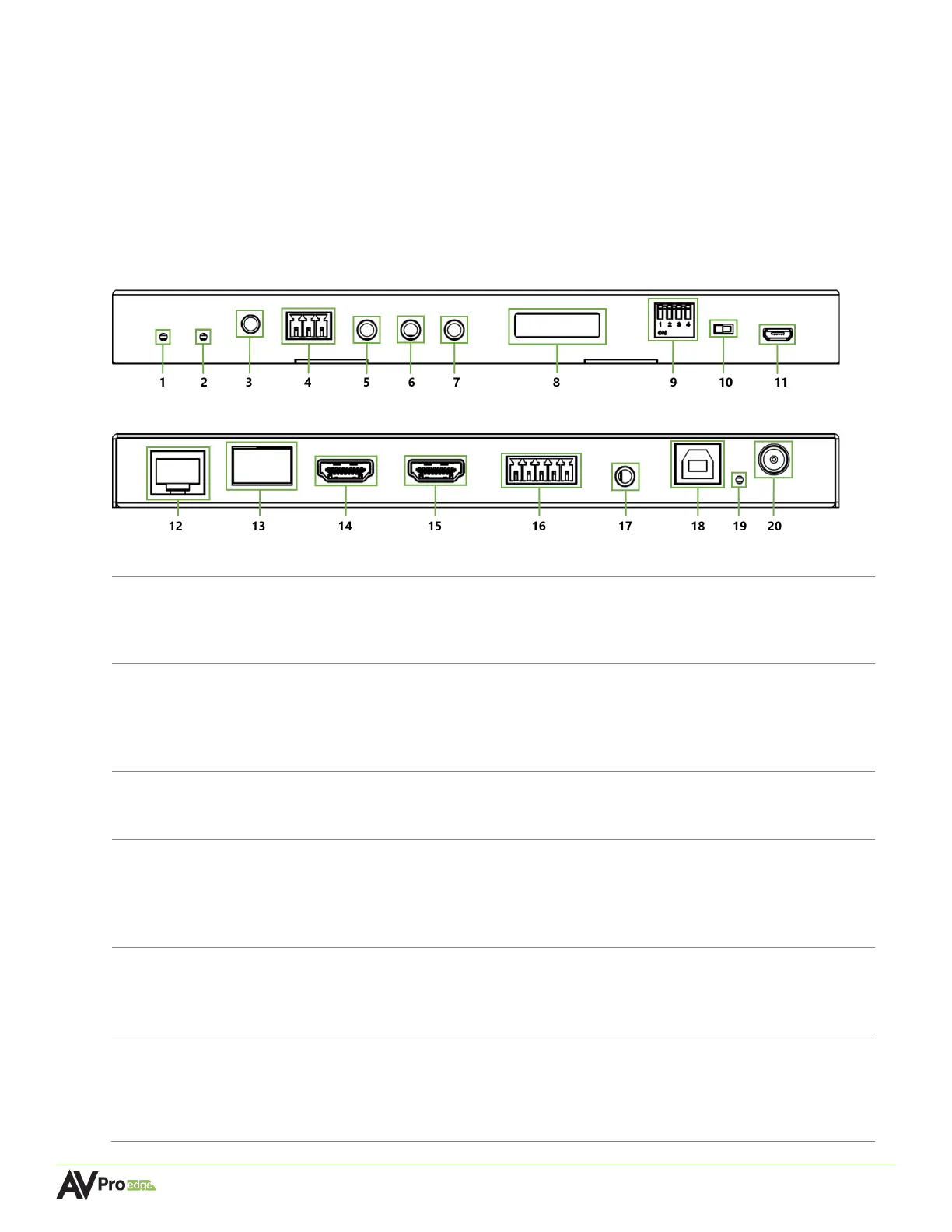
Encoder Front Panel
Encoder Rear Panel
Blue LED status indicator light
• Slowly pulsates until startup is complete after a reboot, at which point the
light will turn solid blue
Green LED status indicator light
• Continuously flashes until an active source is connected to the HDMI IN port
on the encoder, or the source itself becomes active and is routed to a
decoder, at which point the light will turn solid green
Press to copy the EDID of the sink device connected to the HDMI LOOP OUT
port on the back of the encoder
3-pin terminal block connector port
• Sends encapsulated/virtualized RS-232 (serial pass-through) over IP via the
MXNet API
• Supports serial routing with direct connection to a control system processor
3.5mm stereo jack (TRS) IR receiver port
• Sends IR signals via a direct connection from a control system processor to
the IR output of the desired endpoint(s)
3.5mm stereo jack (TRS) IR receiver port
• Supports usage of an IR eye to capture IR signals from a control system
processor or third-party remote to send IR signals to the IR output of the



 To Next Page