4-23
TotalAlert Innity™ HTM Medical Gas Notication System
4107 9016 60.01
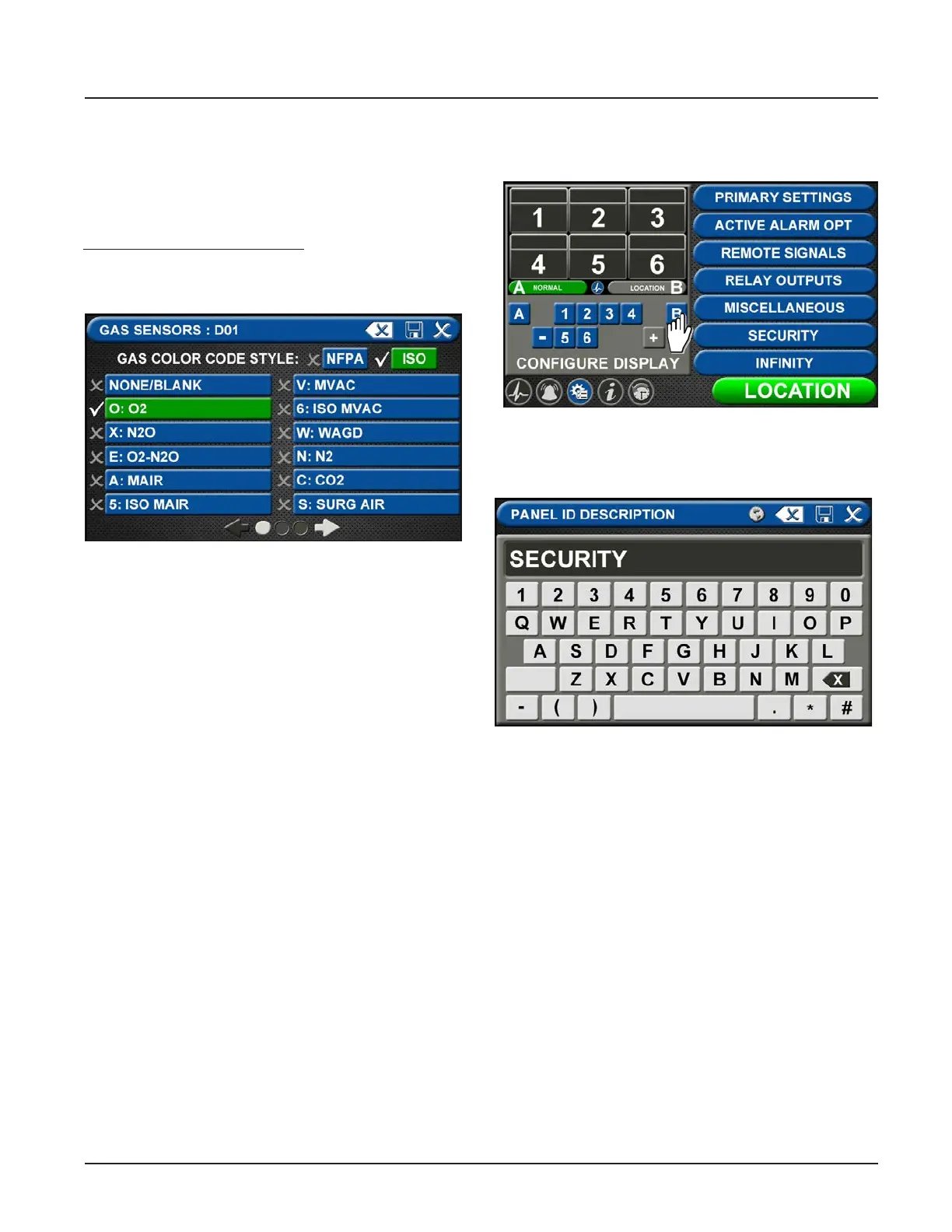
Figure 79: Gas Choices
B60 Board
Users may select up to six dierent gases on the GAS
INPUT screen. These gases correspond to the pressure
sensors wired into the GAS INPUT / B60 board or the
Gas Combination / B65 board.
Note: This setup accommodates:
• Eight badges, with up to 5 central badges or 7 area
badges.
To select the rst gas, touch the D01=NONE/BLANK tab.
• Touch the right and left arrows at the bottom of
the screen to scroll through additional gas choices.
Select the gas that is wired into the D01 input on
the GAS INPUT / B60 board.
• Touch the Save button when you see a check
beside your selection. (If an alarm sounds, press
the Mute button on the panel under the screen and
continue with setup.)
• Repeat to add additional gases.
• Touch the X button in the upper right to close the
GAS SENSORS screen and return to the PRIMARY
SETTINGS screen. The alarm will retain your
information.
Setting up the Location
Touch B to set the LOCATION text.
Enter the central alarm location and touch save to
return to the conguration screen.
Figure 80: Location Setup
Figure 81: Entering the Location



 To Next Page