4-22
TotalAlert Innity™ HTM Medical Gas Notication System
4107 9016 60.01
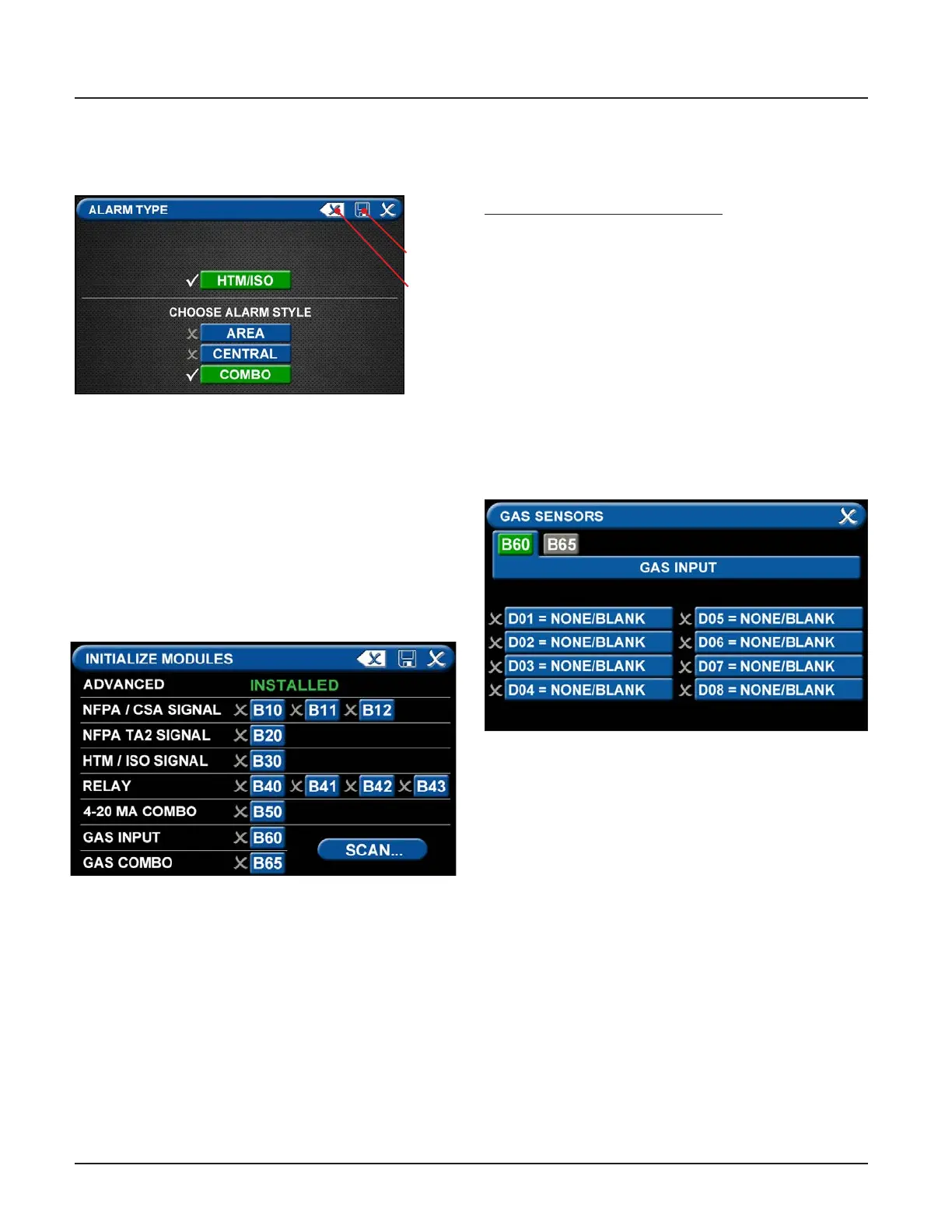
• Touch the ALARM TYPE tab.
• Choose a code style based on code requirements.
• Touch the COMBO tab.
Figure 77: Initialize Modules Screen
Figure 76: Choosing Code and Alarm Styles
Save
Erase
• Once the desired tabs are selected, touch the Save
button to save the selection and go back to the
PRIMARY SETTINGS screen.
Note: To clear your selections, touch the Erase button.
• Initialize Modules Tab
The PRIMARY SETTINGS screen will now display with
ALARM TYPE checked and INITIALIZE MODULES active.
• Touch the INITIALIZE MODULES tab.
The INITIALIZE MODULES screen is used to set up the
boards that are installed. The boards function as the
input/output hardware of the alarm.
At this point, you have two options:
1. Either touch the Scan button to prompt the alarm
to autoll the screen for you.
OR
2. Complete the screen by selecting the boards
installed in the alarm.
Touch the Save button when you see checks beside
your selections.
Gas Sensors Tab
The PRIMARY SETTINGS screen will now display with
ALARM TYPE and INITIALIZE MODULES checked, GAS
SENSORS active, and the last tab grayed out.
• Touch the GAS SENSORS tab
Figure 78: B60 Gas Input Screen



 To Next Page