4-33
TotalAlert Innity™ HTM Medical Gas Notication System
4107 9016 60.01
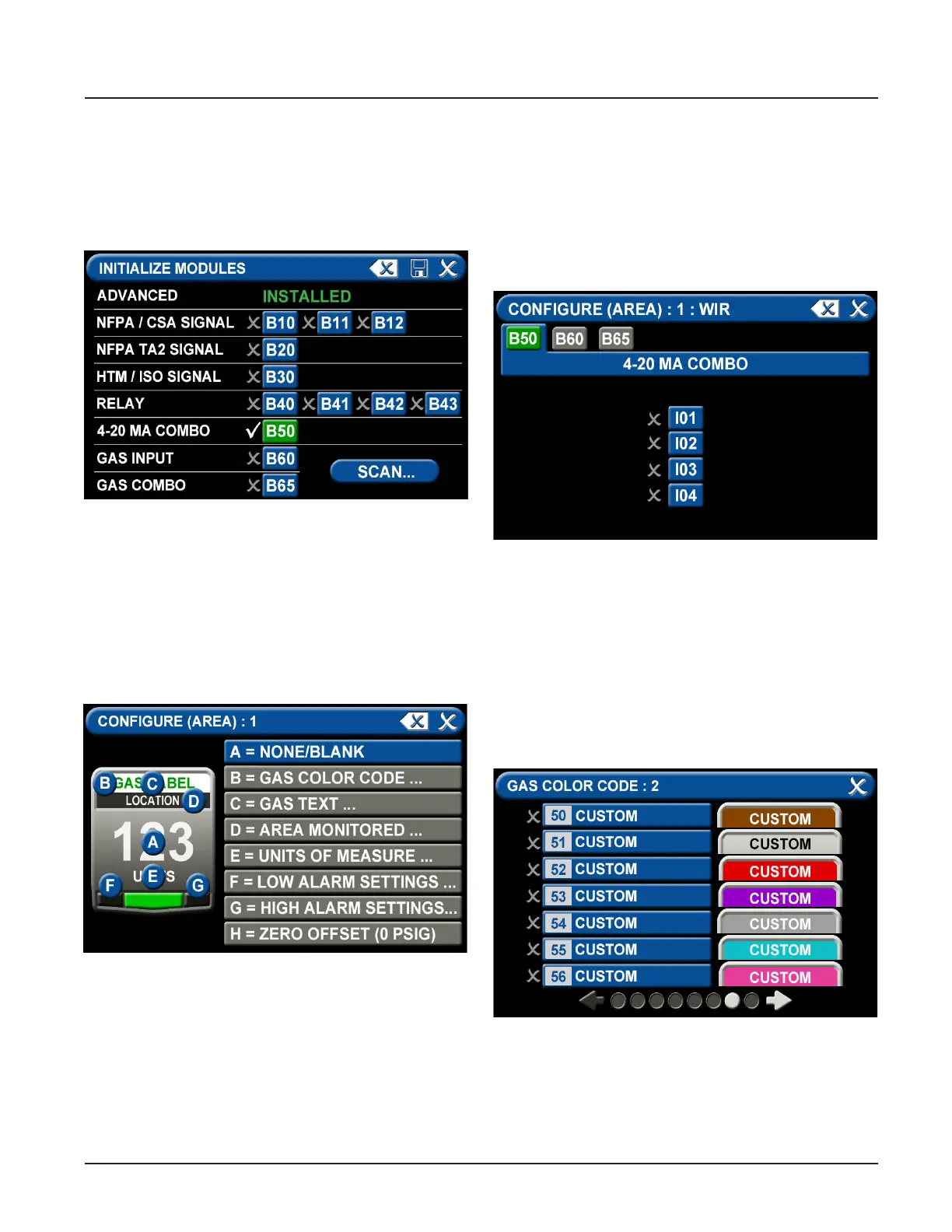
After conguring the Alarm Type, the B50 board must
be initialized. Select “Initialize Modules” on the Primary
Settings Screen. Press the “Scan” button to make sure
the B50 board is set up, as it should turn green. Once
the B50 board is green, press the “Save” icon to exit the
screen. Exit the “Primary Settings” screen.
Figure 112: initialize Modules screen
To congure the rst badge to custom settings, touch
the corresponding number button in the numeric
display that represents the badge to be congured. If
a badge needs to be added, press the “+” for additional
badges.
Eight tabs are used for conguration of a custom
badge. Tabs are listed in alphabetical order.
Figure 113: Congure Area screen
A = [Gas Input] Tab
The B50 should be green and there should be 4
choices (I01, I02, I03, I04). Select the wired input to be
displayed on that badge.
Touch the tab for the appropriate wired gas sensor.
Touch the Save button to close the screen.
Figure 114: B50 Tab, 4-20 mA
B = Gas Desc Tab
To assign a color code for the device:
1. Scroll through the codes using the right and left
arrows at the bottom of the screen. Custom colors
are located on pages 7-8.
2. Touch the tab for the appropriate code.
3. Touch the Save button when you see a check
beside your selection.
Figure 115: Gas Color Code Tab



 To Next Page