4-42
TotalAlert Innity™ HTM Medical Gas Notication System
4107 9016 60.01
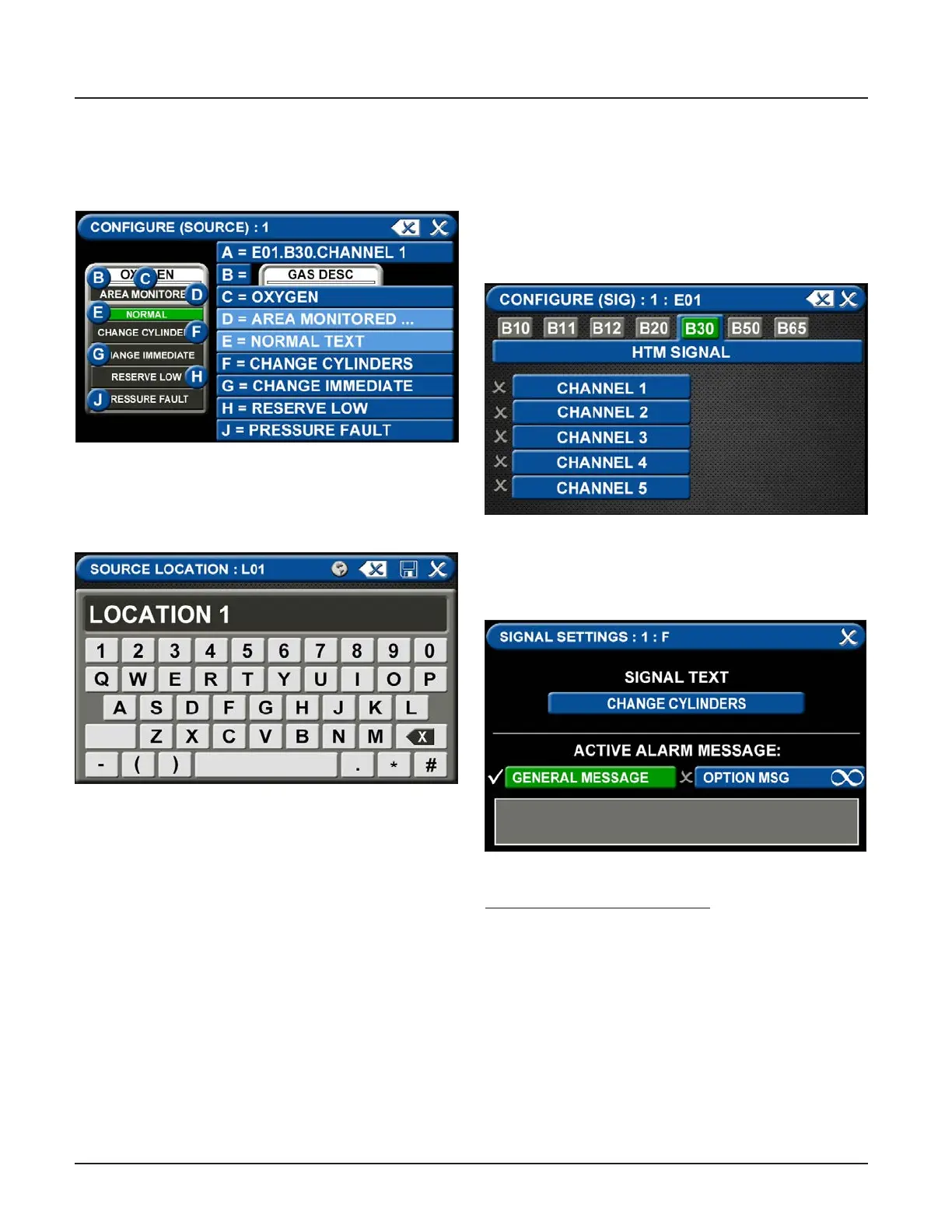
C = Area Monitored Tab
To add areas to be monitored:
1. Touch the AREA MONITORED tab.
Figure 147: Congure Source Screen
2. Using the keyboard, enter the name of the area
monitored
3. Touch the save button.
Figure 150: Signal Settings Screen
Signal Settings (F-J)
• Choose SIGNAL SETTING Tab F-J
Touch the NONE/BLANK tab.
To select source signal input text:
• Scroll through the options using the right and left
arrows at the bottom of the screen.
• Touch the tab for the appropriate option, or select
a blank to create a custom alarm.
Figure 149: Congure Channels
D = Normal Text
• Defaults to Normal condition
E = Alarm Point Tab
• Touch the ALARM POINT tab to assign a channel to
the badge.
• Select one of the ve CHANNEL tabs.
• Touch the save button.
Figure 148: Location Keyboard



 To Next Page