ELECTRICAL SYSTEMS - CHASSIS — 9
188
20 08 CONTESSA
4. COOLANT TEMPERATURE:
Indicates an approximate normal
operating range. Monitor this gauge
frequently in all conditions, especially
when climbing hills, towing and/or
traveling in high ambient temperatures.
If the needle indicates an out of range
condition, take immediate action to
avoid engine damage. Refer to the
OEM manual for specic temperature
recommendations.
5. SPEEDOMETER:
Indicates the speed of the motorhome.
The gauge indicates MPH and KPH.
6. ODOMETER:
Displays total mileage.
7. TACHOMETER:
Displays engine speed in revolutions
per minute (RPM).
8 & 9. AIR PRESSURE GAUGES:
One gauge is for the front air tank,
and the other is for the rear air tank.
Normal air system operating pressures
are approximately 115 to 145 psi.
These air pressures are preset at the
factory. If a problem occurs with either
air system not maintaining normal
operating pressure, it is indication of
a malfunction in the air system. Use
caution and stop the motorhome in
a safe area. Contact an authorized
service technician immediately.
NOTE:
DO NOT drive the motorhome with low
air pressure. It is not safe. Damage can
occur to the suspension and driveline
and the air brake system will not
function properly.
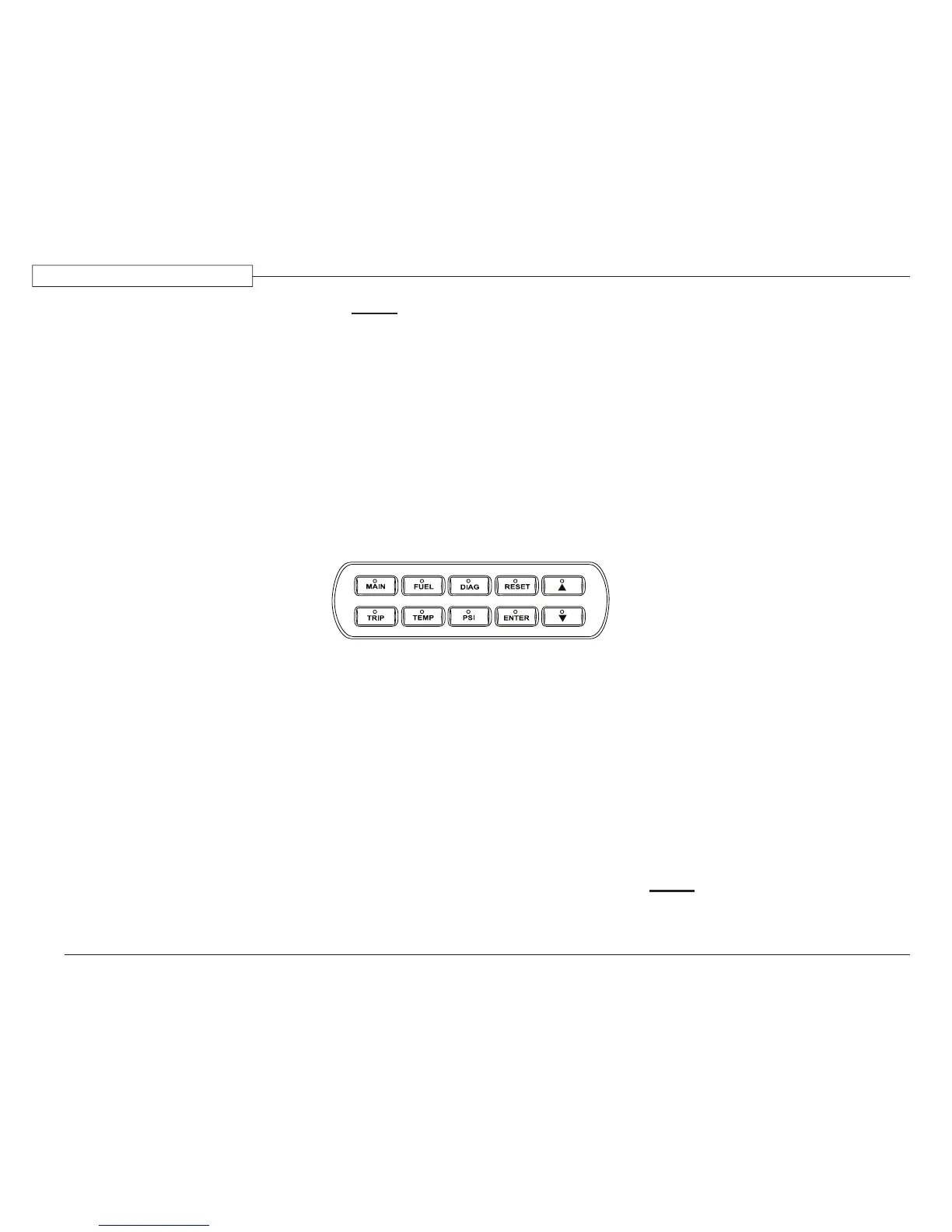
10. LCD DISPLAY:
The LCD displays chassis data and
fault codes. A ten button controller is
located on the dash. Press the up and
down arrows to scroll through menus,
and press the enter button to select
items.
LCD Controller:
Main – Press at any time to return to the
main screen. The main screen displays
outside temperature, chassis battery
voltage and odometer.
Trip – Press to view Trip menu. Use the
up or down arrow to highlight a trip,
and press the Enter button to view trip
information. Trip information includes
average speed, distance traveled, trip
time and fuel used.
Fuel – Press to display average miles per
gallon, instantaneous miles per gallon,
and fuel used. Hold the reset button for
ve seconds to clear.
Temp – Press to view outside, basement,
transmission and engine coolant
temperature.
Diag – Press to view engine, transmission,
ABS, and LCD diagnostic menu. Use the
up and down arrow to highlight an option
from the menu. Press the Enter button to
view diagnostic information and options.
PSI – Press to view oil pressure, turbo boost
pressure and front and rear air tank PSI.
Reset – Press and hold for ve seconds to clear
selected trip information (trips 1 through 4
can be individually selected for reset).
Warnings:
LCD also displays following warnings:
- ABS Warning
- Check Transmission
- Bay Door Open (including engine door)
- Low Oil Pressure
- High Transmission Temp
- Generator Door Open
- High Coolant Temp
- Low/High Battery
- Low Air Pressure – Front
- Low Fuel Level
- Warning
- Low Air Pressure – Rear
- Water in Fuel
- Stop Engine
- Engine Not Running
- Turn Signal
- Headlight On
NOTE:
The “Bay Door Open” warning includes
all bay doors and the engine door.
080515f


 To Next Page