APPLIANCES — 4
92
20 08 CONTESSA
REFRIGERATOR (Optional)
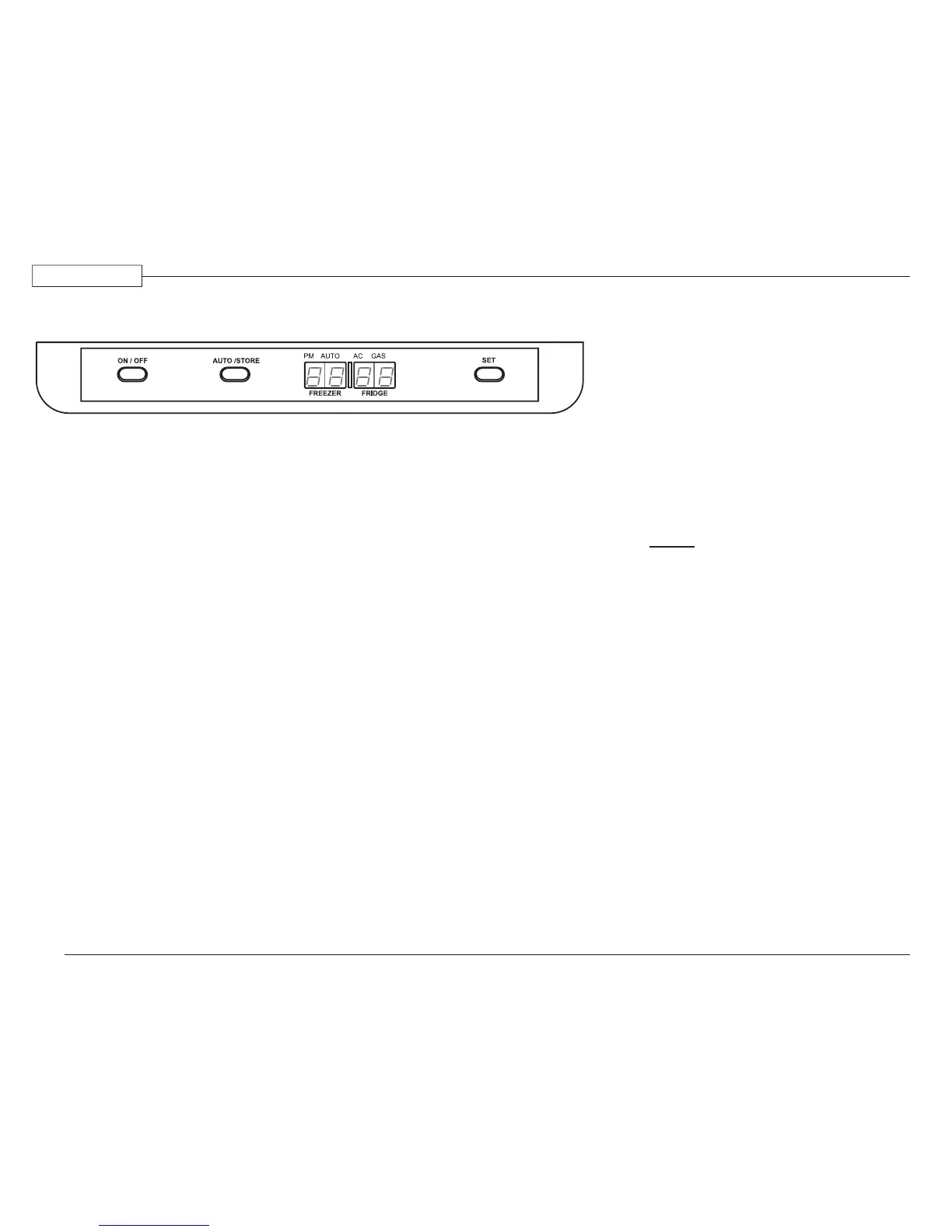
Control Panel
Control Panel Functions:
ON/OFF button – Turns the refrigerator
on or off.
AUTO/STORE button – Selects energy
mode between AUTO AC, AUTO Gas,
or GAS. The AUTO/STORE button is
also used to save settings.
LED display – Displays temperature,
different modes of operation and status
messages.
Includes:
- Temperature in frozen food compartment
- Temperature in fresh food compartment
-
AUTO AC mode
-
AUTO Gas mode
-
GAS mode
- Temperature setting
- Clock
- Status and error messages
SET button – Adjusts temperature range
and sets the clock.
Operation
Press the main power ON/OFF button.
If the clock has to be set the LED display
will show ashing horizontal bars “-- --”.
Setting the Clock:
1. Press the SET button until gures ash
on the LED display.
2. Press the SET button to adjust time.
PM is indicated by a dot under PM on
the LED display.
3. Save settings by either pressing the
AUTO/STORE button, or waiting ve
seconds (the settings will
automatically save).
Setting the Temperature:
1. Press the SET button to the desired
temperature setting (1 to 5, with 5 the
coldest).
2. Save settings by either pressing the
AUTO/STORE button or waiting ve
seconds (the settings will
automatically store).
Selecting Mode of Operation:
The mode of operation ranges between AUTO
AC, AUTO Gas, or GAS.
1. To select automatic operation press the
AUTO/STORE button until AUTO is
displayed. In this mode the system will
automatically select the most suitable
energy source that is available, either
AC or propane operation.
2. To select propane operation only, press
the AUTO/STORE button until a dot
is indicated by GAS.
NOTE:
Current mode of operation and the
energy source, AC or Gas, will be
indicated by a dot on the LED display.
Automatic Defrost:
The refrigerator will automatically defrost
the frozen and fresh food compartments every
24 hours.
Manual Defrost:
The refrigerator may be defrosted manually.
A defrost cycle usually takes about one hour
depending upon the amount of frost in the
refrigerator.
1. Press the
ON/OFF button to turn off
the refrigerator.
2. Press and hold the
AUTO/STORE
button, then press the ON/OFF button.
“dE Fr” will show in the LED display.
031217


 To Next Page