1 695 600 968 2019-01-28| Beissbarth GmbH
Operation | MT ZERO 6 LCD | 97
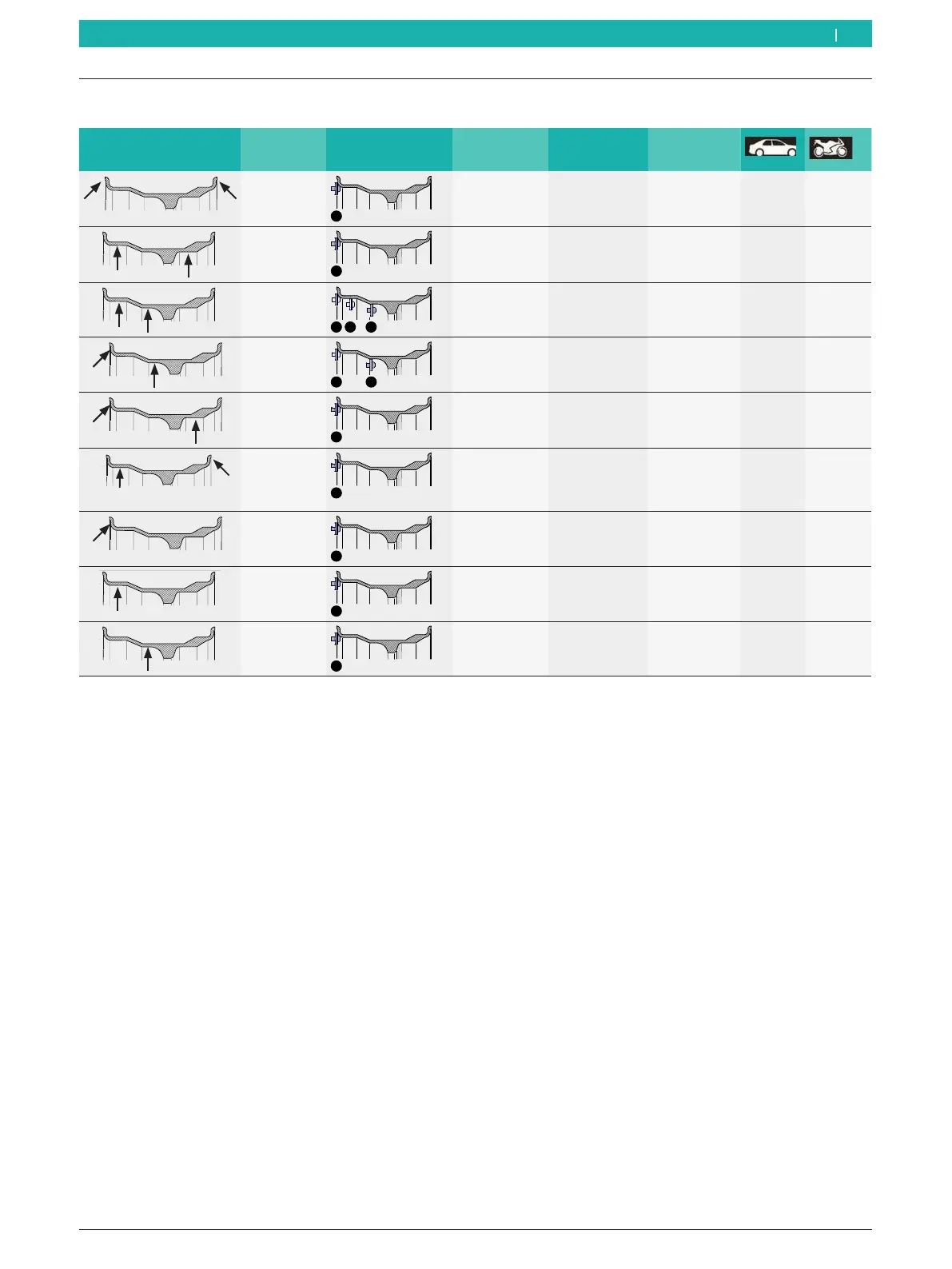
8.5 Balancing programs overview
Balance weight position Balancing
program
Measurement
locations
Inside weight Outside
weight
Preferred for
rims made of
Standard
Clip-on
balance
weight
Clip-on
balance weight
Steel
x x
Alu1
Pax1
Adhesive
balance
weight
Adhesive
balance weight
Alloy
Pax rim
x x
Alu2
Pax2
Adhesive
balance
weight
Adhesive
balance weight
Alloy
Pax rim
x –
Alu3
Clip-on
balance
weight
Adhesive
balance weight
Alloy
x –
Alu4
Clip-on
balance
weight
Adhesive
balance weight
Alloy
x –
Alu5
Adhesive
balance
weight
Clip-on
balance weight
Alloy
x –
Static1
Clip-on
balance
weight
Steel
x x
Static2
Adhesive
balance
weight
Alloy
x x
Static3
Adhesive
balance
weight
Alloy
x x
Tab. 2: Balancing programs overview
i See the following sections for the procedures of attaching adhesive and clip-on balance weights.
en



 To Next Page