1 695 600 968 2019-01-28| Beissbarth GmbH
86 | MT ZERO 6 LCD | Initial commissioning
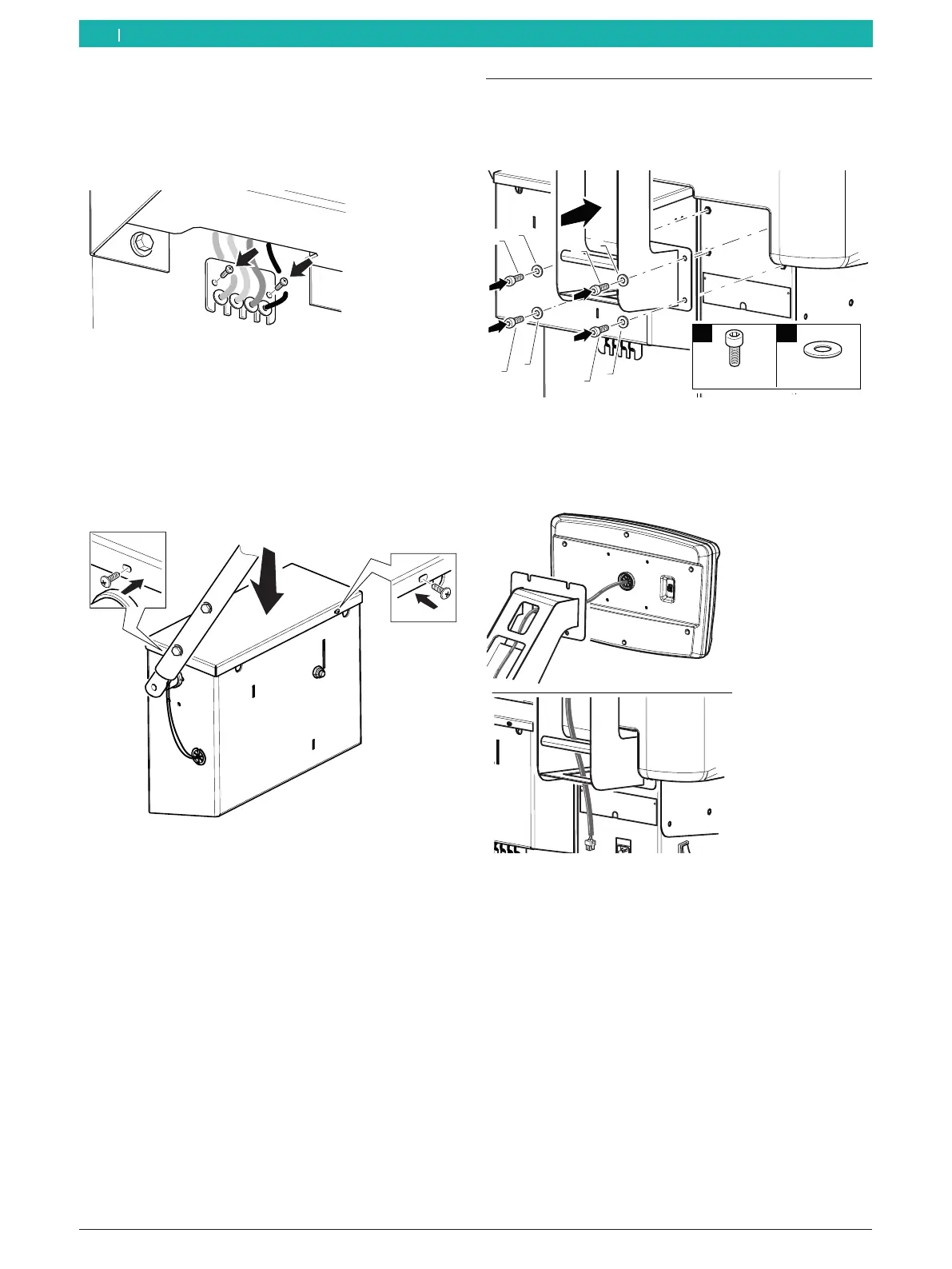
9. Install the interface card plate on the machine.
Proceed with caution.
! Make sure not to crush the cables between the
structure and the plate.
651127-38_BM
Fig. 33: Installing the interface card plate
! To avoid damaging the cables, make sure the
cables are not excessively taut and have freedom of
movement in their notches.
10. After completion of the connections described,
install the cover of the wheel guard moving unit.
651127-27_BM
Fig. 34: Installing the cover
4.8 Mounting the digital control panel
1. Remove the holder for the digital control panel.
2. Use the screw set included in the scope of delivery
to install the mount on the back of the casing.
651127-28_BM
1
2
M8x25 Ø8
n°4
n°4
1
1
2
1
2
2
1
2
Fig. 35: Mounting the holder for the digital control panel
3. Remove the digital control panel.
4. Insert the cable into the holder and route it out of
the base.
651127-29_BM
Fig. 36: Cable penetration
en



 To Next Page