S10/S12/S10A/S12A Patient Monitor User’s Manual
14-5
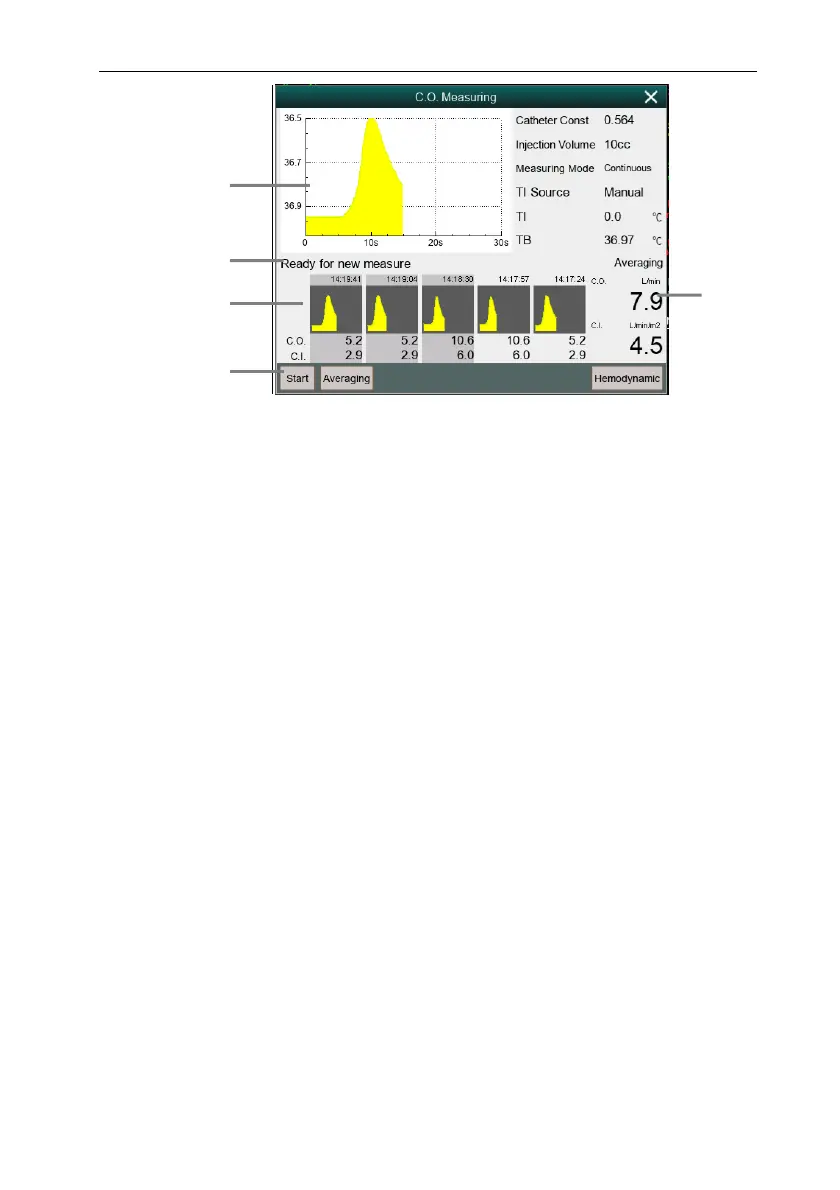
(1) Current measured C.O. curve
(2) Prompt information area
(3) History measurement window
(4) Function button
(5) Average of C.O. and C.I. measured multiple times
3. Follow steps for make a C.O. measurement:
When 【Measure Mode】 is setting to 【Single】, when the prompt
information area displays 【Ready for new measure】, you can select
the 【Start】 button and immediately perform a rapid liquid injection.
The C.O. measurement window will be show the hot dilution curve
immediately. After each measurement, its measurement results will be
displayed in the historical measurement window. It takes a certain
amount of time to repeat this step and start the next measurement.
When the 【Measurement Mode】 setting up 【Continuous】, the C.O.
measurement can be performed continuously. When you see the
message 【Injection now】 on the C.O. measurement interface, you can
start the measurement by injecting ice water.
4. Obtaining the average value of C.O. and C.I. After completing multiple
measurements, select multiple measurement curves if needed in the historical
measurement window, and then select the 【Averaging】 button. The system
will calculate and display the average values of C.O. and C.I., and the average
5
1
2
3
4



 To Next Page