S10/S12/S10A/S12A Patient Monitor User’s Manual
61
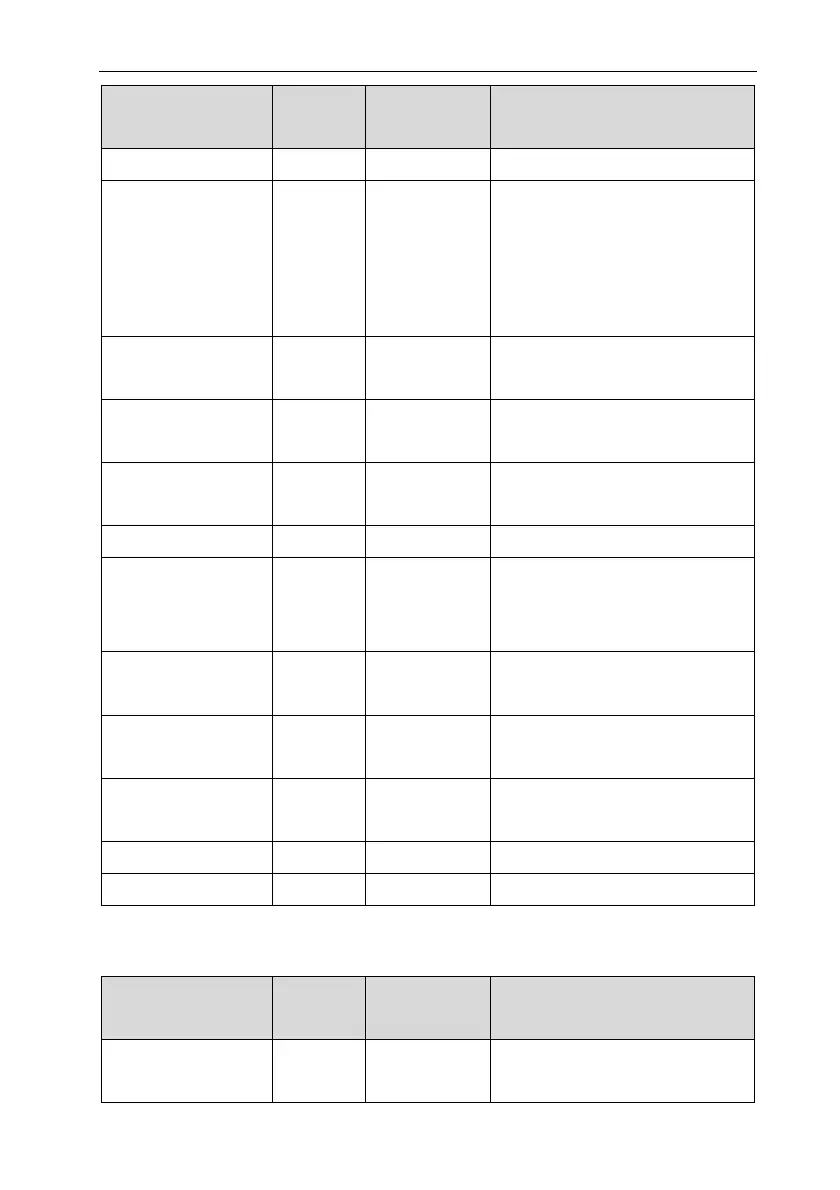
Alarm messages
Default
priority
Alarm clear
method
Cause and solution
check maintenance.
CO2 Self-Test Error Low Not clearable
Hardware errors, Replace sensor,
if the problem cannot be solved,
please contact the after-sales
personnel to check the
maintenance.
CO2 Motor Speed
Error
Low Not clearable
Check whether the sampling tube
is blocked.
CO2 Factory
Calibration lost
Low Not clearable
Contact the after-sales personnel
to check the maintenance.
CO2 Sampling Line
Clogged
Low Not clearable Check sampling line.
CO2 No Sample Line Low Completely clear Check sampling line.
CO2 Internal
Temp.Out of Range
Low Not clearable
Hardware error, and contact the
after-sales personnel to check the
maintenance.
CO2 Ambient Pressure
Out of Range
Low Not clearable
Recalibrate atmospheric
pressure.
CO2 Span Calibration
Command Failed
Low Not clearable
Contact the after-sales personnel
to check the maintenance.
CO2 Span Calibration
in Progress…
Prompt / Disappear after success.
CO2 Replace Adapter Low Not clearable Check adapter.
CO2 No Adapter Low Completely clear Check adapter.
D.2.10 DM Technical Alarm
Alarm messages
Default
priority
Alarm clear
method
Cause and solution
DM Finished Low Completely clear
The infusion container is empty
and the infusion is complete.



 To Next Page