Connecting SMPTE Fiber
The next step in getting started is to connect the SMPTE fiber cable between the studio fiber
unit and the camera unit. This provides power from the studio unit to the camera unit, and fiber
for all video feeds.
Connecting the Fiber Cable to the Studio Unit
The male end of the SMPTE fiber cable's locks securely onto the female fiber connector on the
front panel of the Blackmagic Studio Fiber Converter. This is a secure lock ensuring that the
cable is not accidentally disconnected during broadcast.
To connect the cable:
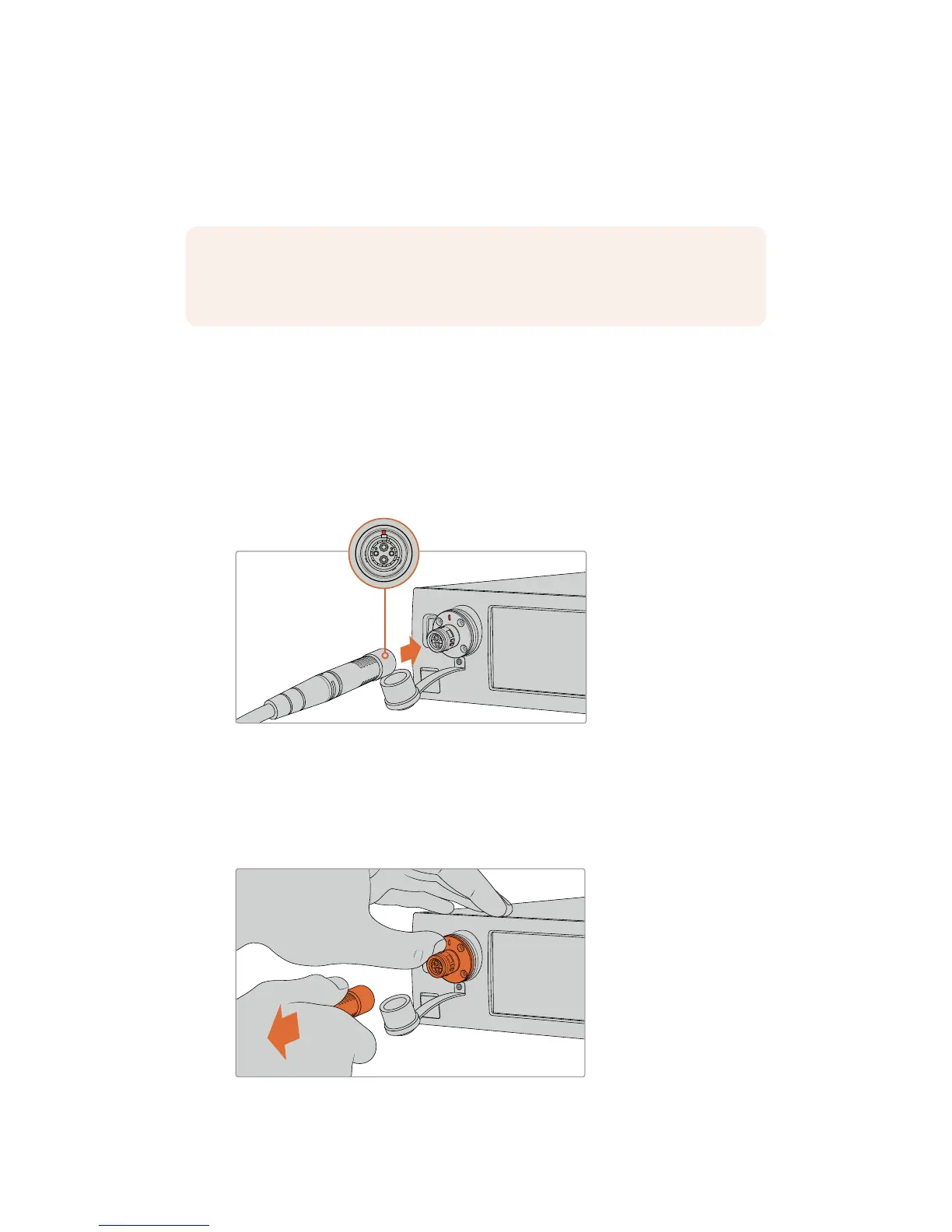
Align the red indicator on the cable connector with the red dot on the unit's fiber connector,
and plug the connector in until it securely clicks into place.
Plug the male end of the SMPTE fiber cable into the female connector
on the front of Blackmagic Studio Fiber Converter
To disconnect the cable:
Push the metal base of the studio unit's fiber connector towards the front panel and remove the
cable connector.
Push the metal base of the studio unit's fiber connector towards the front panel to
disengage the cable connector allowing you to pull the cable away from the unit.
NOTE Extensive safety checks are initiated whenever a powered hybrid fiber optic
cable is plugged into the converter and the power safety of the unit is continually
monitored during use.
166Getting Started with BlackmagicFiber Converters










 To Next Page