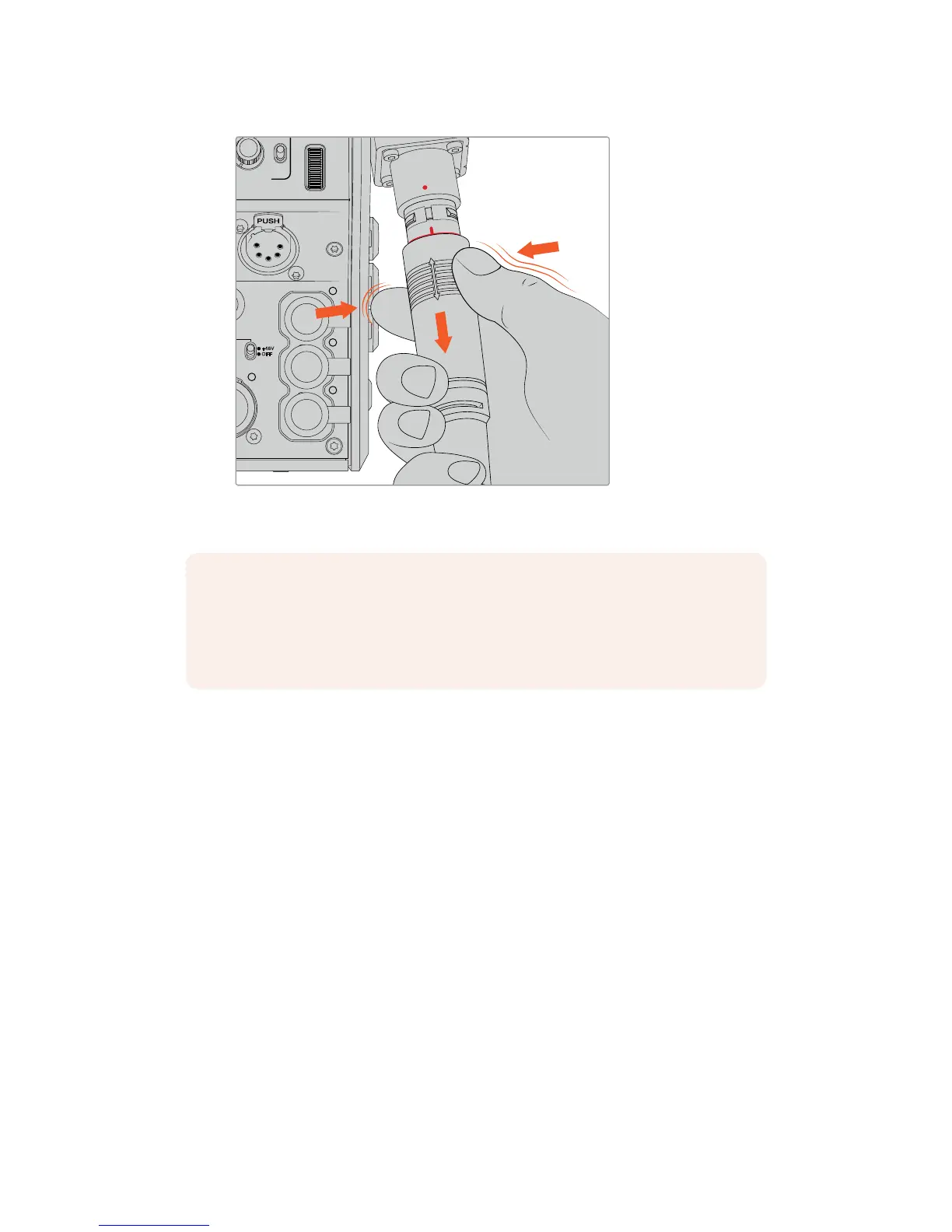
Pinch the rubber around the tip of the cable to reveal the red
ring below, then pull the cable to disconnect
Confirming Power and Fiber
The two units will now establish a handshake process to determine that power is being
supplied safely and fiber is securely connected.
This process involves the following:
1 The studio unit establishes a low power state with the camera unit. This is shown by the
camera unit's red power status indicator. In a low power state, intercom functionality is
enabled, but the full power required to operate the unit has not yet been confirmed.
2 Once power is determined as safely connected, a high power state is established and
the camera unit's power indicator will illuminate green.
3 The fiber connection is confirmed and the fiber status indicator will illuminate green.
This is usually very fast and the indicators can turn green almost immediately. If you are using
acable over greater distances, the handshake process can take a moment longer before
indicators illuminate green.
If the power light remains red for an extended period of time and does not turn green, or
flickers between red and green, check that both ends of the fiber cable are securely
connected. If the interruption persists, check the condition of your fiber cable.
NOTE The SMPTE hybrid fiber cable is the heart of the broadcast ecosystem,
so it iscrucial that great care is taken. For example, avoid kinks in the cable, always
preventthe cable from being pressed under heavy items, and avoid bending at
90degree angles. Avoid dropping the connectors and take care when connecting
and disconnecting. Always cap the connectors as soon as they are exposed.
168Getting Started with BlackmagicFiber Converters










 To Next Page