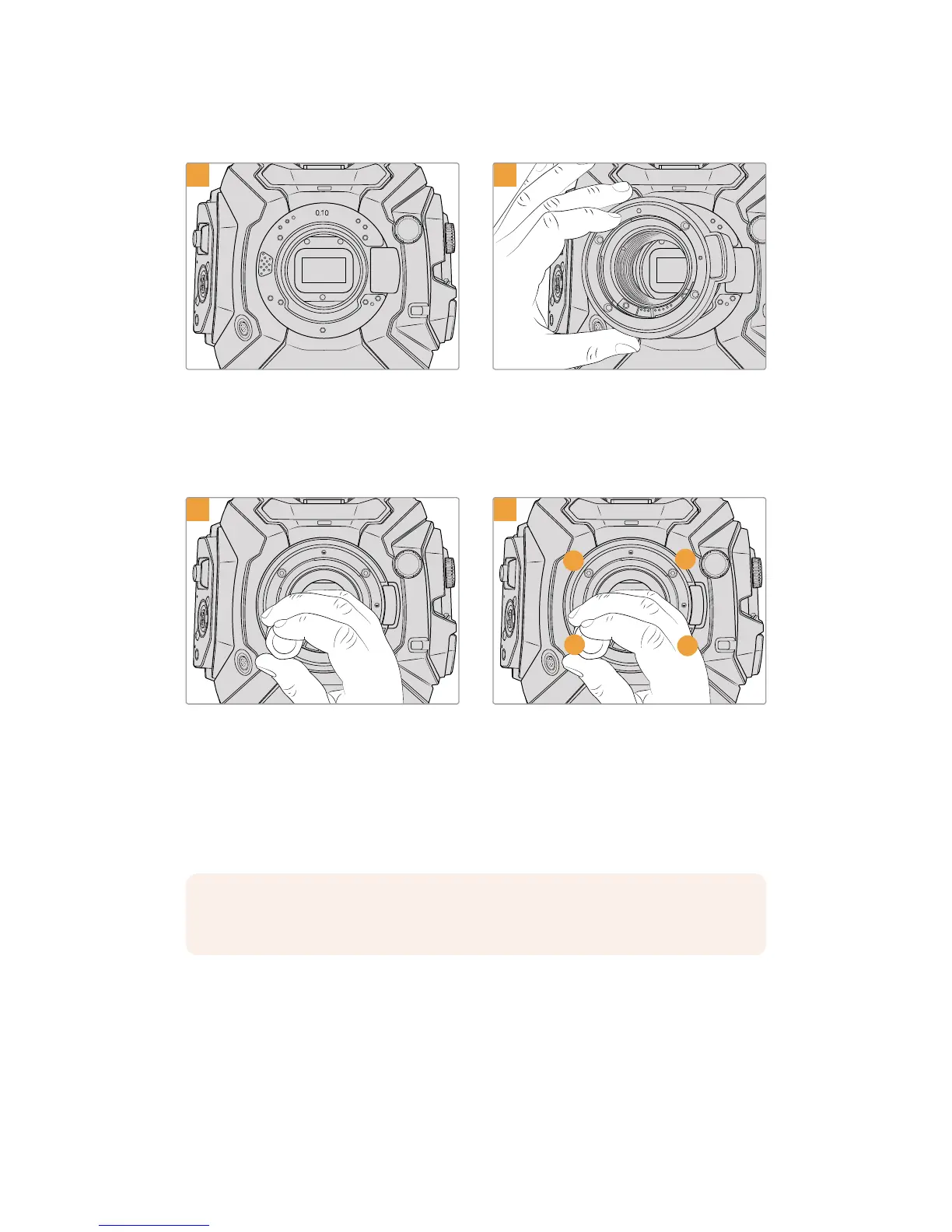
Place Blackmagic URSA Mini Pro 4.6K vertically
on a solid, clean bench top toensure that the
mount can be inserted vertically. If changing from
the PL to the EFmount, ensure that you have
removed thePL baffle before inserting
the EF mount.
Remove the metal 0.10mm shim,
if fitted, while retaining the metal 0.50mm and
plastic 0.10mm shims. Then carefully place the
BlackmagicURSAMiniPro 4.6KEF lens mount
onto the camerabody ensuring thered dot is
at the 12o’clock position.
3
1
3
4
2
Loosely turn the four mounting screws until
initialcontact is made with the shoulder of the
lens mount.
Using the 2mm Hex driver, or torque wrench with
2mm Hex key, apply one full turn of pressure to
mounting screw 1, followed by one full turn to
screw 2, and repeat for screw 3 and then 4.
Continue to apply one full turn to each screw in
the sequence above until all screws have reached
the maximum torque of 0.45Nm.
NOTE When removing the EF mount, simply follow the instructions in reverse order
from step 4 to step 1.
203Interchangeable Lens Mount










 To Next Page