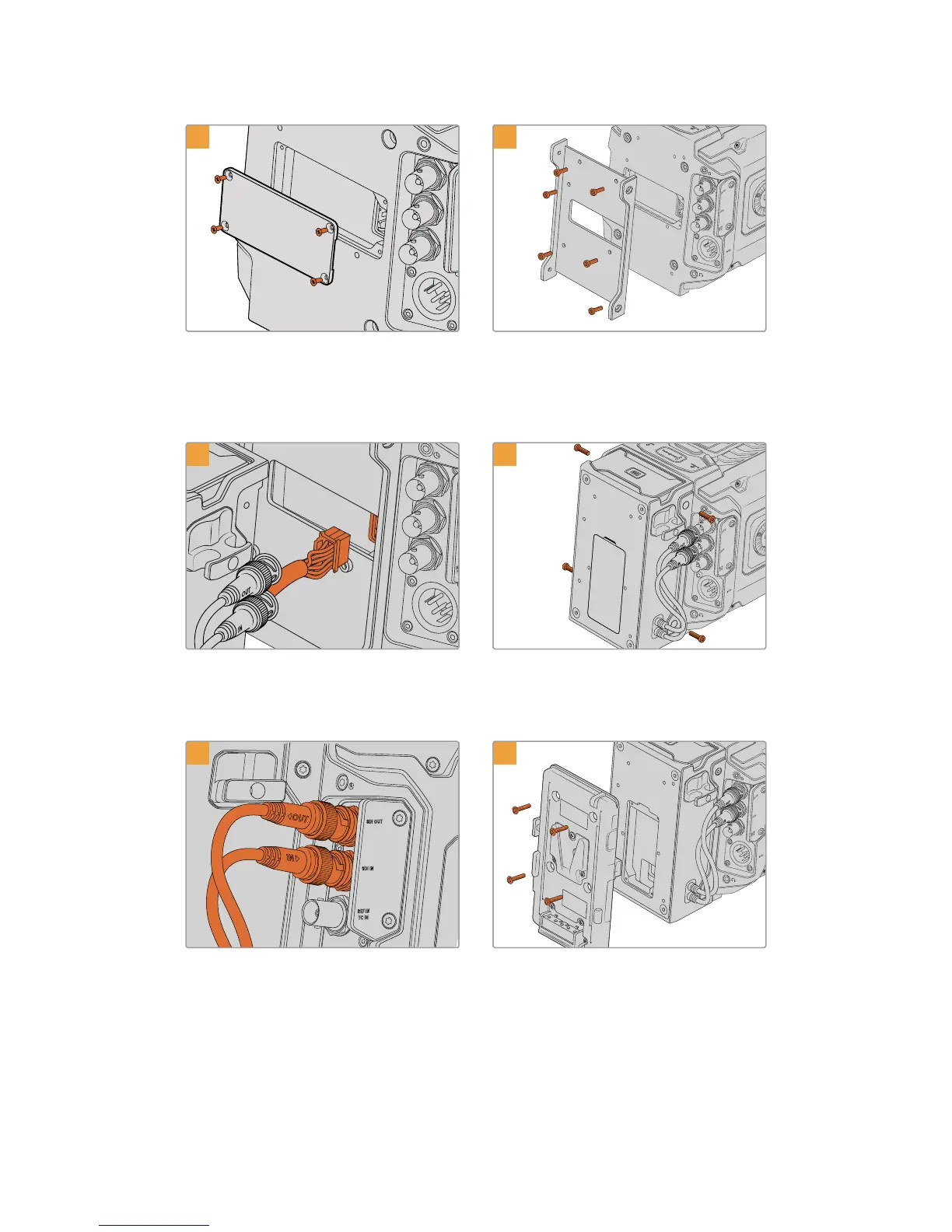
4
If no battery was fitted to your camera,
youmayneed to remove the cover over the
molex socket on your camera's rear panel. Use a
philipshead screwdriver to remove the
fourM3screws holding the cover in place.
Attach URSA Mini SSD Recorder’s
mountingbracket using 6 x T10 torx screws.
6
Plug the molex connector on URSA Mini
SSDRecorder into the molex socket on
yourcamera’s rear panel.
Attach URSA Mini SSD Recorder to the mounting
bracket using 2 x T10 torx screws onthe left and
right side of the brackets.
7
8
Connect the SSD Recorder’s SDI In and SDIout
cables to the SDI inputs and outputs on the back
of your camera. The SSD Recorder’s cables are
marked ‘in’ and ‘out’ tohelp matchthem to the
appropriate connector on your camera.
If you want to use a battery plate with URSAMini
SSD Recorder, use a 2mm hex key driver to
remove the four M3 screws holding the molex
socket cover panel in place. Once the molex
socket is uncovered, attach a battery plate using
the steps outlined in the section ‘mounting
batteries’ inthis manual.
207URSA Mini SSD Recorder










 To Next Page