36
Section 2. Creating Sounds
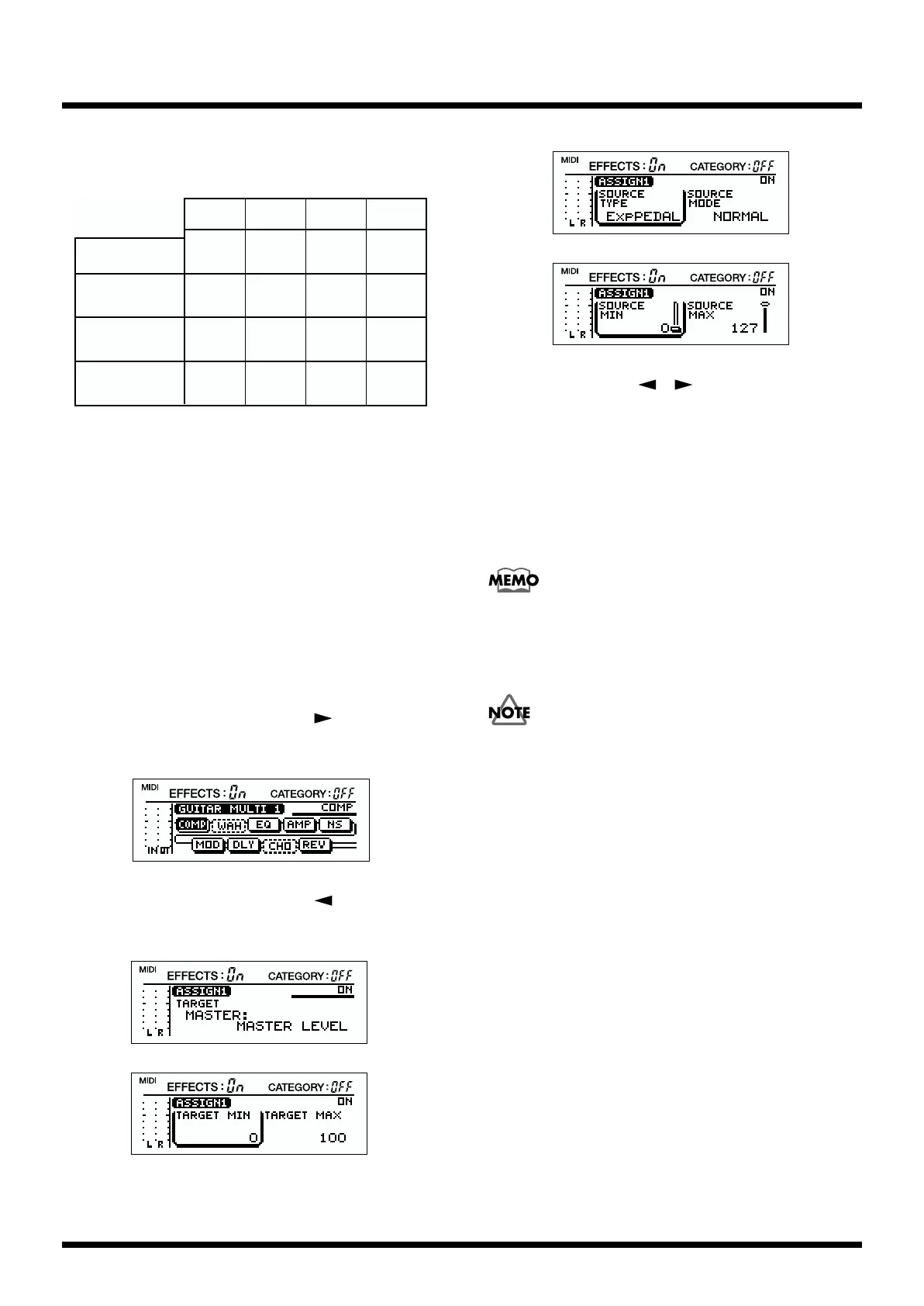
Set the Control Assign as shown below according to the
connected controller.
fig.2-35d
* When the expression pedal is connected, set the SOURCE MIN
and MAX to your taste.
* When using a footswitch of the Momentary type, you can
control the parameters either by setting the SOURCE MODE
to “NORMAL” or “TOGGLE.” The effect you can attain,
however, will differ.
Making settings
* When the foot switch has been set to source, the
control assign settings will be ignored unless the
“CONTROL 1,2” (p. 44) is set to “ASSIGNABLE.”
1. In Play mode, press PARAMETER [ ].
The following display will appear.
fig.2-12
2. In Play mode, press PARAMETER [ ] several time to
select “ASSIGN1.”
fig.2-36a
fig.2-36b
fig.2-36c
fig.2-36d
3. Use PARAMETER [ ][ ] to select the parameter
that you wish to assign.
4. Rotate [VALUE] to change the assignment.
The change will occur more rapidly if you hold down
[CATEGORY] while you rotate [VALUE].
5. Repeat steps 2–4 to complete the desired control assign
(ASSIGN 1–4) settings.
Even when another parameter is selected, you can press
[ENTER] to switch assign on/off.
* Unused control assignments should be set to “ASSIGN OFF.”
If you wish to keep your settings, perform the Write
operation (p.38).
Expression pedal
SOURCE
TYPE
SOURCE
MODE
SOURCE
MIN
SOURCE
MAX
Foot switch
(latch-type)
Foot switch
(momentary-type)
Exp
PEDAL
CONTROL
1,2
CONTROL
1,2
NORMAL
NORMAL
TOGGLE,
NORMAL
1–127
0–126
0
127
0
127
MIDI
MIDI-1–31
MIDI-64–95
TOGGLE,
NORMAL
0–126 1–127



 To Next Page