M410 User Manual 13
Setup
Recycling the Cartridge
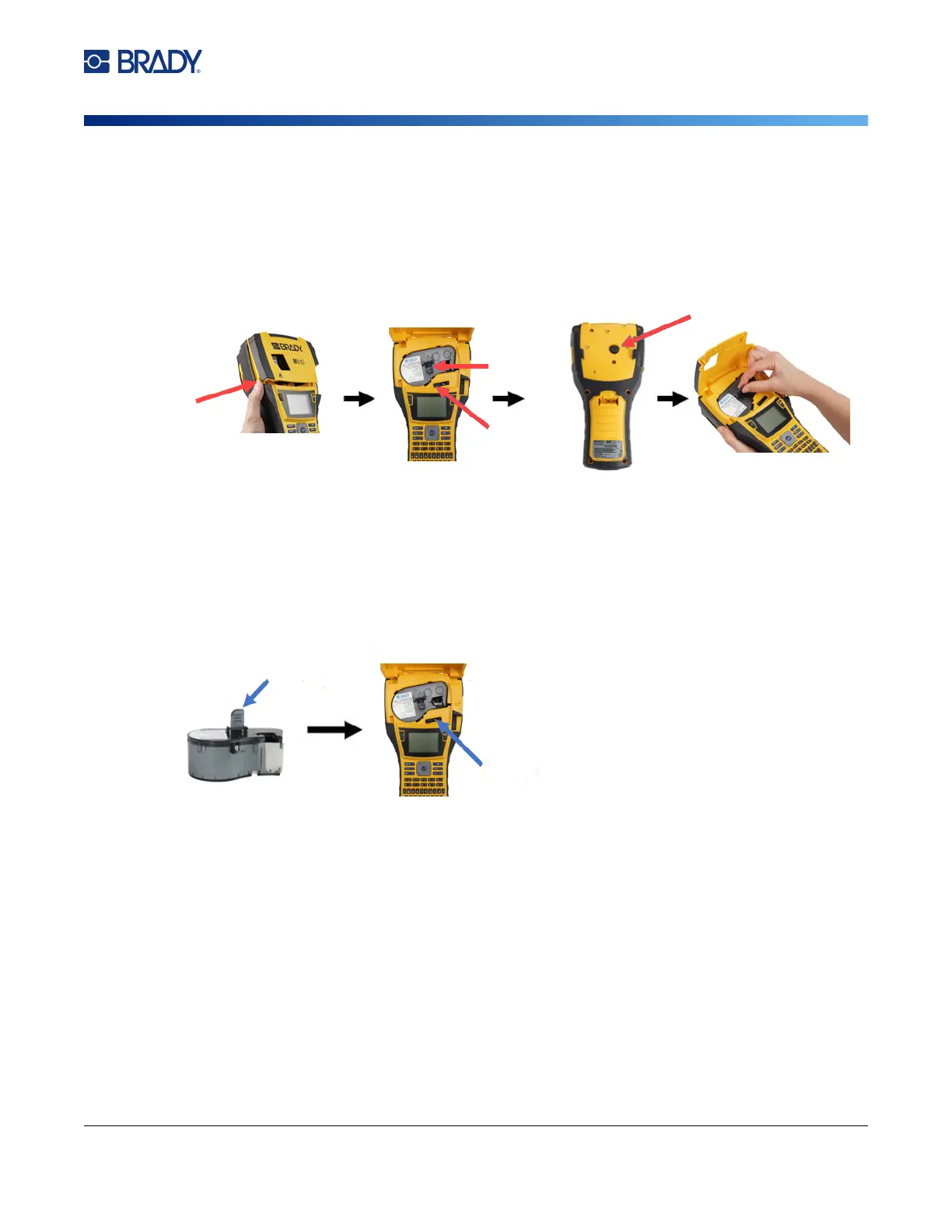
To change the cartridge:
Although the printer can be operated with the cover open, it is recommended that the cover remain
closed except while changing the cartridge.
Recycling the Cartridge
Cartridges need to be recycled in accordance with local regulations. Before recycling, the used
cartridges must be pulled apart to release the individual components. These various components must
then be recycled in the correct recycling bins.
1. To open the printer cover,
push or pull up on the finger
tab.
2.
Slide the locking lever
left to
unl
ock the cartridg
e.
3.
Push the eject button on th
e
b
ack of the printer. Then
,
gr
asping the hinged fin,
pull
th
e cartridge out of the
cartridge bay.
4. Holding the hinged fin on th
e
ne
w cartridge, pl
ace the
cartr
idge into the cartridge
bay, pushing g
ently until it
snap
s into pl
ace.
5.
Slide the locking lever
to the
right
to lock th
e cartridge in
p
lace.
6. Close the cover, pushing
down until it snap
s into
place.
Finger tab
Locking
lever
Hinged
fin
Eject button



 To Next Page