2. Setting the Management IP-Address
1. Connecting the USB cable
If it is not already connected, connect the USB cable between the USB port on the
probe and a USB port on the PC.
2. Starting a terminal program on the PC
Start a terminal program. Window XP users can use Hyperterm, Linux users can use
minicom and Windows Vista users can download from http:// www.putty.org or
http://en.poderosa.org . Select the new COM port that should appear as the USB cable
is plugged in (Linux users should check /var/log/messages to see what device to use).
The following serial port parameters should be used:
• Baud rate: 9600
• Data bits: 8
• Parity: None
• Stop bits: 1
• Flow control: None
Press ENTER a few times to bring up the login prompt.
3. Logging in
Log in using the user name admin and the password elvis.
4. Setting initial network parameters
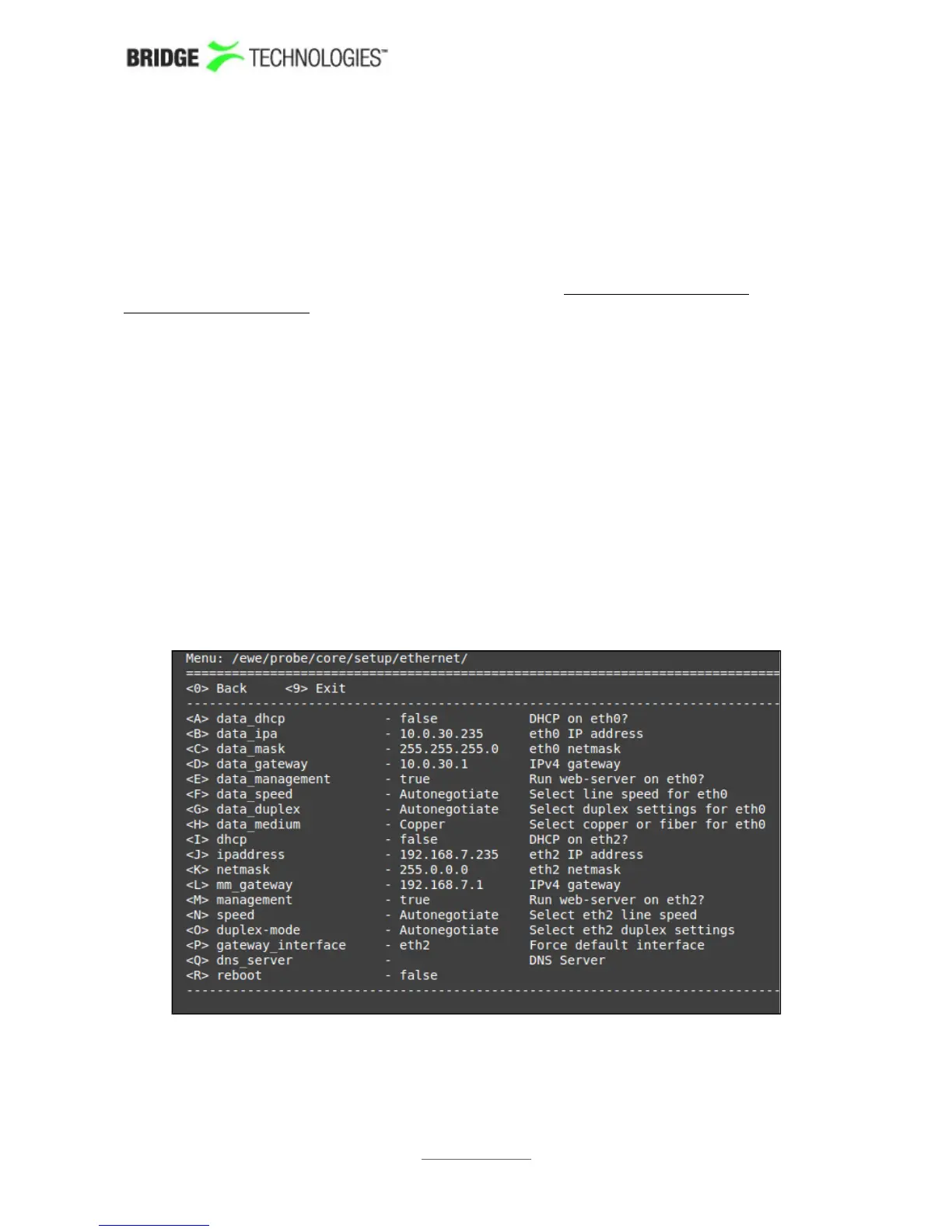
A simple text based menu system should now be displayed:
To change a setting, press the appropriate character (A-R) then enter the new value
and confirm by pressing <ENTER>.
PROBE USERS' MANUAL VERSION 5.0
2014 © BRIDGE Technologies Co AS - Bentsebrugata 20 - N-0476 Oslo, Norway - tel: +47 22 38 51 00 -
www.bridgetech.tv
38



 To Next Page