233
Handling Precautions
• Dirty terminals may cause a poor contact between the battery pack and the camera. Wipe the terminals with a
soft dry cloth.
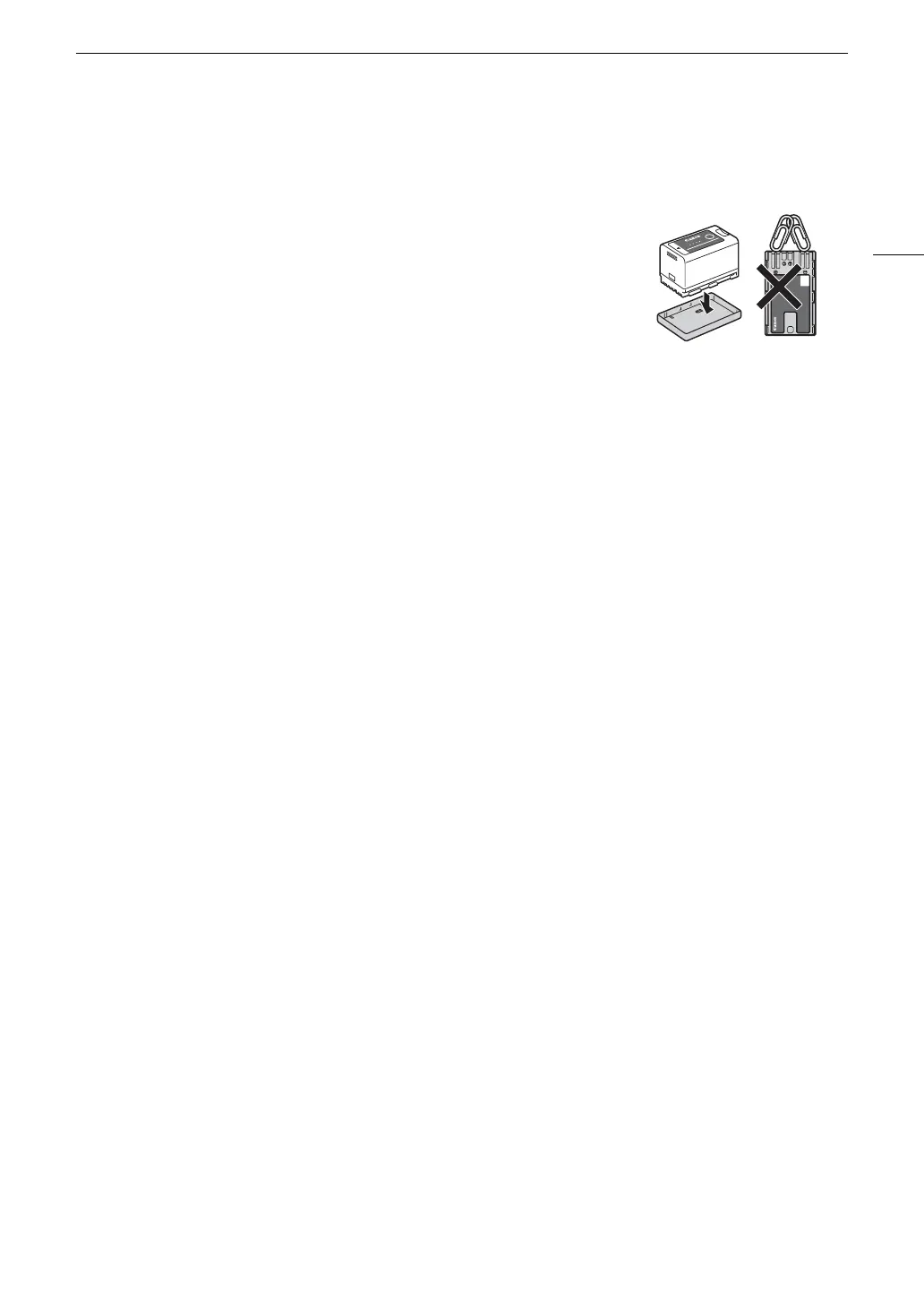
• Be sure to attach the terminal cover (Figure 1) to transport or store the battery
pack. Do not allow any metal objects to touch the terminals (Figure 2), as this
can cause a short circuit and damage the battery pack.
• The correct remaining battery time may not be displayed if a fully charged
battery pack is used continuously in high temperatures or is left unused for
long periods of time. Also, the correct remaining time may not be displayed,
depending on the battery life. Use the time shown on the screen as an
approximation.
• The battery terminal cover has a [
ð
]-shaped hole. This is useful when you
wish to differentiate between charged and uncharged battery packs.
• You can use the battery charger and AC adapter to charge battery packs in any country/region with power
supply between 100 and 240 V AC, 50/60 Hz. Consult a Canon Service Center for information on plug
adapters for overseas use.
Long-term storage
• Store battery packs in a dry place at temperatures no higher than 30
°C (86 °F).
• Before storing battery packs, charge them until two lamps (on the indicator on top of the battery) illuminate
(A 21).
• Charge all your battery packs fully at least once every six months.
Recording Media
• Periodically backing up recordings from the cards used to a computer is recommended. Data may be
corrupted or lost due to defects or exposure to static electricity. Canon shall not be liable for lost or corrupted
data.
• Do not touch or expose the terminals to dust or dirt.
• Do not use cards in places subject to strong magnetic fields.
• Do not leave cards in places subject to high humidity and high temperature.
• Do not attach any labels or stickers on the cards.
• Do not disassemble, bend, drop, or subject cards to shocks and do not expose them to water.
Disposal
When you delete data on a card, only the file allocation table is altered and stored data is not physically erased.
Take the necessary precautions when you dispose of the card, for example by physically damaging it to prevent
the leakage of private data.
If giving the card to another person, initialize it. Fill it up with unimportant recordings, and then initialize it again.
This makes recovering the original recordings very difficult.
Built-in Backup Battery
The camera has a built-in rechargeable lithium battery to keep the date/time and other settings. The built-in
backup battery is recharged while you use the camera; however, it will be depleted completely if you do not use
the camera for about 3 months.
To recharge the built-in backup battery: Turn off the camera and attach a power source (sufficiently charged battery
or DC IN terminal). The built-in backup battery will be fully charged in approx. 24 hours.



 To Next Page