Shutter Speed
64
Shutter Speed
You can set the shutter speed according to the shooting conditions. For example, you may want to set slower
shutter speeds in darker environments. The camera offers the following modes.
You can also perform this function remotely using Browser Remote on a connected network device (A 184).
[Speed]: Allows you to set the shutter speed (in fractions of a second). You can select the increment to use when
adjusting the shutter speed between 1/3-stop and 1/4-stop increments.
[Angle]: You can set the shutter angle to determine the shutter speed.
[Clear Scan]: Set the frequency in order to record CRT computer monitors without displaying black bands or
flicker on the screen.
[Slow]: You can set slower shutter speeds to obtain brighter recordings in places with insufficient lighting.
[Off]: The camera uses a standard shutter speed based on the frame rate.
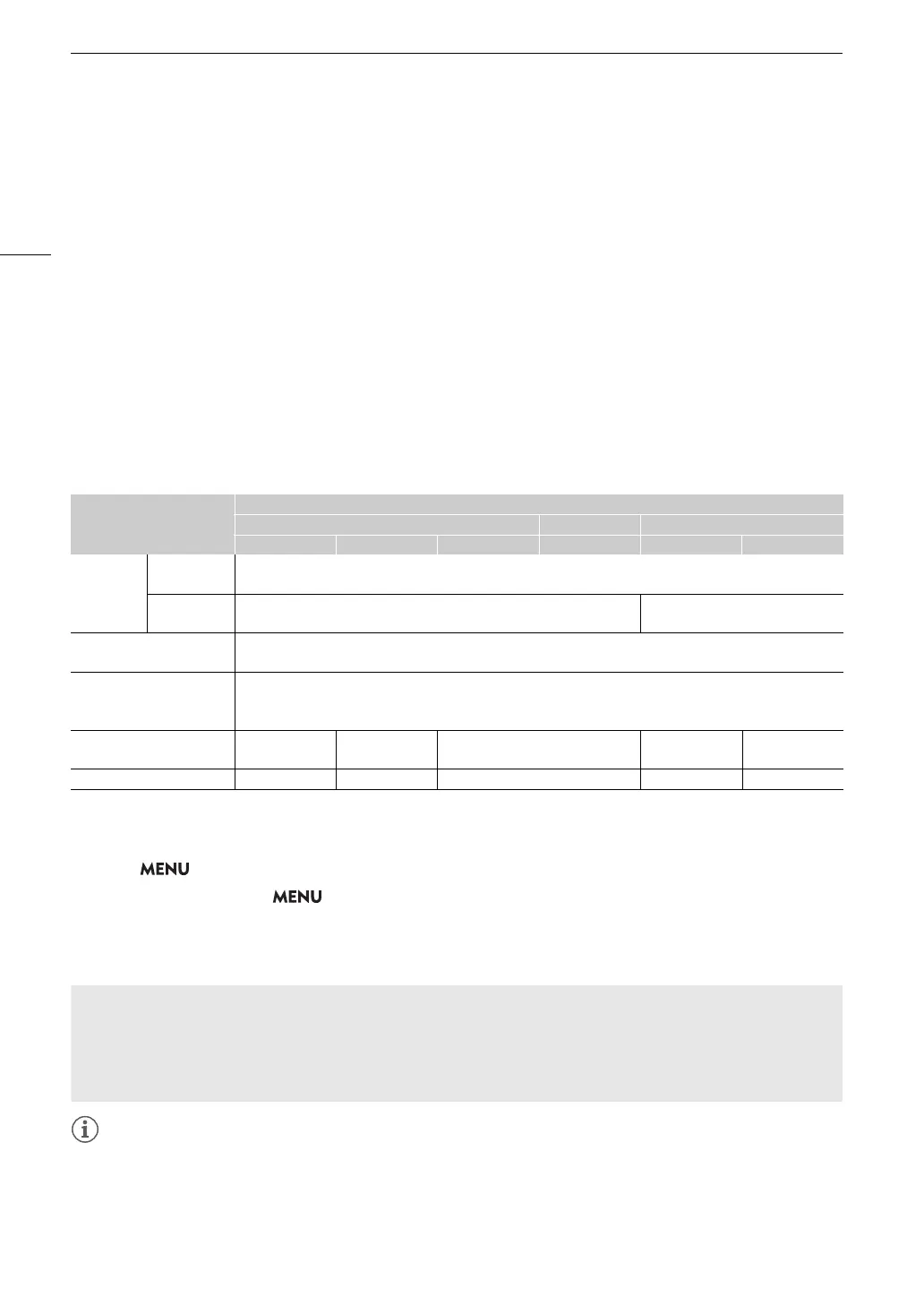
Available shutter speeds
The individual setting options that can be selected will change depending on the frame rate used.
1
When slow & fast motion recording is activated, available setting options will vary depending on the selected shooting frame rate.
2
Not available when slow & fast motion recording is activated.
1 Select > [
v
Camera Setup] > [Shutter Mode] > Desired shutter speed mode.
2For [Speed] only: Select > [
v
Camera Setup] > [Shutter Increment] > [1/3 stop] or [1/4 stop].
3Adjust the shutter speed, angle value or clear scan frequency using the direct setting mode (A 55).
• You can also use direct touch control (A 54).
• When the shutter speed mode is set to [Slow], bright red, green or blue dots may appear on the screen. In
such case, use a faster shutter speed or select a lower ISO speed or gain value (A 66).
• When an RC-V100 Remote Controller is connected to the camera, you can change the shutter speed mode
with the remote controller’s SHUTTER SELECT button and the shutter speed value with the remote controller’s
SHUTTER
Í
/
Î
buttons.
Shutter speed mode
System frequency/Frame rate
59.94 Hz 24.00 Hz 50.00 Hz
59.94P / 59.94i 29.97P 23.98P 24.00P 50.00P / 50.00i 25.00P
[Speed]
1
1/3-stop
increments
1/1 to 1/2000 (34 setting options in total)
1/4-stop
increments
1/1 to 1/2000 (47 setting options in total)
1/1 to 1/2000 (45 setting options in total)
[Angle]
1
360.00°, 240.00°, 180.00°, 120.00°, 90.00°, 60.00°, 45.00°, 30.00°, 22.50°, 15.00°, 11.25°
Also angle values equivalent to the following shutter speeds: 1/120, 1/100, 1/60, 1/50, 1/40, 3/100, 1/30, 1/25.
[Clear Scan]
1
23.97 Hz to 1971 Hz
Within the above range, the frequency can be set with the minimum available resolution depending on the sensor
mode and frame rate.
[Slow]
2
1/4, 1/8, 1/15,
1/30
1/4, 1/8, 1/15 1/3, 1/6, 1/12
1/3, 1/6, 1/12,
1/25
1/3, 1/6, 1/12
[Off]
1
1/60 1/30 1/24 1/50 1/25
Using slow shutter mode
When recording in dark surroundings, you can obtain a brighter picture by using slow shutter mode. You can
also use this mode when you wish to add certain effects to your recordings, such as blurring the background
during panning shots or recording a moving subject with an afterimage trail.
• Image quality may not be as good as when using faster shutter speeds in brighter surroundings.



 To Next Page