39
Selecting the Video Recording Method
Available simultaneous recording configurations
• Simultaneous recording is available only with normal recording while connected to a network with IP streaming
activated.
1
Only when the main recording format is RAW.
2
Not available when recording in RAW format.
3
Not available when recording in XF-AVC format.
4
Unavailable when the slow & fast motion recording frame rate exceeds 60P.
• It is not possible to switch between card slots when proxy recording, sub recording, continuous recording or
audio recording is activated.
• If a card becomes full during double slot recording, recording on both cards will stop. On the other hand, if an
error occurs with one of the cards, recording will continue on the other card.
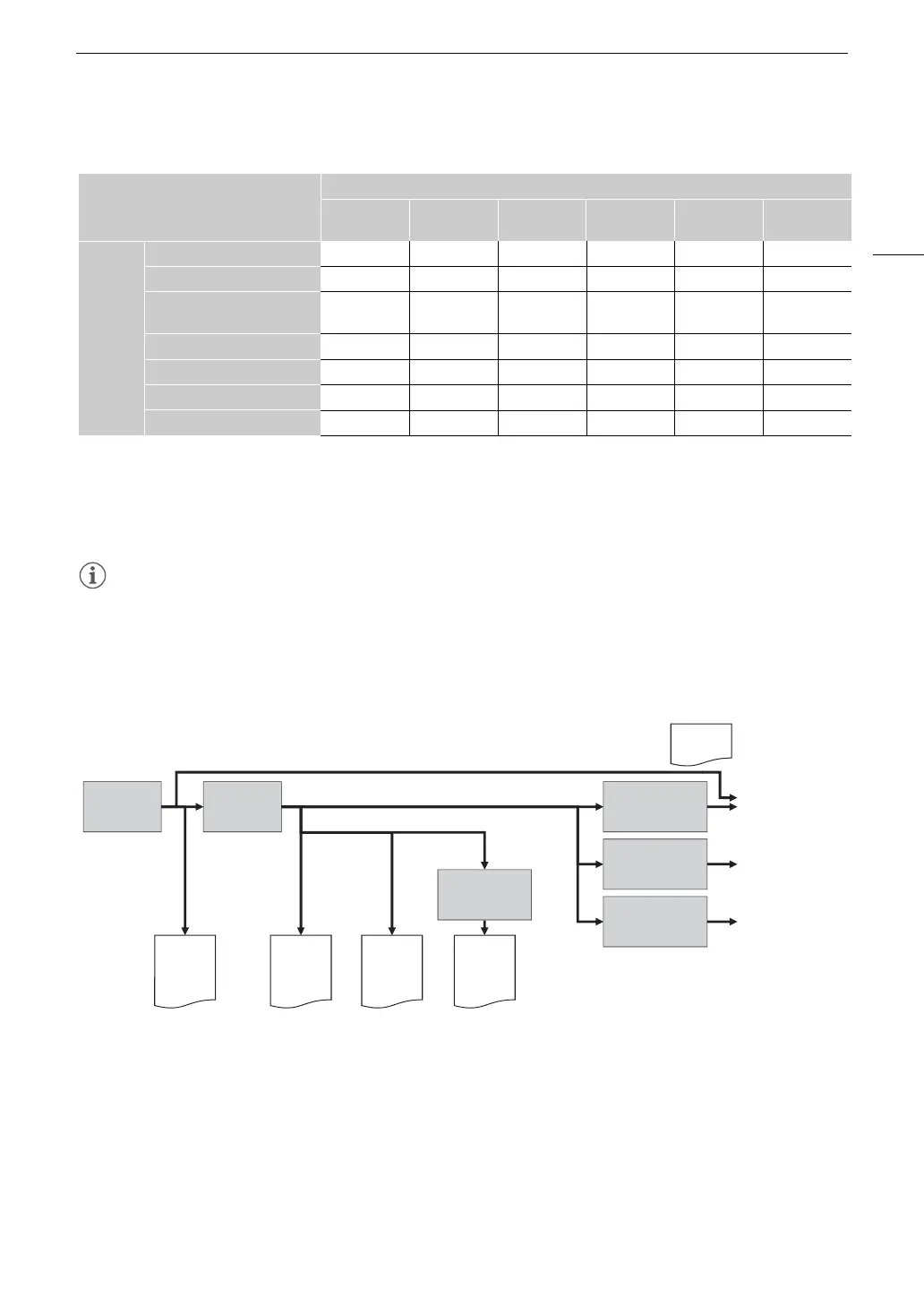
Video Recording and Outputs (Diagram)
Select the main recording format (A 60, 153)
Second card recording functions (A 38)
• Audio recording, relay recording and double slot recording are also available. Some functions are not
available depending on the main recording format and recording mode.
Custom picture settings (A 127)
• You can control various aspects of the image produced using custom picture files.
Second card recording function
Off
Proxy
Recording
Sub Recording
Audio
Recording
Relay
Recording
2
Double Slot
Recording
Recording
mode
Normal Recording
Ü Ü Ü Ü Ü Ü
Slow & Fast Motion Recording
Ü
Ü
1
Ü
1
– – –
Slow & Fast Motion Recording /
Audio (WAV)
4
Ü – – – – –
Pre-recording
2
Ü Ü Ü – Ü Ü
Continuous Recording
Ü
2, 3
– – – – –
Frame Recording
Ü – – – Ü Ü
Interval Recording
Ü – – – Ü Ü
HDMI
RAW
XF-AVC
or
XF-HEVC S /
XF-AVC S
RAW
Sensor
Image
processing
View
assistance:
(HDMI)
View
assistance:
(SDI)
View
assistance:
(LCD)
HDMI OUT
terminal
SDI OUT terminal
LCD monitor
Main recording
(HDMI RAW)
Proxy
recording color
conversion
Custom Picture
Main recording
(RAW)
Main recording
(XF-AVC/XF HEVC S/
XF AVC S)
Sub recording Proxy recording
XF-AVC
or
XF-HEVC S /
XF-AVC S
XF-AVC
or
XF-HEVC S /
XF-AVC S



 To Next Page