COPYRIGHT
©
1999 CANON INC. CANON GP160 REV.0 FEB. 1999 PRINTED IN JAPAN (IMPRIME AU JAPON)
CHAPTER 8 FIXING SYSTEM
8-7
A. Removing the fixing
assembly
1) Remove the two screws, and take off
the lower left cover.
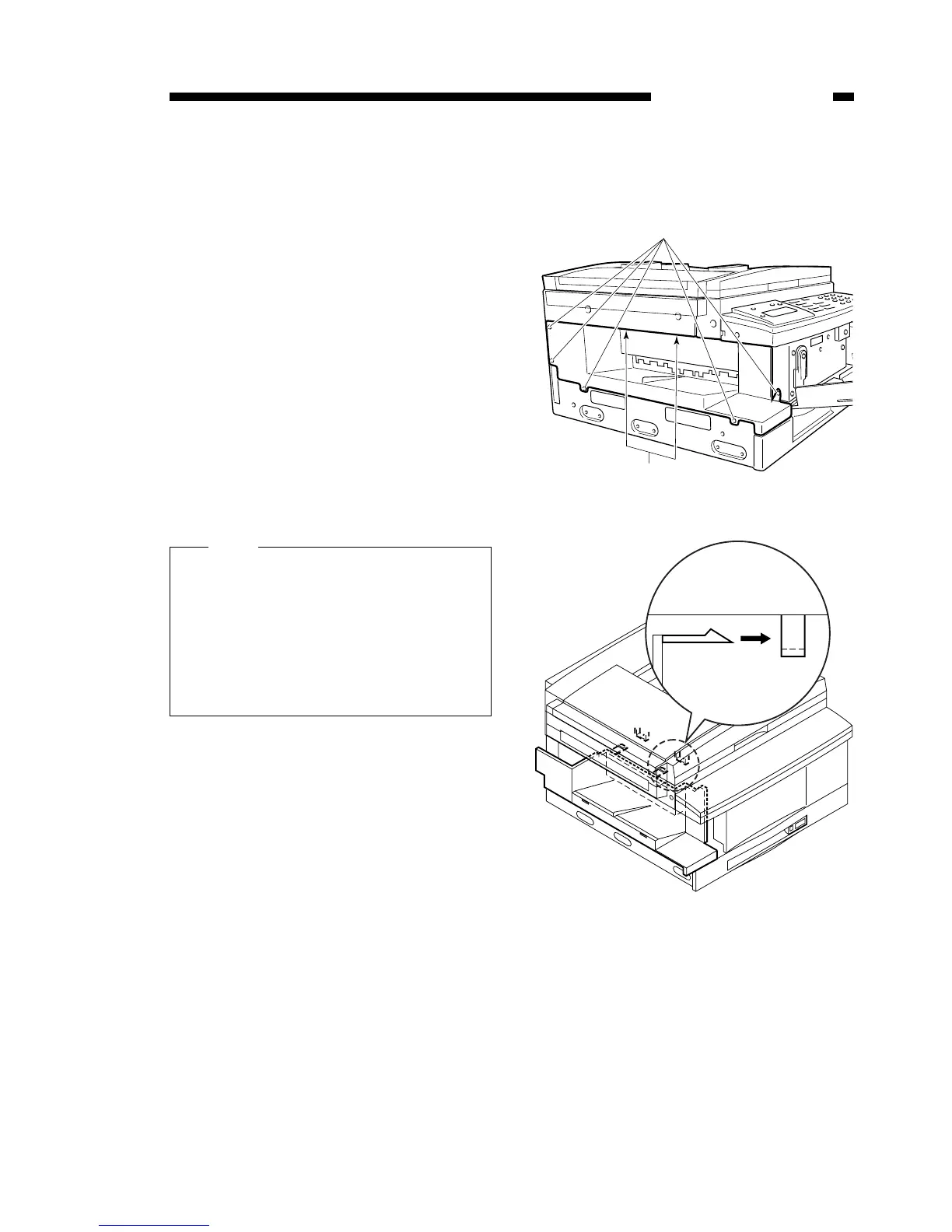
2) Open the front cover, remove the 5
screws [1], and then remove the
delivery assembly cover.
When removing the delivery assem-
bly cover, please place your hands in
the positions shown in the diagram
on the right, and then lift the cover
up.
Figure 8-301
Figure 8-302
On the top of the delivery assembly
cover, inside the area marked ▲,
there is a tab. When the cover is lifted
up, the tab is disconnected from the
catch.
When replacing the cover, be sure to
place the cover tab correctly in the “U”
guide.
Note:



 To Next Page