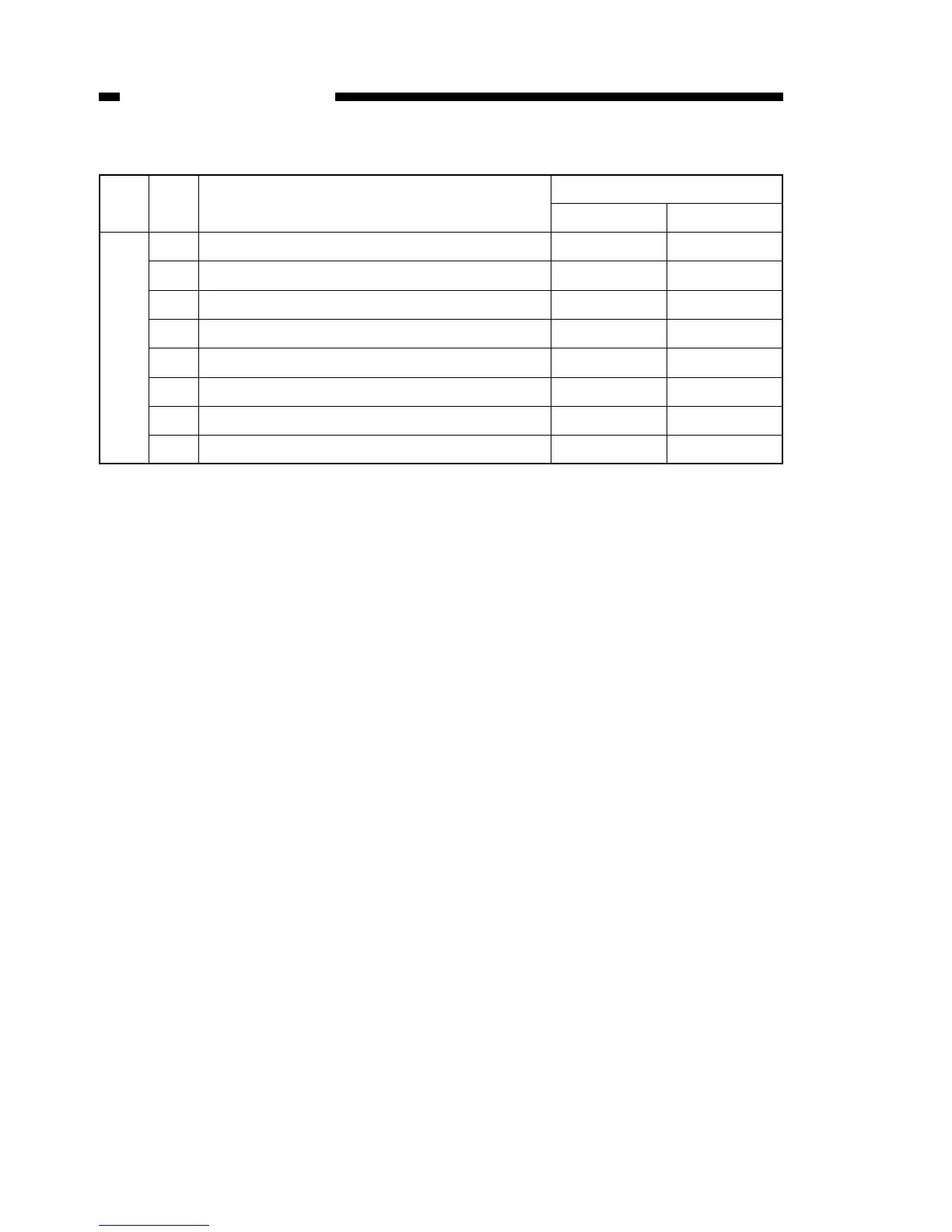
#1 SSSW-SW06: Reading condition settings
Table 13-508
[Bit 2]
Selects the document length limit.
[Bit 4]
Selects the document scanning width. When “letter” is selected, letter size documents
are read at letter width (214 mm).
[Bit 7]
Selects whether or not superfine mode can be set when an image quality mode other
than TEXT mode is selected.
COPYRIGHT
©
1999 CANON INC. CANON GP160 REV.0 FEB. 1999 PRINTED IN JAPAN (IMPRIME AU JAPON)
CHAPTER 13 TROUBLESHOOTING
13-86
SW
No.
Bit
No.
Function
06
0 Reserved
Bit setting
10
1 Reserved
2 Document length restriction
Do not restriction
1 meter or less
3 Reserved
4 Document scanning width Letter A4 Prohibit
5 Reserved
6 Reserved
7 Halftone and superfine Allow Prohibit


 To Next Page