81
Scan
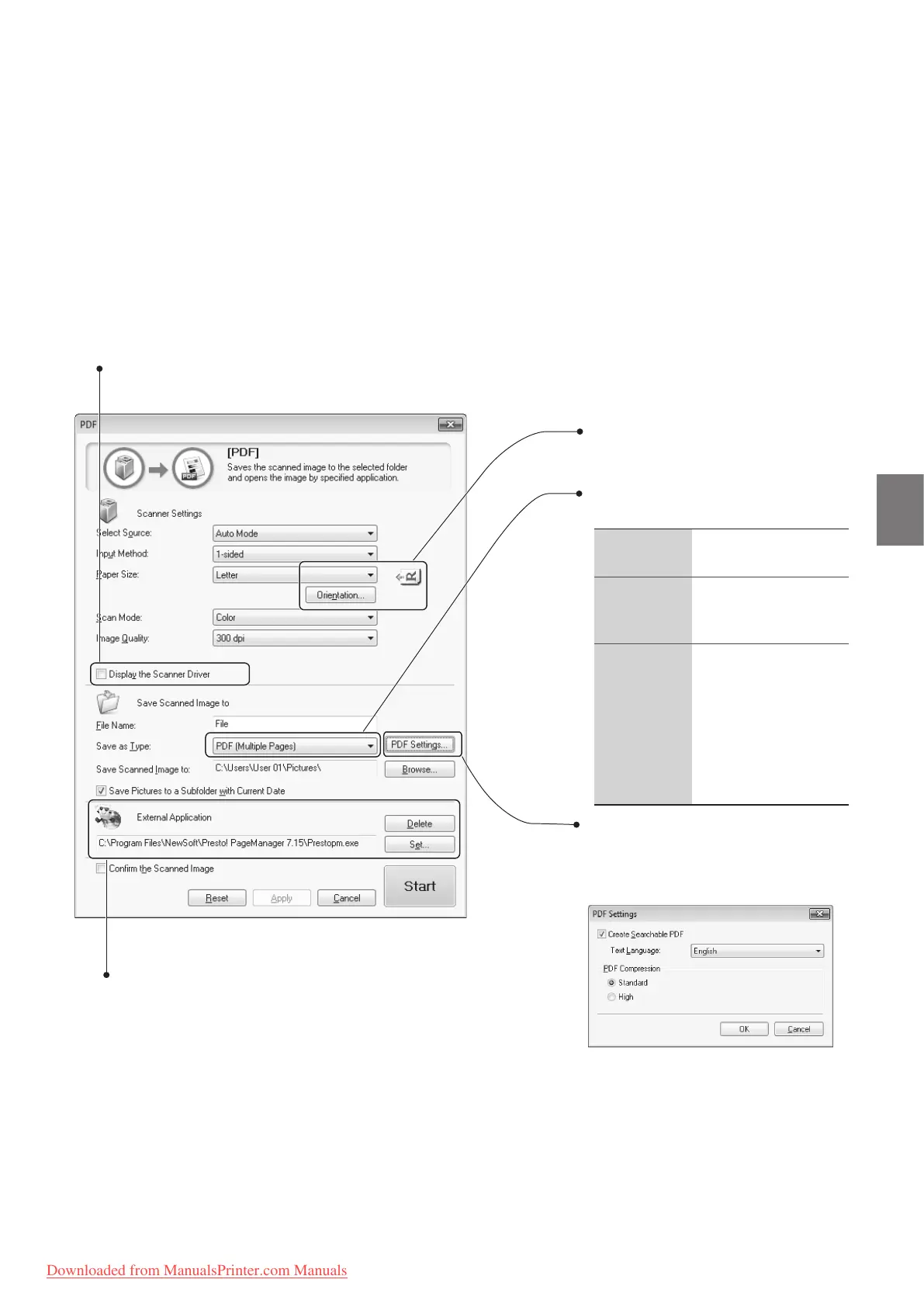
Set the orientation of the document.
If you selected PDF as the le type, you
can create a searchable PDF. Also, you
can set the compression ratio.
• Select to specify the scan settings using the
scanner driver (→p.82).
• When [Start] is clicked with this check box
selected, the [ScanGear MF] dialog box
appears.
• This check box is not available when you scan
using the [OCR] button.
• Set an application to display the scanned image.
• Click [Set] to select an application or drag and drop the
application icon.
• Click [Delete] to save the le without using the applications.
Set the PDF le type to save the scanned
image.
PDF (Single
Page)
Creates a single-page
PDF le.
PDF
(Mu
ltiple
Pages)
Save all scanned
images as a single PDF
l e .
PDF (Add
Pag
es)
• Add the scanned
image to the last
page of an existing
PDF le.
• Click [Browse] on
[Save Scanned
Image to] to select a
PDF le to add.
Downloaded from ManualsPrinter.com Manuals












 To Next Page