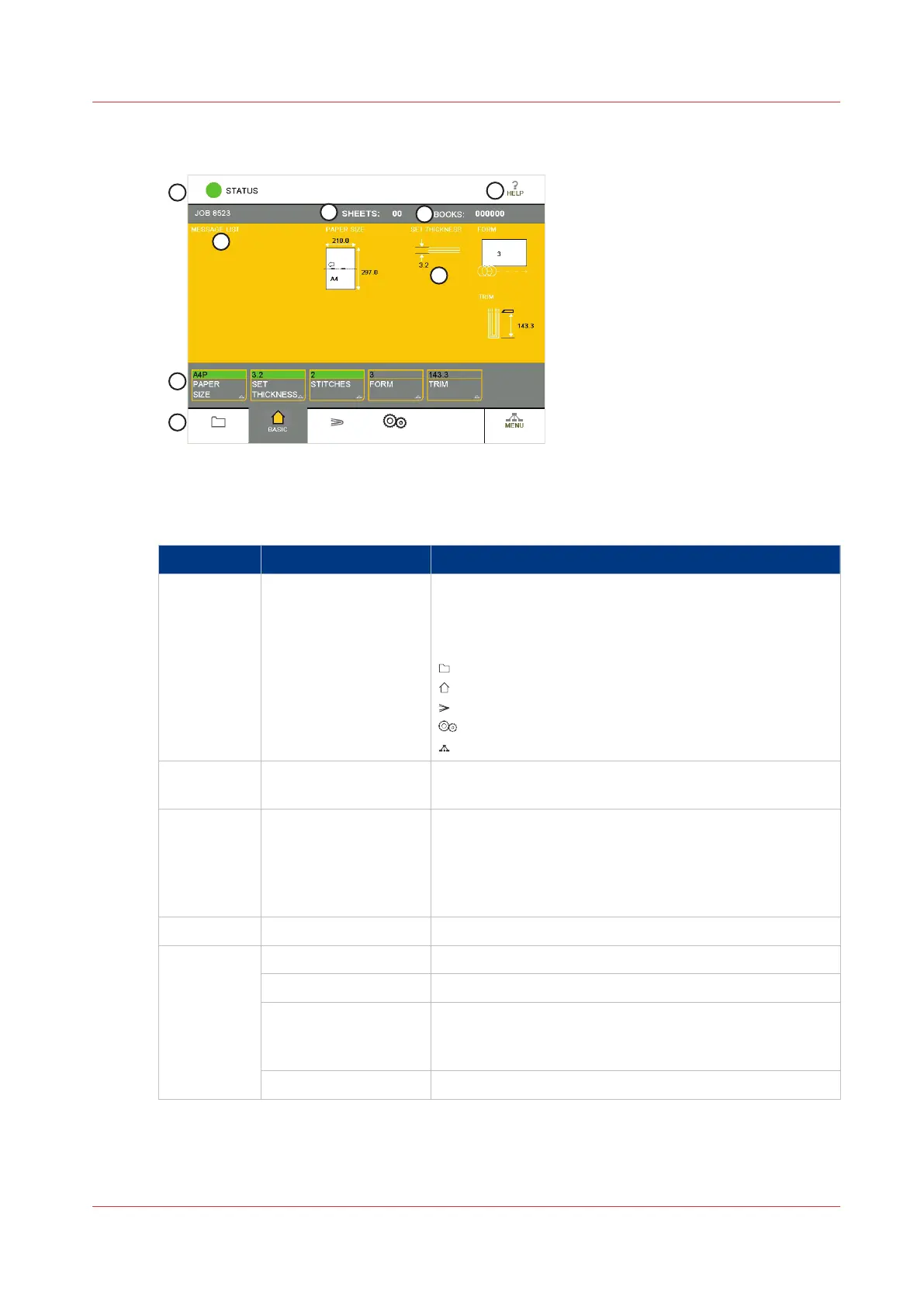
Illustration
[7] The Touch Screen
Component - function table
No. Component Function
1 Window Tabs The touch screen buttons are divided into groups that
have related functions. Each group of buttons has a sep-
arate window. Touch the correct tab to select the win-
dow.
LOAD & SAVE
BASIC
ADVANCED
CONFIGURE
MENU
2 Window Buttons Each window contains a group of buttons. Touch the
button to select the function.
3 Message List
Information and error messages are shown in the MES‐
SAGE LIST.
To display the information about a message, touch HELP
then touch the message list. Use the right-arrow and
left-arrow to see the help text for each message.
4 Job Mimic The job mimic shows the current machine settings.
5 Status
The STATUS line shows the machine status.
- GREEN
The Booklet maker is READY or RUNNING.
- ORANGE
PLEASE WAIT - wait until the Booklet maker is ready.
ATTENTION - the Booklet maker needs intervention by
the operator.
- RED
The Booklet maker is in an ERROR condition.
4
The Touch Screen
Chapter 4 - The User Interface
29



 To Next Page