Panoramic and 3D Modality User guide for CS 8100 3D Family (SM842) Ed07 55
7 3D Object Acquisition
The 3D Object Acquisition comprises the following acquisition modes:
• CS Restore: Acquires 3D representations of digital X-ray images that are used for dental
restorative workflows.
• CS Model: Acquires 3D representations of digital X-ray images that are used for orthodontic
workflows.
• Appliance: Acquires 3D representations of guided surgical images for double-scan protocol
producing acquisition files that are compatible with competitor solutions.
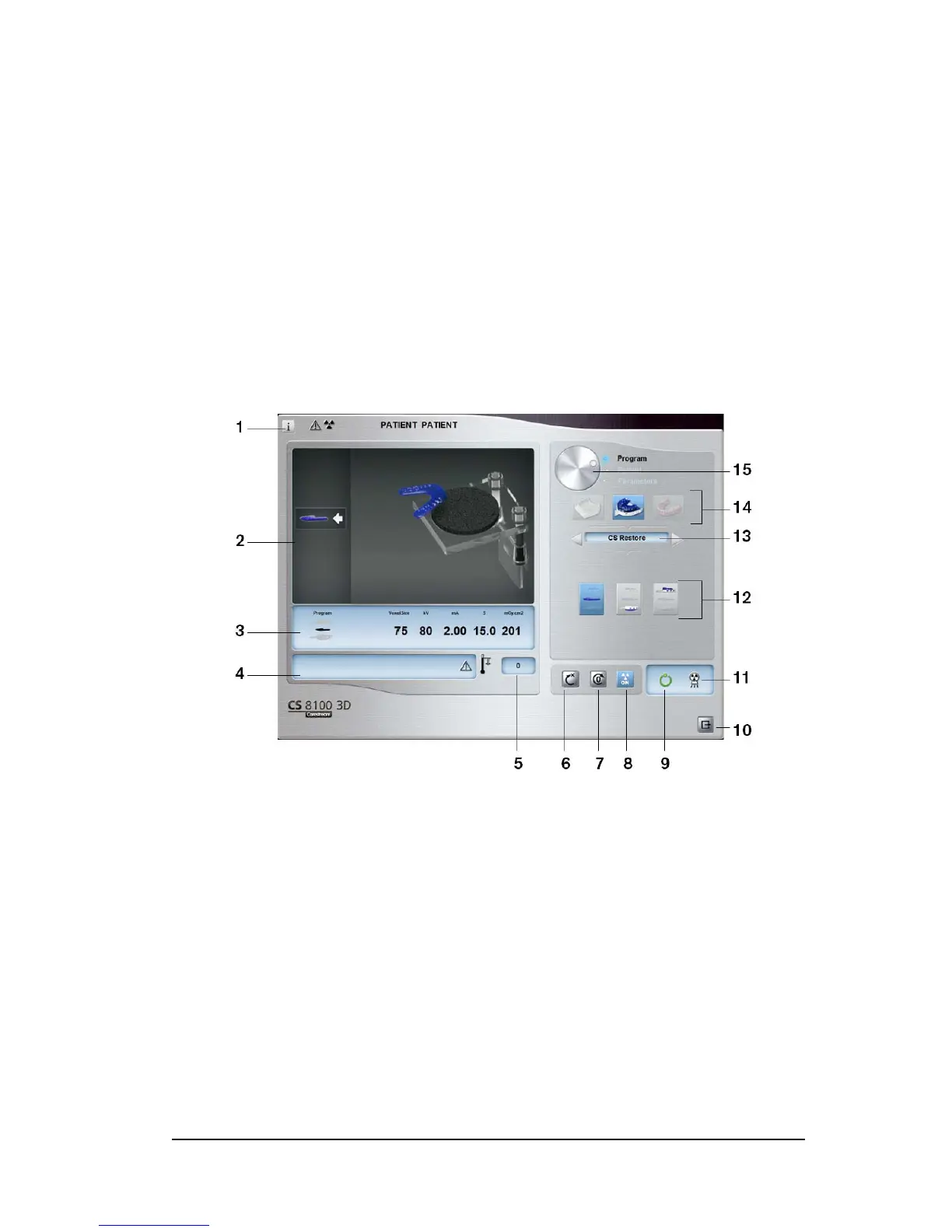
3D Object Acquisition Interface Overview
1 Show versions button: Identifies the Software and the Firmware versions.
2 Animated display screen: Guides you on the acquisition positioning modes.
3 Selected Parameter Display: Displays the current acquisition mode and parameter settings.
4 System Status Screen: Displays various alert or warning messages originating from the unit.
5 Generator Cooling indicator: Indicates the automatic cooling time (mm:ss) required for the
generator to reach 0 for a new acquisition.
6 Reset button: Resets the unit to the patient-entry position.
7 Parallel position button: Leaves more free space around the unit when it is not in use by placing
the rotative arm in a parallel position to the unit head.
8 X-ray On/Off button: Enables or disables X-ray emission.
9 Ready Indicator LED:
• Green indicates that the unit is ready to start an acquisition.
• Black indicates that the unit is not ready to start an acquisition.












 To Next Page