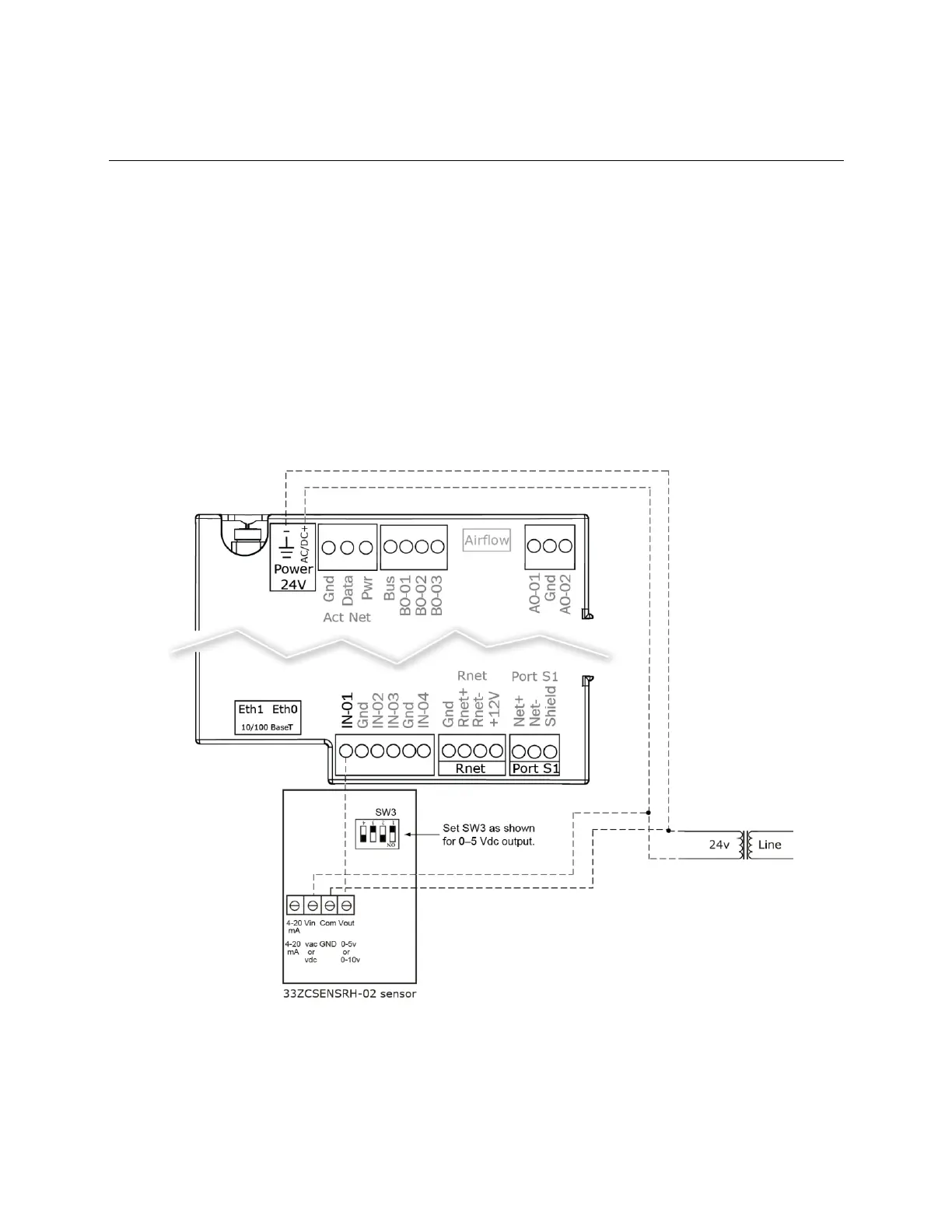
Wiring sensors to the TV-VAVB3-E2's inputs
TruVu™ VAVB3-E2 CARRIER CORPORATION ©2022
Installation and Start-up Guide All rights reserved
38
To wire the Relative Humidity sensor to the controller
Part #33ZCSENSRH-02
The Relative Humidity (RH) sensor is used for zone humidity control (dehumidification) if the rooftop unit has a
dehumidification device. If not, the sensor only monitors humidity.
NOTE Do not use a relative humidity sensor and CO
2
sensor on the same zone controller.
1 Strip the outer jacket from the cable for at least 4 inches (10.2 cm). Strip .25 inch (.6 cm) of insulation from
each wire.
2 Wire the sensor to the controller. See diagram below.
3 Using electrical tape, insulate any exposed resistor lead to prevent shorting.
4 Set SW3 on the sensor as shown below.











 To Next Page