Case Communications 6401 Rugged ADSL Router Manual – Rev 1.5
SECTION 5 – ADVANCED CONFIGURATION Page 5.25
5.5 NETWORK ADDRESS TRANSLATION (NAT)
5.5.1 NAT – VIRTUAL SERVER CONFIGURATION
ADVANCED SETUP >NAT
Advanced Set up>NAT
Virtual Server allows you to direct incoming traffic from the WAN side (identified
by Protocol and External port) to the internal server with private IP address on the
LAN side. The Internal port is required only if the external port needs to be
converted to a different port number used by the server on the LAN side.
A maximum of 32 entries can be configured
On entering the menu option there is a table showing any existing virtual servers, inviting the
network manager to ‘Add’ a new service. Here we can see a configuration for an X-Windows terminal
going out via WAN Interface ppp0
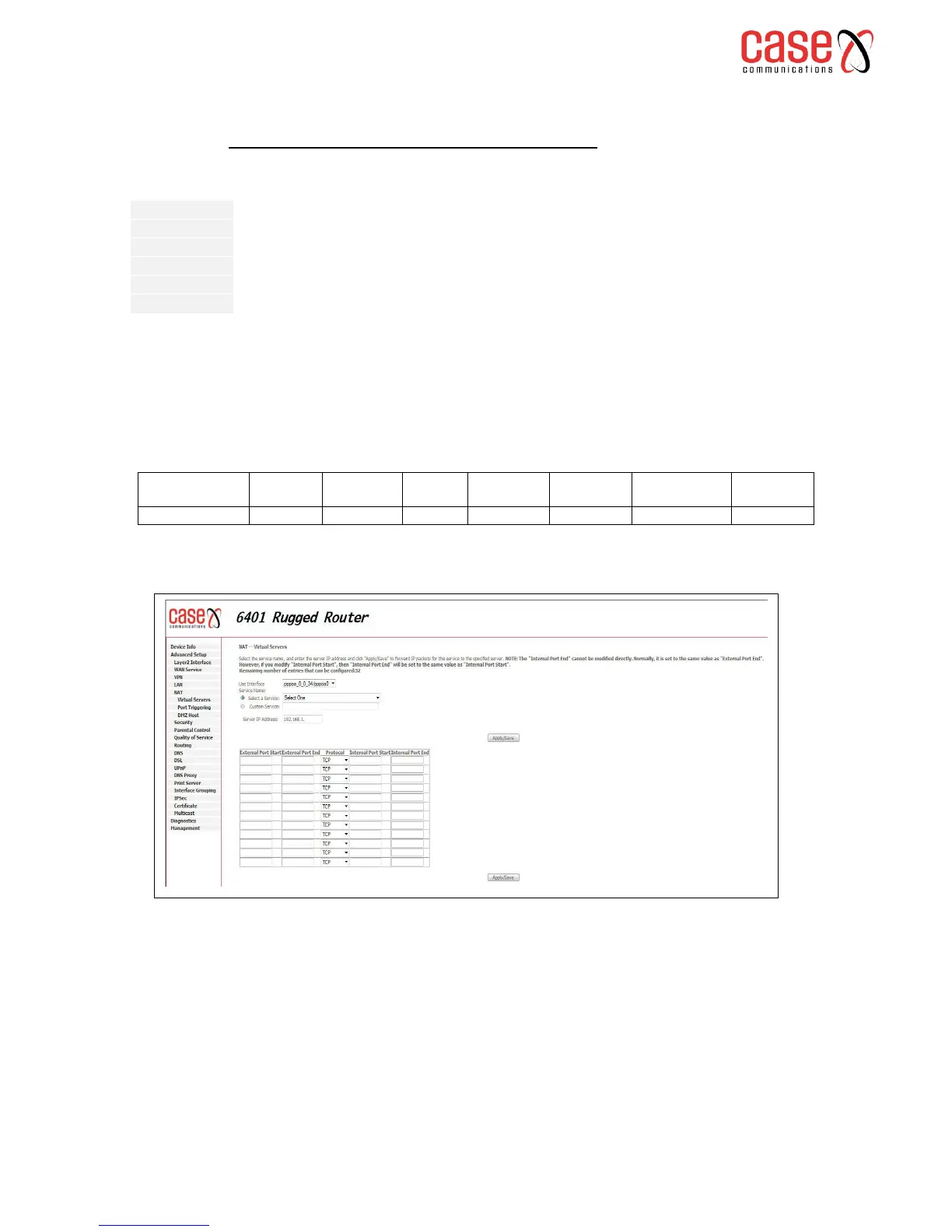
To Add a new Interface select ‘Add’ and the following screen appears.
Adding a service
Select the service name, and enter the server IP address and click "Apply/Save" to forward IP packets
for this service to the specified server. NOTE: The "Internal Port End" cannot be modified directly.
Normally, it is set to the same value as "External Port End". However, if you modify "Internal Port
Start", then "Internal Port End" will be set to the same value as "Internal Port Start".
Remaining number of entries that can be configured: 32



 To Next Page