40
2 - SPECIAL FUNCTIONS Menu (SET UP Fx) MMA
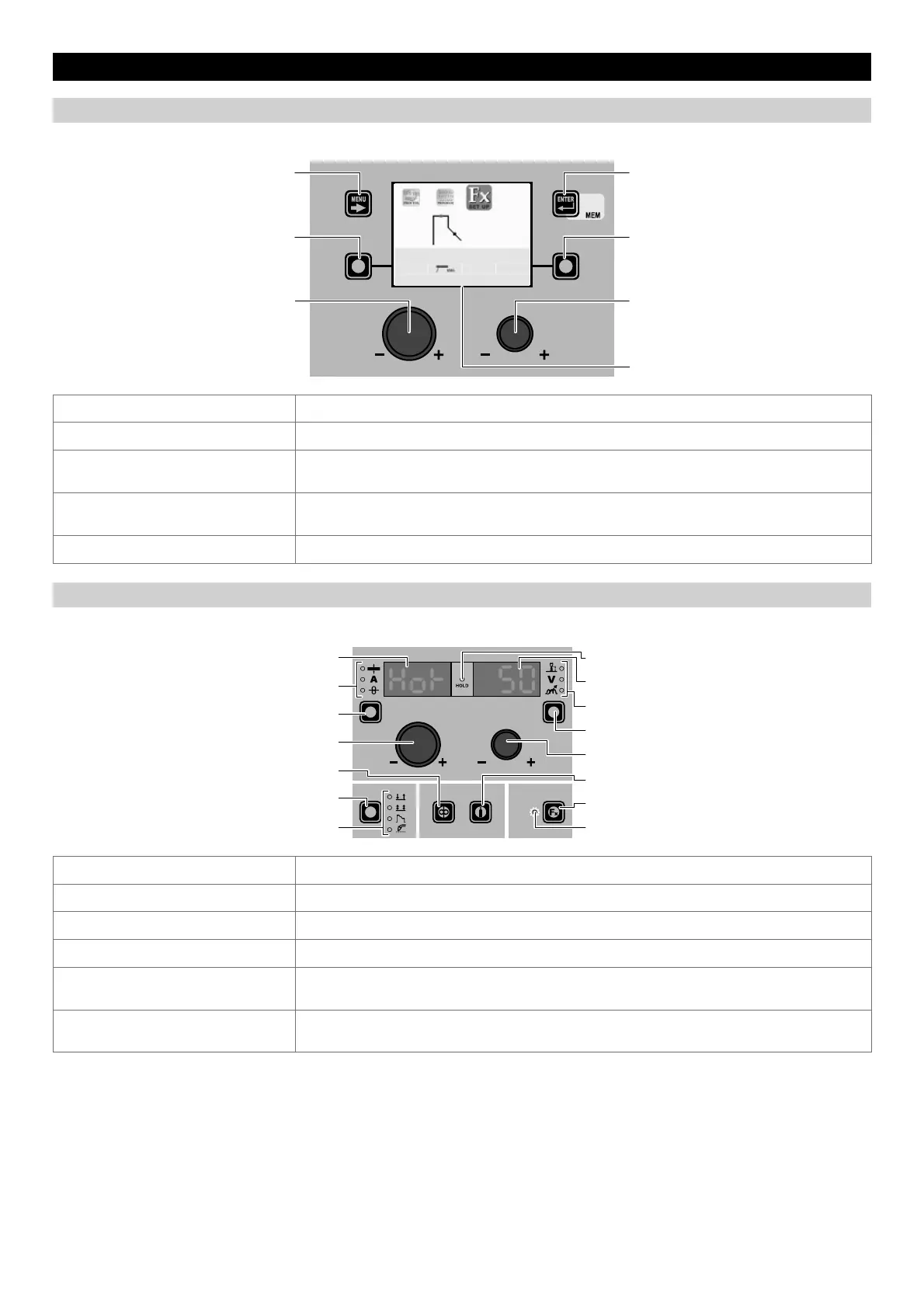
“DH” CONTROL PANEL
To access the SPECIAL FUNCTIONS Menu (SET UP Fx) push the SPECIAL FUNCTIONS (FX) KEY.
MENU KEY ENTER/MEM KEY
ENCODER KNOB - SX ENCODER KNOB - DX
VISION S
CREEN
SX KEY DX KEY
DEFAULT
HOT START
3200 MMA Cr Ni
50
MENU KEY Used to access subsequent menus if there are any.
ENCODER K
NOB - SX Used to select the various SPECIAL FUNCTIONS (Fx).
ENTER/MEM K
EY
Used to access the PRE-SETTING with the changes made to the SPECIAL FUNCTIONS
(Fx).
DX KEY
If held down for 2 seconds it makes it possible to return the value for the SPECIAL
FUNCTION (Fx) selected to the DEFAULT value.
ENCODER K
NOB - DX Used to change the selected SPECIAL FUNCTION (Fx) value.
“HT4” CONTROL PANEL
To access the SPECIAL FUNCTIONS Menu (SET UP Fx) push the MENU KEY.
WELDING MODE SELECTION LED
WELDING MODE SELECTION K
EY
WIRE KEY
ENCODER KNOB - A
PARAMETER SELECTION K
EY - A
PARAMETER SELECTION LED - A
PARAMETER DISPLAY S
CREEN - A
SPECIAL FUNCTIONS (FX) LED
SPECIAL FUNCTIONS (F
X) KEY
GAS KEY
ENCODER KNOB - V
PARAMETER SELECTION K
EY - V
PARAMETER SELECTION LED - V
PARAMETER DISPLAY S
CREEN - V
HOLD Function LED
PARAMETER DISPLAY SCREEN - A Displays the selected SPECIAL FUNCTION (Fx).
ENCODER K
NOB - A Used to select the various SPECIAL FUNCTIONS (Fx).
PARAMETER DISPLAY S
CREEN - V Displays the value for the selected SPECIAL FUNCTION (Fx).
ENCODER K
NOB - V Used to change the selected SPECIAL FUNCTION (Fx) value.
SPECIAL FUNCTIONS (F
X) KEY
Only enables entering and exit afterwards from the SPECIAL FUNCTIONS Menu (SET UP
Fx) on the HT4 panel and not on the DH panel.
SPECIAL FUNCTIONS (FX) LED
The operator must press the SPECIAL FUNCTIONS (SET UP F
X) KEY for it to light up and be
included in the SPECIAL FUNCTIONS Menu (SET UP Fx).











 To Next Page