53
5 - HOLD JOB
When welding ends the fields in the display must show the same values that were displayed during welding, with the difference
that they are now values defined as HOLD. In this phase the VISION S
CREEN
shows the HOLD box highlighted, while on the HT4
panel the HOLD FUNCTION LED flashes until the end of the HOLD Function. If the HOLD Function is Interrupted via a panel (e.g. DH),
it will also be interrupted automatically on the other (HT4) and vice-versa.
WARNING: All the parameters saved within a JOB (including SPECIAL FUNCTIONS (Fx)) can be viewed but not edited!
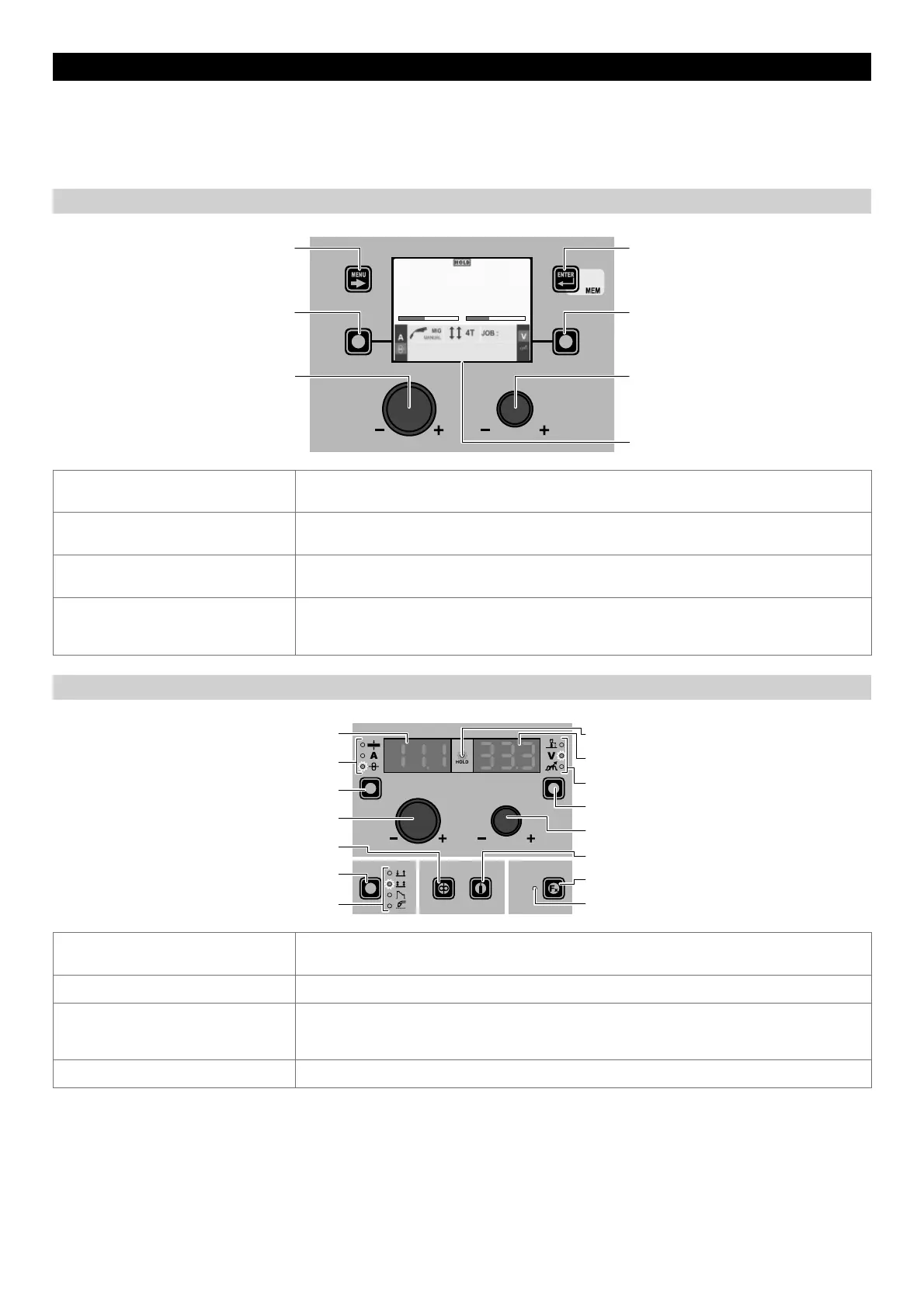
“DH” CONTROL PANEL
MENU KEY ENTER/MEM KEY
ENCODER KNOB - SX ENCODER KNOB - DX
VISION S
CREEN
SX KEY DX KEY
m/min V
11.1 33.3
013
MENU KEY
Used to access the PROCESS SELECTION Menu (PROCESS) interrupting the HOLD
Function and subsequent menus, as applicable.
SX KEY
Scrolls the active parameters in succession, only on the VISION SCREEN, based on the type of
welding process saved in the JOB selected.
ENTER/MEM KEY
If held down for 3 consecutive seconds, it interrupts the HOLD Function and makes it
possible to access SAVE JOB.
DX K
EY
Scrolls the active parameters in succession, only on the VISION SCREEN, based on the type of
welding process saved in the JOB selected.
In this case the values displayed are those for: HOLD.
“HT4” CONTROL PANEL
WELDING MODE SELECTION LED
WELDING MODE SELECTION K
EY
WIRE KEY
ENCODER KNOB - A
PARAMETER SELECTION K
EY - A
PARAMETER SELECTION LED - A
PARAMETER DISPLAY S
CREEN - A
SPECIAL FUNCTIONS (FX) LED
SPECIAL FUNCTIONS (F
X) KEY
GAS KEY
ENCODER KNOB - V
PARAMETER SELECTION KEY - V
PARAMETER SELECTION LED - V
PARAMETER DISPLAY S
CREEN - V
HOLD Function LED
PARAMETER DISPLAY SCREEN - A
Shows the JOB term or value of the parameter indicated by the PARAMETER SELECTION LED -
A.
PARAMETER SELECTION LED - A The LED unit shows the welding parameter selected using the PARAMETER SELECTION K
EY - A.
PARAMETER SELECTION K
EY - A
Scrolls the active parameters in succession, based on the type of welding process saved in
the JOB selected.
In this case the values displayed are those for: HOLD.
WIRE K
EY Activates loading of the wire without interrupting the HOLD Function.
(continued)











 To Next Page