20
4 - PRE-SETTING MIG dual pulse
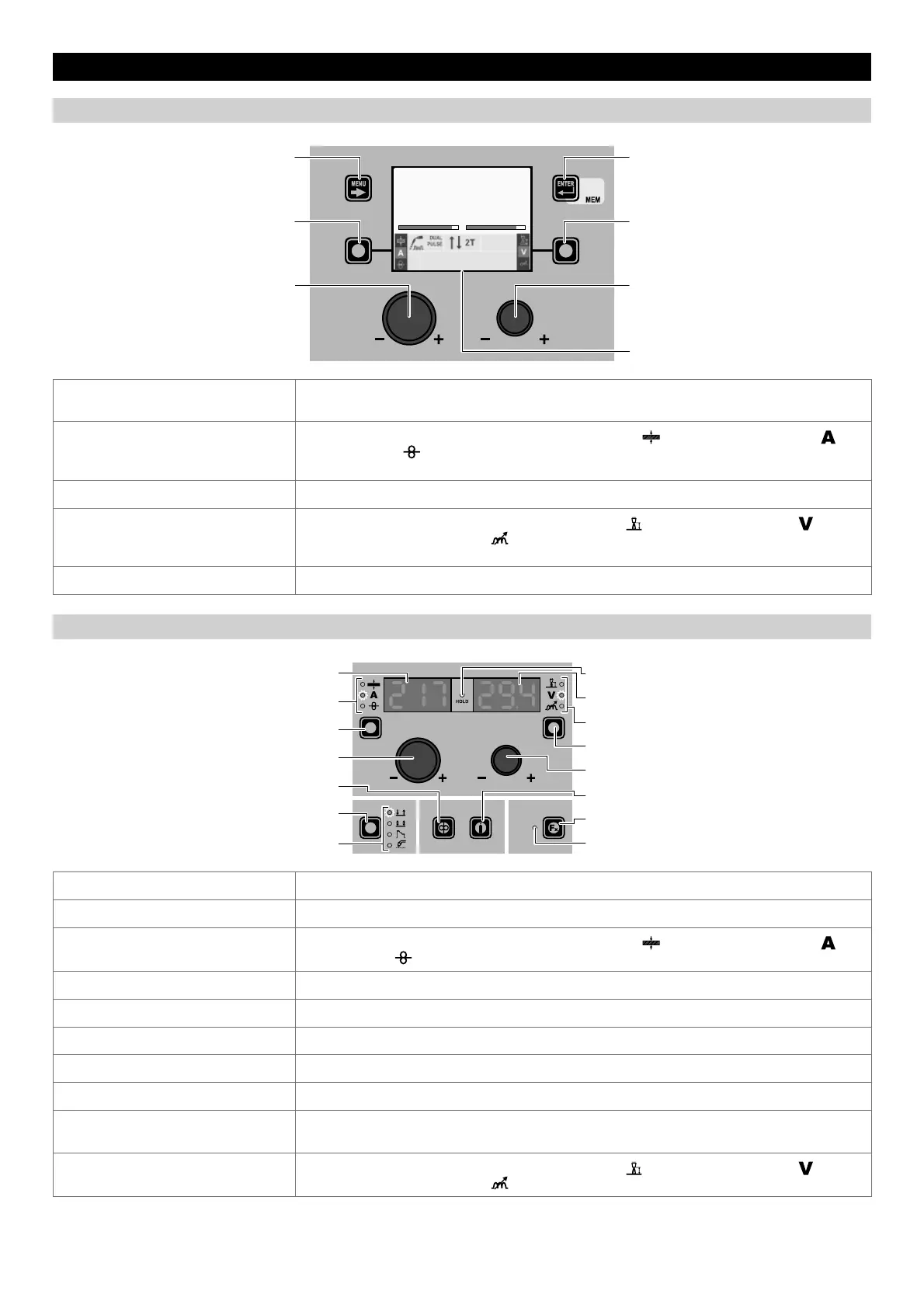
“DH” CONTROL PANEL
MENU KEY ENTER/MEM KEY
ENCODER KNOB - SX ENCODER KNOB - DX
VISION S
CREEN
SX KEY DX KEY
Fe G3 SI-1 Ø 0.8 Ar 16-20% CO2
PROGRAM 2011
AV
217 29.4
MENU KEY
Used to access the PROCESS SELECTION Menu (PROCESS) and subsequent menus, as
applicable.
SX K
EY
Scrolls in succession THICKNESS OF WELDED ITEM ( ) - WELDING CURRENT ( )
- WIRE SPEED (
) only on the VISION SCREEN (this operation is activated when the key is
released).
ENCODER K
NOB - SX Adjusts the parameter selected using the SX KEY.
DX K
EY
Scrolls in succession ARC LENGTH ADJUSTMENT ( ) - WELDING VOLTAGE ( ) -
ELECTRONIC INDUCTANCE (
) only on the VISION SCREEN (this operation is activated when
the key is released).
ENCODER K
NOB - DX Adjusts the parameter selected using the DX KEY.
“HT4” CONTROL PANEL
WELDING MODE SELECTION LED
WELDING MODE SELECTION K
EY
WIRE KEY
ENCODER KNOB - A
PARAMETER SELECTION K
EY - A
PARAMETER SELECTION LED - A
PARAMETER DISPLAY S
CREEN - A
SPECIAL FUNCTIONS (FX) LED
SPECIAL FUNCTIONS (FX) KEY
GAS KEY
ENCODER KNOB - V
PARAMETER SELECTION KEY - V
PARAMETER SELECTION LED - V
PARAMETER DISPLAY SCREEN - V
HOLD Function LED
PARAMETER DISPLAY SCREEN - A Shows the value for the parameter indicated by the PARAMETER SELECTION LED - A.
PARAMETER SELECTION LED - A The LED unit shows the welding parameter selected using the PARAMETER SELECTION K
EY - A.
PARAMETER SELECTION K
EY - A
Scrolls in succession THICKNESS OF WELDED ITEM (
) - WELDING CURRENT ( ) -
WIRE SPEED (
).
ENCODER K
NOB - A Adjusts the parameter displayed by the PARAMETER DISPLAY SCREEN - A.
WIRE K
EY Activates loading of the wire.
WELDING MODE SELECTION K
EY Scrolls the various welding modes in succession.
WELDING MODE SELECTION LED The LED unit indicates the welding mode selected according to the VISION S
CREEN.
PARAMETER DISPLAY S
CREEN - V Shows the parameter indicated by the PARAMETER SELECTION LED - V.
PARAMETER SELECTION LED - V
The LED unit indicates the welding parameter selected using the PARAMETER SELECTION K
EY
- V.
PARAMETER SELECTION K
EY - V
Scrolls in succession ARC LENGTH ADJUSTMENT (
) - WELDING VOLTAGE ( ) -
ELECTRONIC INDUCTANCE (
).
(continued)











 To Next Page