42
PARAMETER DISPLAY SCREEN - V
Shows the parameter indicated by the PARAMETER SELECTION LED - V.
The WELDING VOLTAGE shown is the measured voltage.
PARAMETER SELECTION LED - V
The LED unit indicates the welding parameter selected using the PARAMETER SELECTION K
EY
- V.
PARAMETER SELECTION K
EY - V
Scrolls in succession the parameters HOT START (
) - WELDING VOLTAGE ( ) - ARC
FORCE (
).
ENCODER K
NOB - V Adjusts the parameter displayed by the PARAMETER DISPLAY SCREEN - V.
SPECIAL FUNCTIONS (F
X) KEY
Only enables entering and exit afterwards from the SPECIAL FUNCTIONS Menu (SET UP
Fx) on the HT4 panel and not on the DH panel.
4 - WELDING MMA
When welding takes place the fields in the displays show the same values as those included for pre-setting with the difference
that now, if possible, they are those measured.
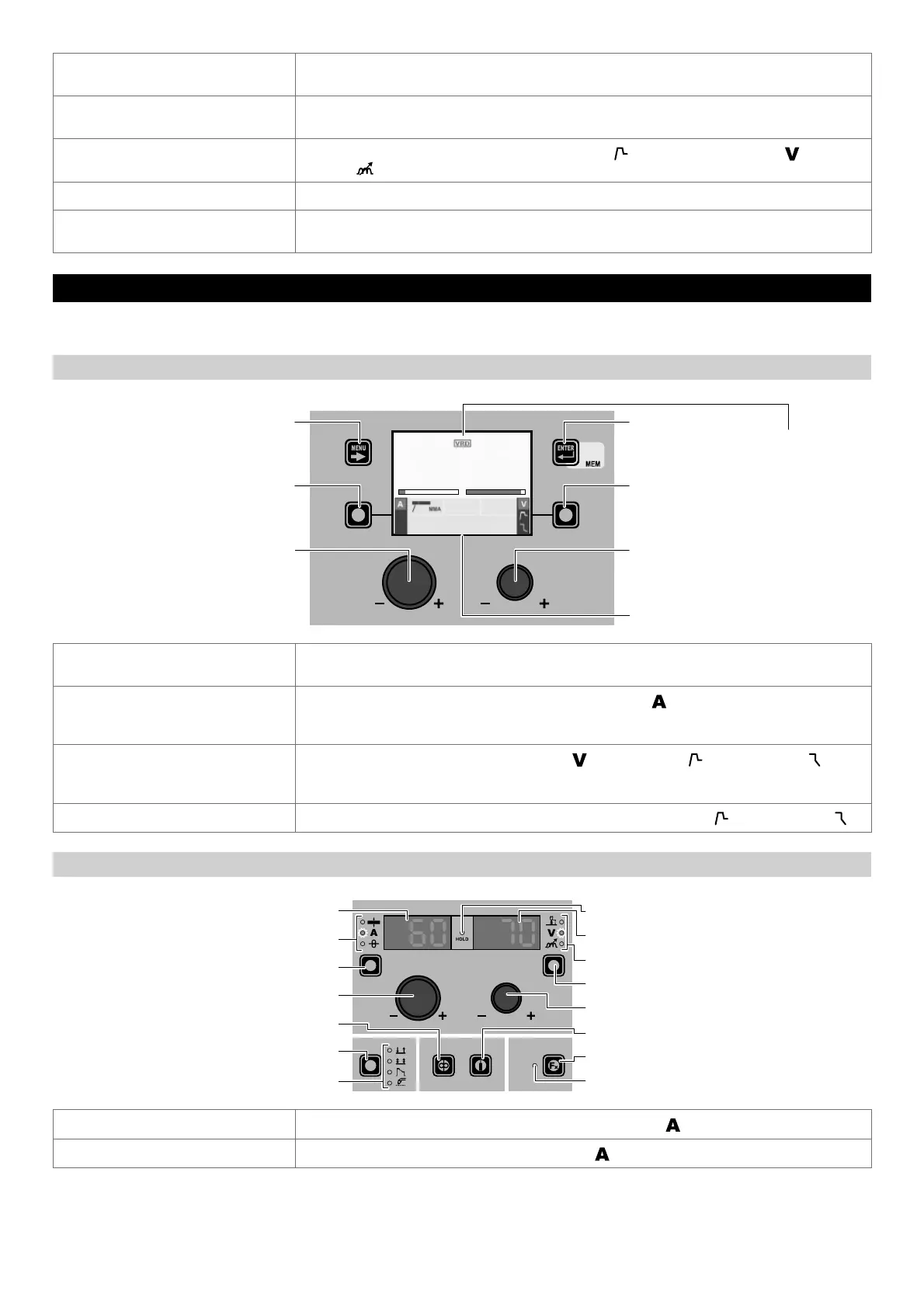
“DH” CONTROL PANEL
VRD IN OPERATION
MENU KEY ENTER/MEM KEY
ENCODER KNOB - SX ENCODER KNOB - DX
VISION SCREEN
SX KEY DX KEY
AV
60 70.0
MMA Cr Ni
PROGRAM 3200
MENU KEY
Used to access the PROCESS SELECTION Menu (PROCESS) and subsequent menus, as
applicable.
ENCODER K
NOB - SX
Adjust the value of the parameter WELDING CURRENT (
).
In this case the values displayed become those pre-set.
After a period of 3 seconds the values displayed go back to those measured if possible.
DX K
EY
Scrolls in succession WELDING VOLTAGE ( ) - HOT START ( ) - ARC FORCE ( ) only
on the VISION S
CREEN (the operation is activated when the key is released).
In this case, where possible, the values displayed will be those measured.
ENCODER K
NOB - DX
Adjusts the parameter selected using the DX K
EY (only HOT START ( ) - ARC FORCE ( )).
“HT4” CONTROL PANEL
WELDING MODE SELECTION LED
WELDING MODE SELECTION K
EY
WIRE KEY
ENCODER KNOB - A
PARAMETER SELECTION K
EY - A
PARAMETER SELECTION LED - A
PARAMETER DISPLAY S
CREEN - A
SPECIAL FUNCTIONS (FX) LED
SPECIAL FUNCTIONS (FX) KEY
GAS KEY
ENCODER KNOB - V
PARAMETER SELECTION KEY - V
PARAMETER SELECTION LED - V
PARAMETER DISPLAY SCREEN - V
HOLD Function LED
PARAMETER DISPLAY SCREEN - A
Displays the value of the parameter WELDING CURRENT (
).
PARAMETER SELECTION LED - A
The LED unit shows the WELDING CURRENT (
) switched on.
(continued)











 To Next Page