55
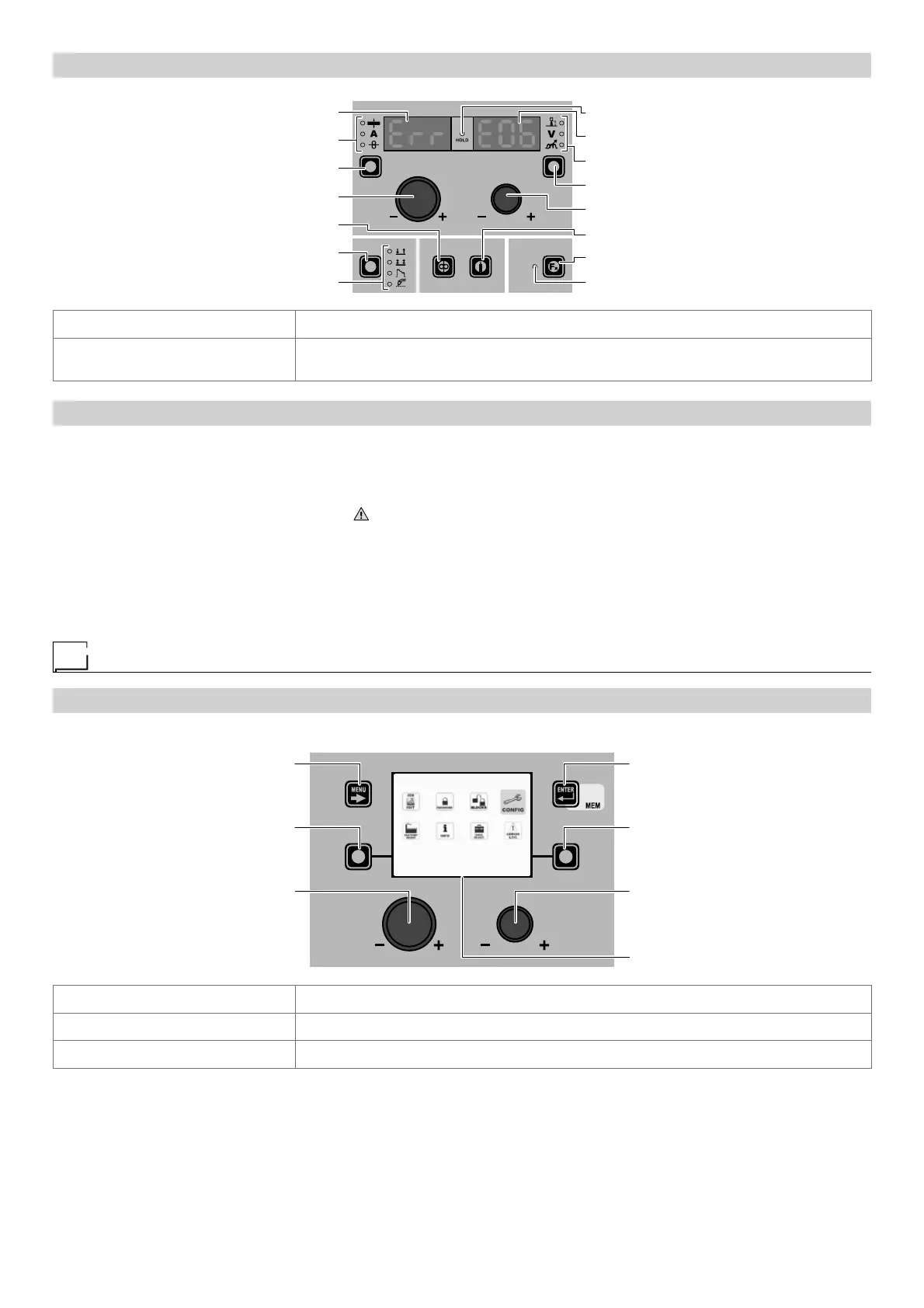
“HT4” CONTROL PANEL
WELDING MODE SELECTION LED
WELDING MODE SELECTION K
EY
WIRE KEY
ENCODER KNOB - A
PARAMETER SELECTION K
EY - A
PARAMETER SELECTION LED - A
PARAMETER DISPLAY S
CREEN - A
SPECIAL FUNCTIONS (FX) LED
SPECIAL FUNCTIONS (F
X) KEY
GAS KEY
ENCODER KNOB - V
PARAMETER SELECTION K
EY - V
PARAMETER SELECTION LED - V
PARAMETER DISPLAY S
CREEN - V
HOLD Function LED
PARAMETER DISPLAY SCREEN - A Displays the error message (e.g. Err.).
PARAMETER DISPLAY S
CREEN - V
Shows the alarm code (e.g. E1.0) of in succession, the codes for the alarms in succession if
there are a number of errors.
In the case of an Automatically reset error once the alarm condition has ended (reinstatement completed correctly), the weld-
ing plant is once again ready and the operator can recommence welding! The alarm state disappears and the VISION S
CREEN re-
turns to precisely the same point at which it was operating previously.
PLEASE NOTE: After resetting has been completed, during normal operation of the machine, the VISION S
CREEN will still show the
error signal to inform the operator of the event ( ), but this can be removed visually from the display by simply pushing the MENU
KEY. WARNING: This only removes the visual error indication but not the history of what happened!
In the case of NON automatically reset errors, to remove the alarm status and reinstate correct operation of the machine, the
welding plant must be switched off.
When it is switched on again, the machine will be working again and the operator can weld again!
PLEASE NOTE: If, when switching on, the error status presents itself again, immediately contact Technical Assistance
Department.
SETUP Menu
“DH” CONTROL PANEL
To access the SETUP Menu hold down for at least 5 consecutive seconds the SX KEY.
MENU KEY ENTER/MEM KEY
ENCODER KNOB - SX ENCODER KNOB - DX
VISION S
CREEN
SX KEY DX KEY
SETUP
MENU KEY Used to exit the SETUP Menu and take the VISION SCREEN back to the entry phase.
ENCODER K
NOB - SX Used to scroll the various icons (sub-menus) in the menu and then select them.
ENTER/MEM K
EY Used to access the menu related to the icon selected.
WARNING:
• It is impossible to weld!
• If the VISION S
CREEN is protected by a password, access to this menu will only be allowed by entering the correct password.











 To Next Page